> ## Documentation Index
> Fetch the complete documentation index at: https://docs.solidyne.ar/llms.txt
> Use this file to discover all available pages before exploring further.
# Audio Settings
> Sound profile customization.
## Input Level
The Audimax 362HD **does not have manual input level control**.\
Adjustment is automatic through the **AGC system**.
* The rear panel has input connectors for **balanced (XLR and RJ45)** and **unbalanced (RCA)** equipment.
* It can be connected to non-professional consoles (-10 dBV) up to broadcast consoles with balanced outputs of +4 dBu or even +8/+12 dBu.
* The **AGC eliminates level variations** inherent to operation or recorded material:
* If the level remains low, it compensates the signal to maintain uniform output.
* If the level constantly exceeds 0 VU, it attenuates to prevent overload.
This way, the program signal reaches the processing stages with a constant level, achieving uniform on-air sound with consistent processing.
### Verifying Input Level
The AGC (image section 2) has a three-stage indicator:
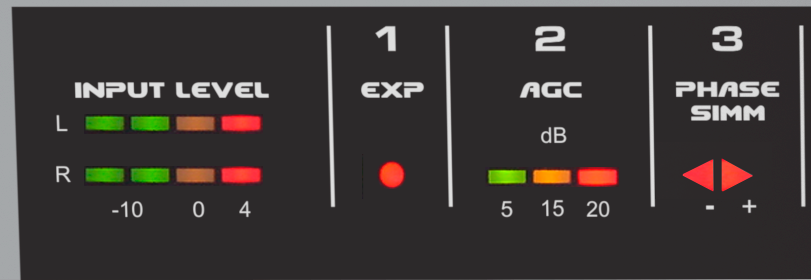 * The first LED (green) should remain lit when music or voice is present.
* The second LED (yellow) should light on peaks or remain steadily lit.
* The third LED (red) **should never remain permanently lit**.
***
## Sound Customization
The **Audimax 362HD** has been designed for easy and intuitive operation. No specialized knowledge in audio processing is required to set it up and adjust its sound.
Initial setup: simply set all controls to center position... and that's it!\
You'll be on air with proper sound.
Sound customization is done through **seven rotary controls** on the front panel.
* The first LED (green) should remain lit when music or voice is present.
* The second LED (yellow) should light on peaks or remain steadily lit.
* The third LED (red) **should never remain permanently lit**.
***
## Sound Customization
The **Audimax 362HD** has been designed for easy and intuitive operation. No specialized knowledge in audio processing is required to set it up and adjust its sound.
Initial setup: simply set all controls to center position... and that's it!\
You'll be on air with proper sound.
Sound customization is done through **seven rotary controls** on the front panel.
 ### Dynamic Equalizer
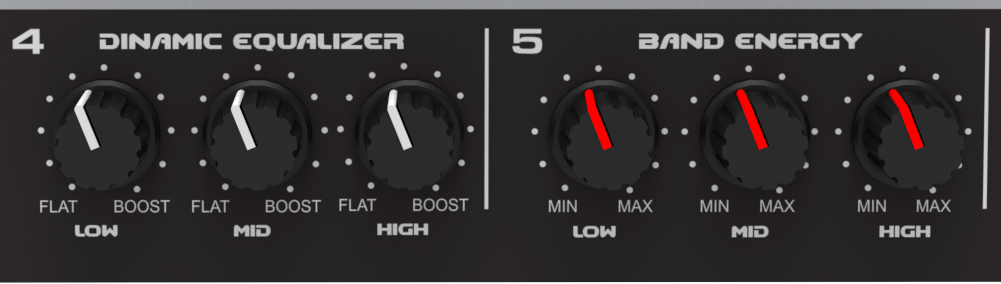
The 3-band dynamic equalizer acts on the **compression thresholds** of each band.\
Unlike a conventional equalizer, **its effect increases with higher signal levels**.
* Ensure that the multiband compressor **is working** (check "Multiband compressor" LEDs).
* Adjust the *Dynamic Equalizer* knobs for **bass, mid, and treble**:
* Turn left → increases compression in that band.
* Turn right → decreases compression, releasing the band and enhancing those frequencies.
It's advisable to maintain a balanced relationship between the three bands. Extreme differences create imbalance between bass, mids, and treble.
* For bass impact, release this band slightly more than mids and treble.
* Remember that listeners can boost bass on their receivers; therefore, it's better to deliver clean, not over-compressed bass.
### Band Energy
These controls **increase peak density in the bands** by modifying compressor **recovery times**.
* Turn right → **compact and aggressive** sound (fast recovery).
* Turn left → **soft sound with more dynamics** (slow recovery).
### Multiband Compressor
This is the heart of processing. The indicators show the **band compressors** action.
### Dynamic Equalizer
The 3-band dynamic equalizer acts on the **compression thresholds** of each band.\
Unlike a conventional equalizer, **its effect increases with higher signal levels**.
* Ensure that the multiband compressor **is working** (check "Multiband compressor" LEDs).
* Adjust the *Dynamic Equalizer* knobs for **bass, mid, and treble**:
* Turn left → increases compression in that band.
* Turn right → decreases compression, releasing the band and enhancing those frequencies.
It's advisable to maintain a balanced relationship between the three bands. Extreme differences create imbalance between bass, mids, and treble.
* For bass impact, release this band slightly more than mids and treble.
* Remember that listeners can boost bass on their receivers; therefore, it's better to deliver clean, not over-compressed bass.
### Band Energy
These controls **increase peak density in the bands** by modifying compressor **recovery times**.
* Turn right → **compact and aggressive** sound (fast recovery).
* Turn left → **soft sound with more dynamics** (slow recovery).
### Multiband Compressor
This is the heart of processing. The indicators show the **band compressors** action.
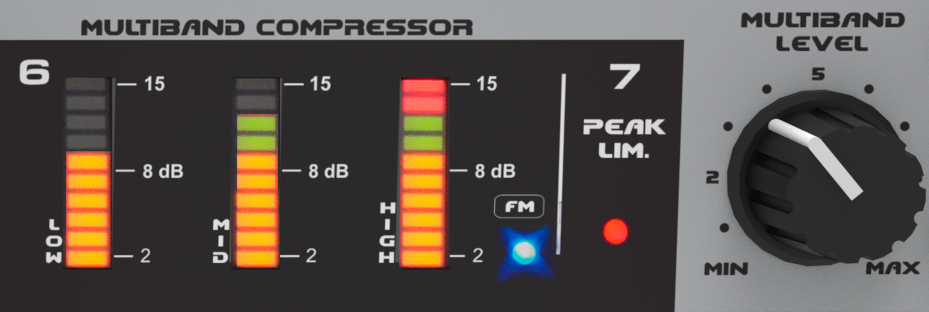 The **Multiband** control adjusts the input gain to the compressors.\
This control has the most impact on **station loudness**.
* Turn left → softer sound, less processed, with lower energy.
* Turn right → stronger sound, with more energy, but less dynamics and naturalness.
Excessive processing can result in a very loud but **squashed** sound (no dynamics) and unnatural voices.
An appropriate working level is achieved when multiband compressor indicators are active without reaching maximum.
* For natural and balanced voices: medium or lower position of Multiband control.
* For more intense processing: use **slow recovery** times (Band Energy toward the left).
***
## Control Relationships
For **Dynamic EQ** and **Band Energy** to work, the **multiband compressor must be active**. This means at least the first LEDs in each band should light up.\
Without multiband compression, the controls have no effect since they are associated with compression operation.
The **Multiband** control adjusts the input gain to the compressors.\
This control has the most impact on **station loudness**.
* Turn left → softer sound, less processed, with lower energy.
* Turn right → stronger sound, with more energy, but less dynamics and naturalness.
Excessive processing can result in a very loud but **squashed** sound (no dynamics) and unnatural voices.
An appropriate working level is achieved when multiband compressor indicators are active without reaching maximum.
* For natural and balanced voices: medium or lower position of Multiband control.
* For more intense processing: use **slow recovery** times (Band Energy toward the left).
***
## Control Relationships
For **Dynamic EQ** and **Band Energy** to work, the **multiband compressor must be active**. This means at least the first LEDs in each band should light up.\
Without multiband compression, the controls have no effect since they are associated with compression operation.