> ## Documentation Index
> Fetch the complete documentation index at: https://docs.solidyne.ar/llms.txt
> Use this file to discover all available pages before exploring further.
# MPX Connection
> Multiplex output (MPX) and modulation adjustment.
The **Audimax 362HD** features dual MPX outputs with independent level adjustments.\
This allows connecting a backup transmitter or dedicating it to a nighttime transmitter.
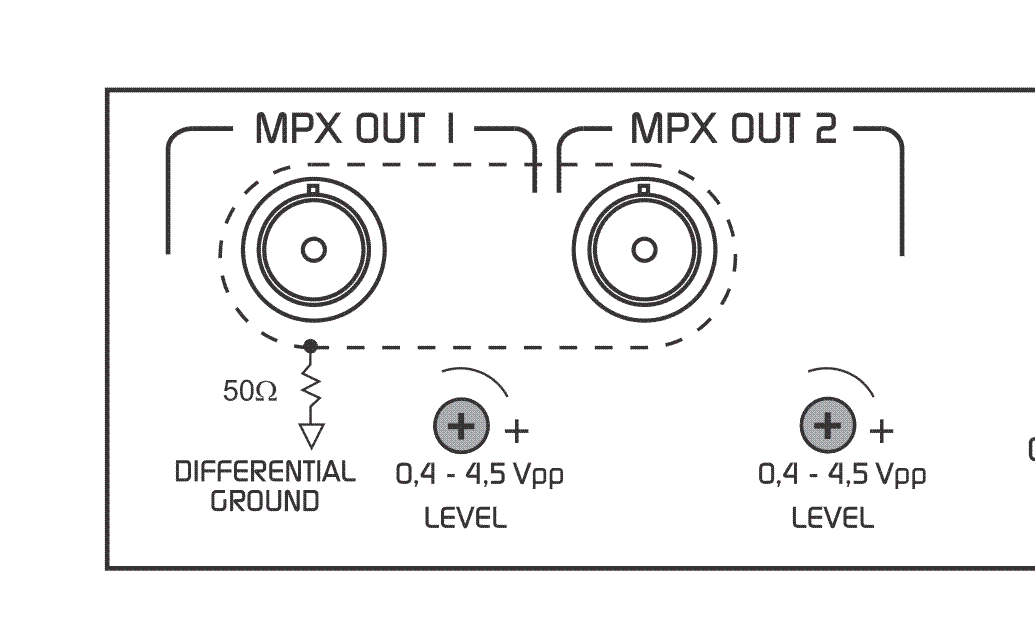 * Output connectors are **BNC** type.
* For MPX connection, use **75 Ohm** coaxial cable (CCTV standard).
* Cable length should not exceed **25 meters**.
Proper ground distribution is essential.
When connecting to the transmitter's MPX input, ensure the transmitter's internal pre-emphasis network is disabled (flat response 20 - 100 kHz).
Pre-emphasis in the Audimax 362HD is factory-set, available in either 50 µs or 75 µs.
## Adjusting to 100% Modulation
Modulation is adjusted by varying the equipment's MPX output level.\
It is recommended to use program material with **voice and strong music** (e.g., contemporary pop).
* Ensure you are using the appropriate inputs (BAL/UNBAL) according to your console.
* Adjust the console's audio level to reach **0 VU on peaks**.
* This way, the AGC stage works at its equilibrium point.
* Set all processor controls to their **center position**.
* If the transmitter has modulation level control, set it to maximum.
* Adjust the 362HD's MPX output level until reaching **75 kHz deviation (100%)**, measured with an **FM modulation monitor** or the transmitter's indicator instrument.
Some countries allow infrequent peaks up to **110% modulation** (e.g., FCC regulations in USA).\
Needle-type modulation indicators may show peaks above 100% due to ballistic overshoots or average readings of sinusoidal signals. This does not indicate actual over-modulation in the system.
Once modulation level is set, proceed to **customize the station's sound** by adjusting the Audimax 362HD controls.\
This process does not affect the modulation level, as the processor delivers constant peak level.
* Output connectors are **BNC** type.
* For MPX connection, use **75 Ohm** coaxial cable (CCTV standard).
* Cable length should not exceed **25 meters**.
Proper ground distribution is essential.
When connecting to the transmitter's MPX input, ensure the transmitter's internal pre-emphasis network is disabled (flat response 20 - 100 kHz).
Pre-emphasis in the Audimax 362HD is factory-set, available in either 50 µs or 75 µs.
## Adjusting to 100% Modulation
Modulation is adjusted by varying the equipment's MPX output level.\
It is recommended to use program material with **voice and strong music** (e.g., contemporary pop).
* Ensure you are using the appropriate inputs (BAL/UNBAL) according to your console.
* Adjust the console's audio level to reach **0 VU on peaks**.
* This way, the AGC stage works at its equilibrium point.
* Set all processor controls to their **center position**.
* If the transmitter has modulation level control, set it to maximum.
* Adjust the 362HD's MPX output level until reaching **75 kHz deviation (100%)**, measured with an **FM modulation monitor** or the transmitter's indicator instrument.
Some countries allow infrequent peaks up to **110% modulation** (e.g., FCC regulations in USA).\
Needle-type modulation indicators may show peaks above 100% due to ballistic overshoots or average readings of sinusoidal signals. This does not indicate actual over-modulation in the system.
Once modulation level is set, proceed to **customize the station's sound** by adjusting the Audimax 362HD controls.\
This process does not affect the modulation level, as the processor delivers constant peak level.