> ## Documentation Index
> Fetch the complete documentation index at: https://docs.solidyne.ar/llms.txt
> Use this file to discover all available pages before exploring further.
# Alarms, Status Panel, and Logs
> Alarm and warning configuration
## Alarms
Access via **SYSTEM → ALARMS tab**.
Alarm-triggering parameters are based on the **FM tuner** signal.
* If RF Level \< 40 dB or multipath > 10%, measurements are invalid.
* In such cases, fields appear grayed out and no alarms are generated.
The 542APC can send email alerts for the following events:
1. **AUDIO SILENCE**
2. **OVERMODULATION**
3. **LOW RF POWER**
### Alarm Configuration
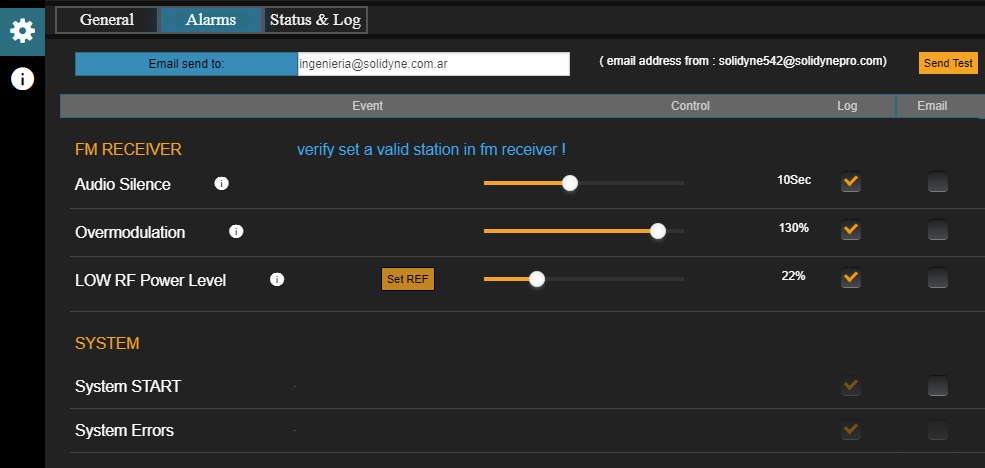 * **E-mail Send To** → address where alerts will be sent.
* "Send Test" sends a test email.
To send alerts to multiple addresses, use the **auto-forwarding (mail forwarding)** function in the configured email account.
* **LOG and E-MAIL checkboxes** → enable logging to internal memory and/or email sending.
### Alarm Types
* **AUDIO SILENCE**:
* Triggers when the signal falls below the threshold defined in **Fail Backup**.
* The time limit (seconds) is adjusted via slider control.
* Important: analyzes the **FM Receiver post-Gain** signal, so gain affects detection.
* **OVERMODULATION**:
* Activates if modulation exceeds the defined alarm value.
* This setting **does not affect transmission**, only detection.
* **LOW RF POWER LEVEL**:
* Triggers when low transmission power is detected.
* Procedure: press **Set REF** under normal conditions. Then define the % loss that triggers the alarm.
* Does not affect transmission.
* **SYSTEM START**:
* Generates alarm when the unit restarts (e.g., after power loss).
* **SYSTEM ERRORS**:
* For internal use only. Events are logged in **SYSLOG**.
***
### Status and Logs
* **E-mail Send To** → address where alerts will be sent.
* "Send Test" sends a test email.
To send alerts to multiple addresses, use the **auto-forwarding (mail forwarding)** function in the configured email account.
* **LOG and E-MAIL checkboxes** → enable logging to internal memory and/or email sending.
### Alarm Types
* **AUDIO SILENCE**:
* Triggers when the signal falls below the threshold defined in **Fail Backup**.
* The time limit (seconds) is adjusted via slider control.
* Important: analyzes the **FM Receiver post-Gain** signal, so gain affects detection.
* **OVERMODULATION**:
* Activates if modulation exceeds the defined alarm value.
* This setting **does not affect transmission**, only detection.
* **LOW RF POWER LEVEL**:
* Triggers when low transmission power is detected.
* Procedure: press **Set REF** under normal conditions. Then define the % loss that triggers the alarm.
* Does not affect transmission.
* **SYSTEM START**:
* Generates alarm when the unit restarts (e.g., after power loss).
* **SYSTEM ERRORS**:
* For internal use only. Events are logged in **SYSLOG**.
***
### Status and Logs
 * **SYSTEM STATUS**
* Shows running modules and indicates normal operation (Main Processor, Stereo Generator, FM Monitor, RDS, and AoIP/Streaming).
* **SYSLOG**:
* Event log in internal memory.
* Reserved for **qualified personnel** for diagnostics and technical support.
* **SYSTEM TIME**:
* If the unit has internet access, synchronizes time with an **NTP server**.
* Can also sync from a PC using **SYNC FROM PC**.
* Date and time are used only for reports and logs.
* **SYSTEM STATUS**
* Shows running modules and indicates normal operation (Main Processor, Stereo Generator, FM Monitor, RDS, and AoIP/Streaming).
* **SYSLOG**:
* Event log in internal memory.
* Reserved for **qualified personnel** for diagnostics and technical support.
* **SYSTEM TIME**:
* If the unit has internet access, synchronizes time with an **NTP server**.
* Can also sync from a PC using **SYNC FROM PC**.
* Date and time are used only for reports and logs.