> ## Documentation Index
> Fetch the complete documentation index at: https://docs.solidyne.ar/llms.txt
> Use this file to discover all available pages before exploring further.
# Audio inputs and outputs
> Configuration of audio inputs and outputs
## Audio inputs
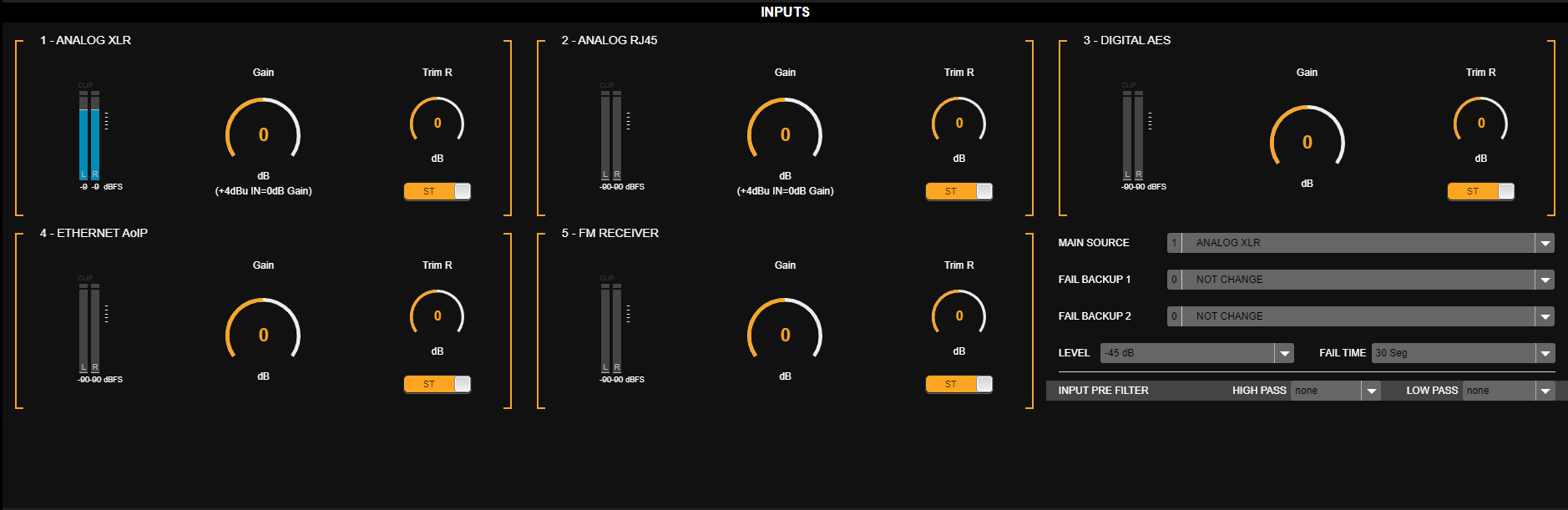
In advanced mode (**SETUP**), select **AUDIO INPUT** from the side menu.\
Each input has the following controls:
 ### Gain (GAIN)
* Adjusts the input signal level within a range of **±14 dB**.
* For analog inputs, **0 dB** corresponds to **+4 dBu**, referenced to **-18 dBfs (AES K18)**.\
This provides **18 dB of headroom**.
Gain should be adjusted so that **0 VU peaks at the console** oscillate between **-22 and -9 dBfs** on the processor's level meter.
### Trim R
* Gain compensation for the right channel.
* Adjustment range: **±3 dB**.
* Allows correction of **channel imbalances**.
### ST/MONO
* Switches the input between:
* **STEREO**
* **MONO** (sum of left and right channels).
### Main and alternative inputs
The 542APC automatically switches between inputs based on signal presence or absence.
* A **main input** is defined.
* Up to **two alternative inputs** can be configured (FAIL BACKUP 1 and 2).
* The unit switches in this order:
1. Main input
2. FAIL BACKUP 1
3. FAIL BACKUP 2
#### Switching parameters
* **LEVEL** → threshold below which the signal is considered failed.
* Adjustable between **-45 and -80 dB** (5 dB steps).
* **FAIL TIME** → time in seconds that the signal must remain below the **LEVEL** threshold to trigger switching.
### Input filters
* **HI PASS** (Chebyshev type)
* Options: 0 (disabled), 20 Hz (factory default), 40 Hz, 60 Hz, 80 Hz.
* Eliminates subsonic signals, typically picked up by microphones.
* **LOW PASS**
* Options: 15 kHz, 16 kHz, 20 kHz.
* Can be disabled (**None**).
## Audio outputs
In advanced mode (**SETUP**), select **AUDIO OUTPUT** from the side menu.
The processor has **four audio outputs**, each with **independent level adjustment.**
### Gain (GAIN)
* Adjusts the input signal level within a range of **±14 dB**.
* For analog inputs, **0 dB** corresponds to **+4 dBu**, referenced to **-18 dBfs (AES K18)**.\
This provides **18 dB of headroom**.
Gain should be adjusted so that **0 VU peaks at the console** oscillate between **-22 and -9 dBfs** on the processor's level meter.
### Trim R
* Gain compensation for the right channel.
* Adjustment range: **±3 dB**.
* Allows correction of **channel imbalances**.
### ST/MONO
* Switches the input between:
* **STEREO**
* **MONO** (sum of left and right channels).
### Main and alternative inputs
The 542APC automatically switches between inputs based on signal presence or absence.
* A **main input** is defined.
* Up to **two alternative inputs** can be configured (FAIL BACKUP 1 and 2).
* The unit switches in this order:
1. Main input
2. FAIL BACKUP 1
3. FAIL BACKUP 2
#### Switching parameters
* **LEVEL** → threshold below which the signal is considered failed.
* Adjustable between **-45 and -80 dB** (5 dB steps).
* **FAIL TIME** → time in seconds that the signal must remain below the **LEVEL** threshold to trigger switching.
### Input filters
* **HI PASS** (Chebyshev type)
* Options: 0 (disabled), 20 Hz (factory default), 40 Hz, 60 Hz, 80 Hz.
* Eliminates subsonic signals, typically picked up by microphones.
* **LOW PASS**
* Options: 15 kHz, 16 kHz, 20 kHz.
* Can be disabled (**None**).
## Audio outputs
In advanced mode (**SETUP**), select **AUDIO OUTPUT** from the side menu.
The processor has **four audio outputs**, each with **independent level adjustment.**
 1. **Balanced analog output** (XLR)
2. **Unbalanced analog output** (RJ45)
3. **AES-3 digital output**
4. **Ethernet streaming (AoIP)**
### PRE-emphasis
All outputs feature **pre-emphasis** switching. When activated, the output includes the 50 uS or 75 uS emphasis curve, according to configuration.
Pre-emphasized output is used in configurations where the exciter or transmitter applies de-emphasis to the input audio.
### Signal source switching
The **RJ45 analog**, **AES-3 digital**, and **AoIP** outputs can be configured to send:
* Processed signal.
* Signal from the FM receiver.
When an output transmits the FM receiver signal, the output level reflects the **actual on-air level**, assuming: Modulation = 100%; **FM Receiver** input gain = 0 dB.
1. **Balanced analog output** (XLR)
2. **Unbalanced analog output** (RJ45)
3. **AES-3 digital output**
4. **Ethernet streaming (AoIP)**
### PRE-emphasis
All outputs feature **pre-emphasis** switching. When activated, the output includes the 50 uS or 75 uS emphasis curve, according to configuration.
Pre-emphasized output is used in configurations where the exciter or transmitter applies de-emphasis to the input audio.
### Signal source switching
The **RJ45 analog**, **AES-3 digital**, and **AoIP** outputs can be configured to send:
* Processed signal.
* Signal from the FM receiver.
When an output transmits the FM receiver signal, the output level reflects the **actual on-air level**, assuming: Modulation = 100%; **FM Receiver** input gain = 0 dB.