> ## Documentation Index
> Fetch the complete documentation index at: https://docs.solidyne.ar/llms.txt
> Use this file to discover all available pages before exploring further.
# Preset Management
> Managing and creating processing presets
## Processing Presets
The unit includes 16 factory presets and 16 empty memory slots for users to store their own settings.
* Factory presets are read-only: they cannot be deleted or modified.
* User presets come factory-configured with moderate processing settings.
### Managing Presets
Processing presets can be accessed from the MONITORING section of the web control interface.
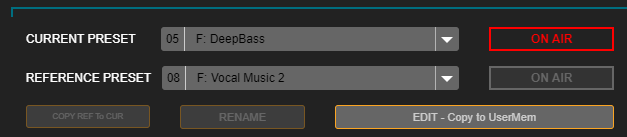 **CURRENT PRESET** corresponds to the active setting, which is currently on air.\
**REFERENCE PRESET** allows loading a second setting to compare with the current one by pressing ON AIR.
### Creating Processing Presets
To copy and edit presets, you must access **SETUP** mode.\
Users can either edit a user preset directly or copy a factory preset and then modify it (recommended).
You can only edit the preset loaded in CURRENT PRESET when it is on air.\
If REFERENCE is on air, editing is disabled.
The preset loaded as reference is used to compare settings, both audibly and by viewing process values.
**To copy a factory preset:**
1. Load the desired factory preset into the CURRENT PRESET field. When a read-only preset is loaded here, the **SAVE** button changes to **EDIT – Copy to UserMem**.
2. Press **EDIT – Copy to UserMem**. A screen will appear to choose the user position where the copy will be saved.
**CURRENT PRESET** corresponds to the active setting, which is currently on air.\
**REFERENCE PRESET** allows loading a second setting to compare with the current one by pressing ON AIR.
### Creating Processing Presets
To copy and edit presets, you must access **SETUP** mode.\
Users can either edit a user preset directly or copy a factory preset and then modify it (recommended).
You can only edit the preset loaded in CURRENT PRESET when it is on air.\
If REFERENCE is on air, editing is disabled.
The preset loaded as reference is used to compare settings, both audibly and by viewing process values.
**To copy a factory preset:**
1. Load the desired factory preset into the CURRENT PRESET field. When a read-only preset is loaded here, the **SAVE** button changes to **EDIT – Copy to UserMem**.
2. Press **EDIT – Copy to UserMem**. A screen will appear to choose the user position where the copy will be saved.
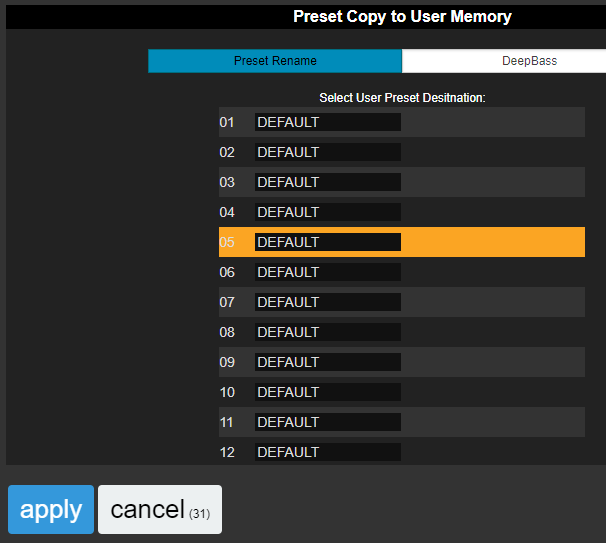 3. The preset name can also be edited on this screen.
4. Press **APPLY**. The factory preset will be copied to the chosen user memory, **overwriting** the existing one.
***
### Preset Administration
The **Preset Manager** is accessed from the Web Control screen's side menu. It allows:
* Exporting a preset to a disk file
* Importing a preset from file
* Copying factory presets to user memories
* Renaming a preset
* Assigning the **MONO** property, which forces mono transmission
* Assigning the **VOICE** property, optimized for voices
3. The preset name can also be edited on this screen.
4. Press **APPLY**. The factory preset will be copied to the chosen user memory, **overwriting** the existing one.
***
### Preset Administration
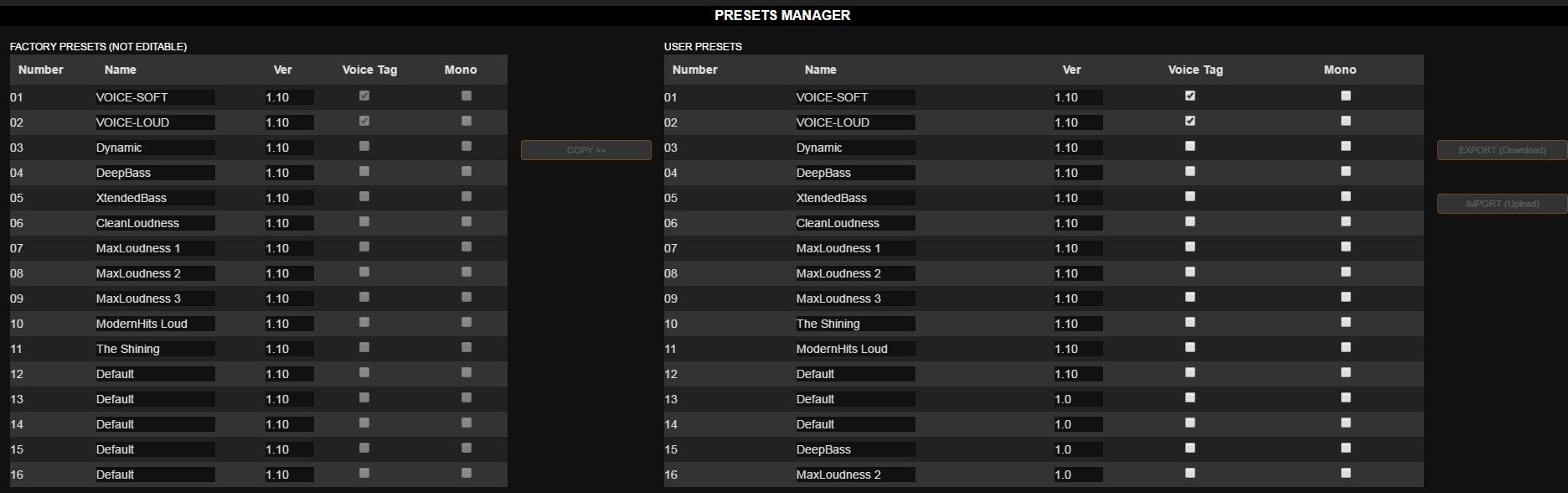
The **Preset Manager** is accessed from the Web Control screen's side menu. It allows:
* Exporting a preset to a disk file
* Importing a preset from file
* Copying factory presets to user memories
* Renaming a preset
* Assigning the **MONO** property, which forces mono transmission
* Assigning the **VOICE** property, optimized for voices
 #### Exporting and Importing Presets
To export a preset:
1. Select the desired preset from the list
2. Press the **EXPORT (Download)** button
3. A file named `[preset_name].542` is generated
4. The file is saved to the browser's default downloads folder
***
## Factory Presets
Presets store processing configurations that determine the on-air sound of the radio.\
Factory presets were created to cover different needs: maximum quality, maximum loudness, bass enhancement, treble enhancement, voice optimization, etc.
* Settings **01 to 03** are for voices
* Settings **04 to 16** are for general purpose, mainly organized by loudness
Users can copy and modify factory presets to create their own settings.
When choosing and configuring a processing preset, it's important to define whether a single preset will be used all day or if there will be automatic switching by microphone or schedule.\
A single preset requires a compromise setting that works with all voices and music. Automatic switching eliminates compromises since each type of material is processed with its optimal setting, reducing the listening fatigue typical of rigid processors.
\[Content continues with technical specifications and settings for different preset types...]
#### Exporting and Importing Presets
To export a preset:
1. Select the desired preset from the list
2. Press the **EXPORT (Download)** button
3. A file named `[preset_name].542` is generated
4. The file is saved to the browser's default downloads folder
***
## Factory Presets
Presets store processing configurations that determine the on-air sound of the radio.\
Factory presets were created to cover different needs: maximum quality, maximum loudness, bass enhancement, treble enhancement, voice optimization, etc.
* Settings **01 to 03** are for voices
* Settings **04 to 16** are for general purpose, mainly organized by loudness
Users can copy and modify factory presets to create their own settings.
When choosing and configuring a processing preset, it's important to define whether a single preset will be used all day or if there will be automatic switching by microphone or schedule.\
A single preset requires a compromise setting that works with all voices and music. Automatic switching eliminates compromises since each type of material is processed with its optimal setting, reducing the listening fatigue typical of rigid processors.
\[Content continues with technical specifications and settings for different preset types...]