> ## Documentation Index
> Fetch the complete documentation index at: https://docs.solidyne.ar/llms.txt
> Use this file to discover all available pages before exploring further.
# Wizard and Enhancers
> Audio Processing: Wizard Simplified Controls and Enhancers
## Introduction
Processing stages are accessed from the **SETUP** screen, **PROCESS** option in the side menu.
* Different stages are grouped in **tabs**.
* The left-to-right order corresponds to the **actual signal flow**, except for **WIZARD**, which is not a processing stage itself.
Available stages:
1. WIZARDS
2. ENHANCERS
3. ENHANCER EQ
4. AGC
5. MULTIBAND AGC
6. MULTIBAND LIMITER
7. MIX & CLIPPER – FINAL LIMITER
***
## WIZARD
The **WIZARD** controls work on user presets.\
They allow you to **quickly change the sound character** and create new presets without modifying each individual stage.
* No advanced knowledge required.
* Related: see **Preset Management**.
Main functions:
1. Modify a preset's character in four essential aspects:
* **BASS**
* **BRIGHT**
* **COMPRESSION**
* **LOUDNESS**
2. Toggle and basic adjustment of **ENHANCERS**:
* Voice Symmetrizer
* EQ
* Bass Enhancer
* Stereo Enhancer
Each WIZARD control modifies multiple parameters across different stages in a synchronized way.
 #### Control Interaction
* The four controls are interrelated: a single parameter can be affected by more than one control.
* When one control is moved, the positions of others are recalculated.
* When loading a preset, controls are positioned according to its settings.
This allows you to **visualize at a glance** the sonic characteristics of each preset and compare them.
#### Usage Tips
* Use WIZARD for **moderate changes**.
* Always start from a preset close to the desired result.
* Example: if seeking maximum loudness, don't start from a soft preset and maximize **LOUDNESS**.
* It's recommended to start from a **MaxLoudness** type preset, already optimized for that goal.
Advanced users can adjust each stage individually for greater sound precision.
***
## Enhancers
#### Control Interaction
* The four controls are interrelated: a single parameter can be affected by more than one control.
* When one control is moved, the positions of others are recalculated.
* When loading a preset, controls are positioned according to its settings.
This allows you to **visualize at a glance** the sonic characteristics of each preset and compare them.
#### Usage Tips
* Use WIZARD for **moderate changes**.
* Always start from a preset close to the desired result.
* Example: if seeking maximum loudness, don't start from a soft preset and maximize **LOUDNESS**.
* It's recommended to start from a **MaxLoudness** type preset, already optimized for that goal.
Advanced users can adjust each stage individually for greater sound precision.
***
## Enhancers
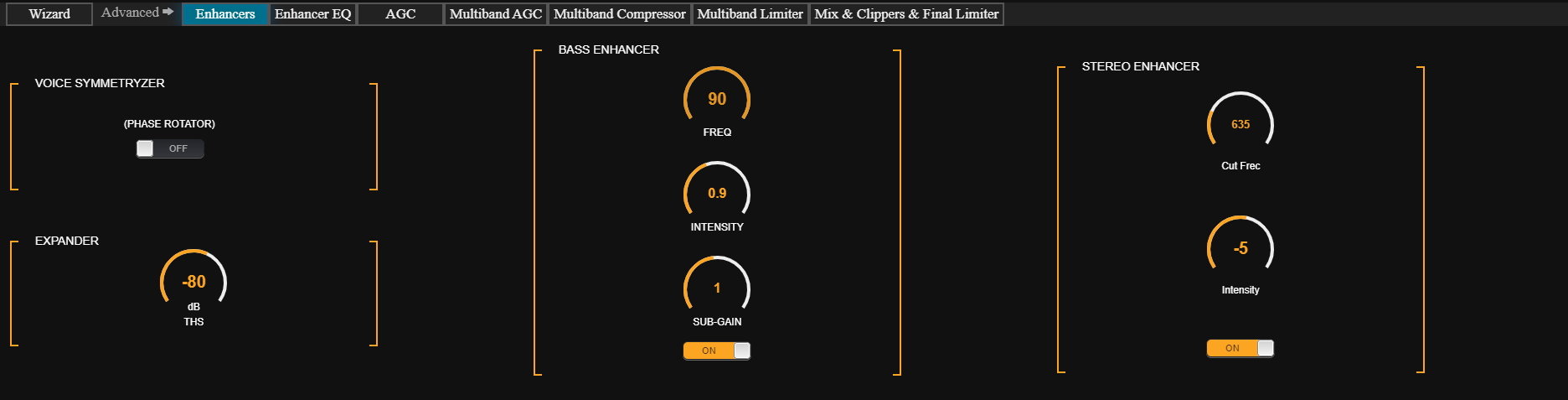 ### Voice Symmetrizer
Human voice is asymmetric due to vocal cord nature (asymmetric triangular pulses). This asymmetry remains after vocal cavity filtering.
As a result, when passing through a compressor:
* One polarity reaches 100%, while the opposite rarely exceeds 50%.
* Voice is perceived less intense than music, which is more symmetric.
To correct this phenomenon without altering sound quality, **peak symmetrizers** are used.
Technique based on Dr. Kahn's discoveries and developed by Eng. Oscar Bonello.\
Reference: *Journal of the AES, Vol.24, No.5*.
***
### Expander
* Its purpose is to **improve the signal-to-noise ratio (S/N)** of the on-air sound.
* Multiband compression increases loudness but reduces S/N.
* Without an expander, noise floor might be audible during long voice pauses.
**Available control:**
* **THS (Threshold):** adjusts in dBFS the level at which the expander starts reducing gain.
***
### Bass Enhancer
* Reinforces **mid-bass (50 – 300 Hz)**, improving presence on small speakers.
* Unlike an EQ, it **synthesizes and adds harmonics** from lower frequencies.
**Controls:**
* **FREQUENCY:** low-pass filter cutoff frequency (defines harmonic range).
* **INTENSITY:** amount and intensity of generated harmonics.
* **SUB-GAIN:** level of synthesized bass added to the signal.
When using preset switching for voices, music and voice settings should have **BASS ENHANCER** in the same condition (active or inactive).
***
### Stereo Enhancer
* Provides a **more immersive sound**, making the station stand out against conventional broadcasts.
* This effect helps increase perceived loudness.
* The effect is more noticeable on headphones.
* Uses a **stereo expansion** algorithm to simulate surround sound in two-channel systems.
**Controls:**
* **Cut Freq (Hz):** low-pass filter cutoff frequency defining the phase-shifted signal range. Hearing is more sensitive to phase differences below 2000 Hz → increasing phase difference widens stereo image.
* **Intensity:** level of expanded signal added to original audio.
In voice-switched presets, music and voice should maintain **Stereo Enhancer** in the same condition (enabled/disabled).
***
### Enhancer EQ
### Voice Symmetrizer
Human voice is asymmetric due to vocal cord nature (asymmetric triangular pulses). This asymmetry remains after vocal cavity filtering.
As a result, when passing through a compressor:
* One polarity reaches 100%, while the opposite rarely exceeds 50%.
* Voice is perceived less intense than music, which is more symmetric.
To correct this phenomenon without altering sound quality, **peak symmetrizers** are used.
Technique based on Dr. Kahn's discoveries and developed by Eng. Oscar Bonello.\
Reference: *Journal of the AES, Vol.24, No.5*.
***
### Expander
* Its purpose is to **improve the signal-to-noise ratio (S/N)** of the on-air sound.
* Multiband compression increases loudness but reduces S/N.
* Without an expander, noise floor might be audible during long voice pauses.
**Available control:**
* **THS (Threshold):** adjusts in dBFS the level at which the expander starts reducing gain.
***
### Bass Enhancer
* Reinforces **mid-bass (50 – 300 Hz)**, improving presence on small speakers.
* Unlike an EQ, it **synthesizes and adds harmonics** from lower frequencies.
**Controls:**
* **FREQUENCY:** low-pass filter cutoff frequency (defines harmonic range).
* **INTENSITY:** amount and intensity of generated harmonics.
* **SUB-GAIN:** level of synthesized bass added to the signal.
When using preset switching for voices, music and voice settings should have **BASS ENHANCER** in the same condition (active or inactive).
***
### Stereo Enhancer
* Provides a **more immersive sound**, making the station stand out against conventional broadcasts.
* This effect helps increase perceived loudness.
* The effect is more noticeable on headphones.
* Uses a **stereo expansion** algorithm to simulate surround sound in two-channel systems.
**Controls:**
* **Cut Freq (Hz):** low-pass filter cutoff frequency defining the phase-shifted signal range. Hearing is more sensitive to phase differences below 2000 Hz → increasing phase difference widens stereo image.
* **Intensity:** level of expanded signal added to original audio.
In voice-switched presets, music and voice should maintain **Stereo Enhancer** in the same condition (enabled/disabled).
***
### Enhancer EQ
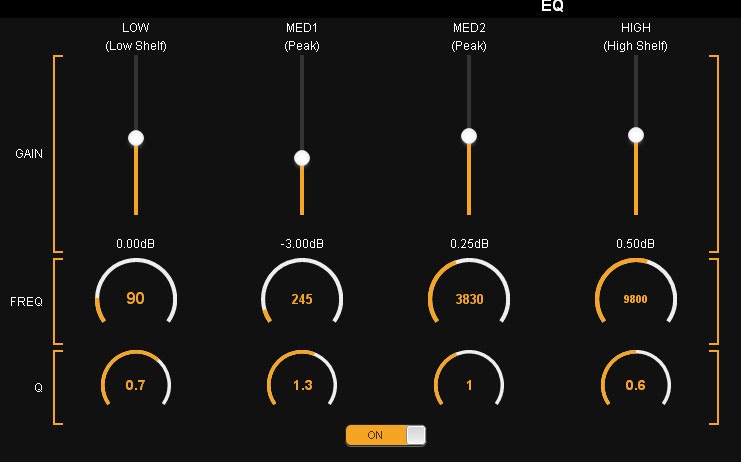 **4-band** parametric equalizer. Corrections should be applied over ranges smaller than the global processing band (LOW, MID1, MID2, PRES, HI). Special care needed in frequencies **\< 800 Hz** (LOW and M1).
**Reference Q factor:**
* Q=3 → width ≈ ½ octave.
* Q=4 → width ≈ ⅓ octave.
**Example:**
-3 dB attenuation centered at 250 Hz with Q=2 → width of 125 Hz. This frequency falls within **M1 (125 – 800 Hz)**.
* The correction affects ≈ 50% of that band (125-375 Hz).
* Higher Q means more specific correction.
* With Q=0.5 → width of 500 Hz, affecting LOW and M1.
In some cases, applying correction from either the **parametric EQ** or the **multiband density EQ** may be preferred, depending on the desired effect.\
Both produce subtly different results.
#### Recommendations
* Use parametric EQ for **very specific cuts or boosts**.
* The global equalization profile should be defined with **multiband AGC** and **density EQ**.
**4-band** parametric equalizer. Corrections should be applied over ranges smaller than the global processing band (LOW, MID1, MID2, PRES, HI). Special care needed in frequencies **\< 800 Hz** (LOW and M1).
**Reference Q factor:**
* Q=3 → width ≈ ½ octave.
* Q=4 → width ≈ ⅓ octave.
**Example:**
-3 dB attenuation centered at 250 Hz with Q=2 → width of 125 Hz. This frequency falls within **M1 (125 – 800 Hz)**.
* The correction affects ≈ 50% of that band (125-375 Hz).
* Higher Q means more specific correction.
* With Q=0.5 → width of 500 Hz, affecting LOW and M1.
In some cases, applying correction from either the **parametric EQ** or the **multiband density EQ** may be preferred, depending on the desired effect.\
Both produce subtly different results.
#### Recommendations
* Use parametric EQ for **very specific cuts or boosts**.
* The global equalization profile should be defined with **multiband AGC** and **density EQ**.