> ## Documentation Index
> Fetch the complete documentation index at: https://docs.solidyne.ar/llms.txt
> Use this file to discover all available pages before exploring further.
# Tuner and Measurements
> FM Tuner and Transmission Monitoring
## FM Tuner
The **internal FM tuner** enables measurements of the received radio signal.\
Access it from the SETUP side menu, under **FM RECEIVER – ANALYZER**.
* Usually the tuned station is the same one where the processor operates.
* Any other station can also be tuned to view its parameters.
The tuner is linked to a **modulation monitor** that displays different aspects of the transmission in real-time by analyzing the received RF signal.
Measurements are only valid when the station is properly tuned.
* If RF level is **below 40 dB** or multipath exceeds **10%**, measurements are **not valid**.
* Under these conditions, data fields appear dimmed.
### Tuner Controls
* **ON/OFF** → turns the FM tuner on or off.\
If reception is very poor, the unit turns off automatically.
* **FREQ** → enter the station frequency (MHz, use decimal point, e.g. 95.9).
* Type the value using the keyboard and confirm with **ENTER**.
* If it was off, the tuner turns on.
### Reception Parameters
* **Reception Quality:** Reception validity indicators:
* Show if signal quality allows reliable measurements.
* Otherwise, out-of-range variables are displayed: *RF low level*, *Multipath*, *Noise*, *Adjacent channel interference*.
* Reception quality depends on the **connected antenna**.\
(See **FM Receiver Antenna** section).
* **RF LEVEL** → RF signal level at antenna. Must be > 40 dB.
* **Multipath** → distortion percentage due to reflections. Must be \< 10%.
* **Band Type** → FM band type according to region.
* **RBDS Mode** → activates RBDS system (RDS version used in USA).
***
### DIAL SCAN
Tool that scans the FM band in **100 kHz** steps and generates a graph showing signal strength for each detected station.
 ***
## Transmission Analysis
### FM Measurements
Monitoring of parameters measured on the tuned signal:
***
## Transmission Analysis
### FM Measurements
Monitoring of parameters measured on the tuned signal:
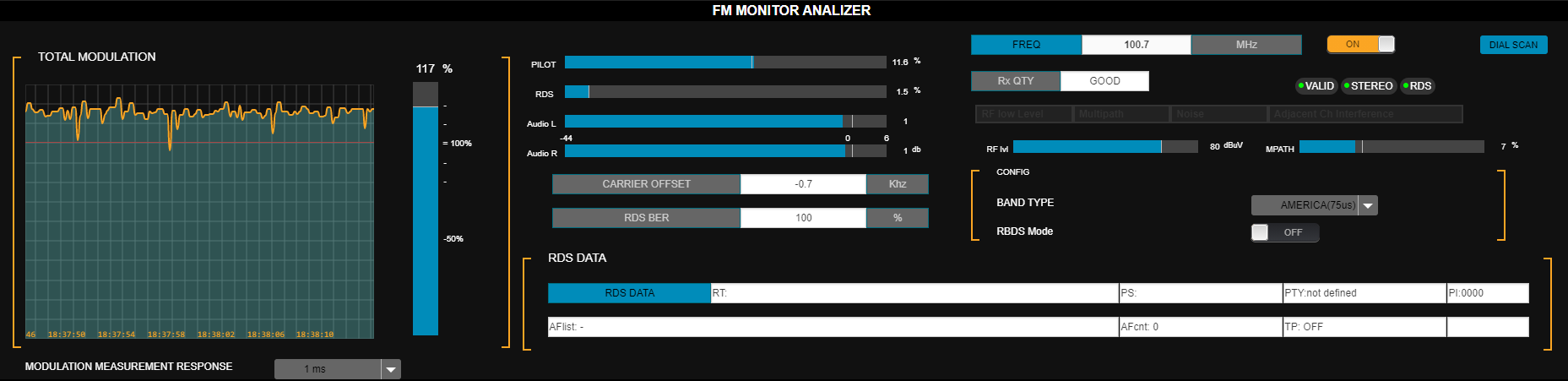 * **TOTAL MODULATION** → FM modulation level measured on the tuned signal.
* **MODULATION MEASUREMENT RESPONSE** → measurement integration time:
* Instantaneous
* 125 µs (recommended for peak)
* 250 µs
* 500 µs
* 1 ms
Appropriate integration depends on regional standards.
* **PILOT** → pilot tone modulation % (default: 9%).
* **RDS** → RDS subcarrier modulation % (default: 4%).
* **AUDIO L/R** → audio level (dBFS).
* **CARRIER OFFSET** → carrier deviation (kHz).
* **RDS BER** (bit error ratio) → RDS data quality.
* 0% = no errors.
* 100% = unreadable data.
* **RDS DATA** → RDS transmitted texts.
***
### Channel Separation, Distortion and SNR
The system measures:
* Channel separation.
* Total harmonic distortion + noise (THD+N).
* Signal-to-noise ratio (SNR).
* **TOTAL MODULATION** → FM modulation level measured on the tuned signal.
* **MODULATION MEASUREMENT RESPONSE** → measurement integration time:
* Instantaneous
* 125 µs (recommended for peak)
* 250 µs
* 500 µs
* 1 ms
Appropriate integration depends on regional standards.
* **PILOT** → pilot tone modulation % (default: 9%).
* **RDS** → RDS subcarrier modulation % (default: 4%).
* **AUDIO L/R** → audio level (dBFS).
* **CARRIER OFFSET** → carrier deviation (kHz).
* **RDS BER** (bit error ratio) → RDS data quality.
* 0% = no errors.
* 100% = unreadable data.
* **RDS DATA** → RDS transmitted texts.
***
### Channel Separation, Distortion and SNR
The system measures:
* Channel separation.
* Total harmonic distortion + noise (THD+N).
* Signal-to-noise ratio (SNR).
 These measurements consider the **complete chain**: processor + stereo encoder + transmitter + antenna.
* Can be done **remotely** without interrupting transmission.
* During the process:
* A very brief audible tone is injected (\~250 ms).
* For SNR, the on-air signal is muted for 2 seconds.
**Procedure**
* Click the **RUN new measurement** option shown to the right of the parameter.
* This executes the measurement for that parameter and displays the result.
**Channel Separation Scale**
| Separation (dB) | Rating |
| :-------------: | :-----------: |
| **> 40 dB** | **Excellent** |
| 35 to 40 dB | Very good |
| 30 to 35 dB | Good |
| 25 to 30 dB | Fair |
| \< 25 dB | Poor |
Separation can be optimized from the stereo encoder advanced controls.\
See **Channel Separation Measurement and Adjustment**.
***
### Technical Transmission Report
* The **DOWNLOAD FULL TEST** button runs all measurements and generates a text file with results, including FM Analyzer values.
* The file is saved to the browser's downloads folder.
* This report can be sent to **Technical Support** for remote diagnosis.
* If the tuner is off, reports cannot be generated. To turn it on: press **ON/OFF** and wait for values to stabilize.
The report introduces **brief audible tones on-air** during measurements.
These measurements consider the **complete chain**: processor + stereo encoder + transmitter + antenna.
* Can be done **remotely** without interrupting transmission.
* During the process:
* A very brief audible tone is injected (\~250 ms).
* For SNR, the on-air signal is muted for 2 seconds.
**Procedure**
* Click the **RUN new measurement** option shown to the right of the parameter.
* This executes the measurement for that parameter and displays the result.
**Channel Separation Scale**
| Separation (dB) | Rating |
| :-------------: | :-----------: |
| **> 40 dB** | **Excellent** |
| 35 to 40 dB | Very good |
| 30 to 35 dB | Good |
| 25 to 30 dB | Fair |
| \< 25 dB | Poor |
Separation can be optimized from the stereo encoder advanced controls.\
See **Channel Separation Measurement and Adjustment**.
***
### Technical Transmission Report
* The **DOWNLOAD FULL TEST** button runs all measurements and generates a text file with results, including FM Analyzer values.
* The file is saved to the browser's downloads folder.
* This report can be sent to **Technical Support** for remote diagnosis.
* If the tuner is off, reports cannot be generated. To turn it on: press **ON/OFF** and wait for values to stabilize.
The report introduces **brief audible tones on-air** during measurements.