> ## Documentation Index
> Fetch the complete documentation index at: https://docs.solidyne.ar/llms.txt
> Use this file to discover all available pages before exploring further.
# System Settings
> System Settings
## General System Settings
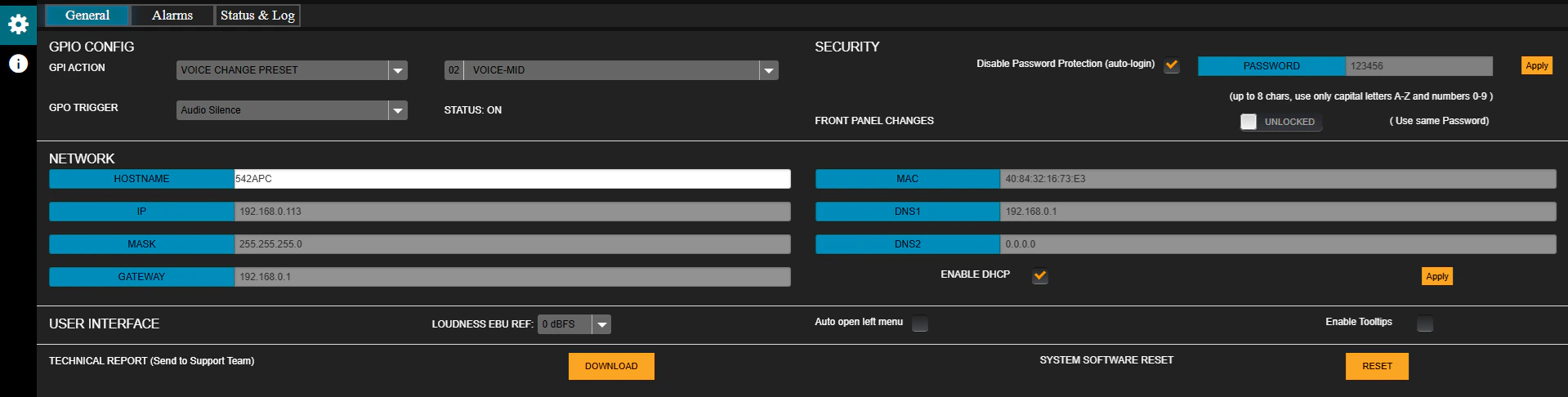 ### GPIO CONFIG
* **GPI VOICE CHANGE PRESET**:\
When the GPI is activated, it switches the processing preset.
* The trigger signal is generated in the Studio when microphones are enabled.
* It can reach the processor via **hardware** connection or **LAN** (models with /AoIP option).
* The field on the right defines the preset to apply (default: **VOICE-LOUD**).
* **GPO TRIGGER**:\
List of events that can activate the GPO output:
1. AUDIO SILENCE
2. INPUT FAIL BACKUP
3. OVERMODULATION
4. LOW RF POWER
5. FORCE FM MONO
See details on [GPIO connection](/en/unidex/instalacion-gpio)
***
### SECURITY
Allows enabling a password by unchecking the **Disable Password Protection** option (default: enabled).
* Default password: `1234`.
* To modify it, enter the new password in the **PASSWORD** field and press **APPLY**.
* Rules: up to **8 characters**, only **UPPERCASE** letters and numbers.
* **FRONT PANEL CHANGES (LOCK/UNLOCK)**:\
Locks or enables access from the front panel.\
If locked, the password is required to make changes from the front.
***
### NETWORK
Network configuration.
* Factory default: **DHCP enabled** mode.
* A **static IP** can be assigned by disabling DHCP.
* The IP address is displayed on the front panel or via LAN using the **Solidyne Multi-Discovery** tool.
For more details, see [Ethernet Connection and Access](/en/542/542-instalacion-web).
***
### User Interface
* **LOUDNESS EBU REFERENCE**: Loudness reference level for general monitoring (default: 0 dBfs).
* **AUTO-OPEN LEFT MENU**: Automatically expands the menu when hovering the mouse.
* **ENABLE TOOLTIPS**: Enables help pop-up messages for controls and indicators.
***
### TECHNICAL REPORT
Generates a report with the equipment's operating parameters and configuration.
* Pressing "DOWNLOAD" saves the report to the browser's downloads folder.
* It can be sent to **technical support** for diagnostics.
**SYSTEM SOFTWARE RESET**
Restarting the equipment may cause a brief interruption of on-air audio.
### GPIO CONFIG
* **GPI VOICE CHANGE PRESET**:\
When the GPI is activated, it switches the processing preset.
* The trigger signal is generated in the Studio when microphones are enabled.
* It can reach the processor via **hardware** connection or **LAN** (models with /AoIP option).
* The field on the right defines the preset to apply (default: **VOICE-LOUD**).
* **GPO TRIGGER**:\
List of events that can activate the GPO output:
1. AUDIO SILENCE
2. INPUT FAIL BACKUP
3. OVERMODULATION
4. LOW RF POWER
5. FORCE FM MONO
See details on [GPIO connection](/en/unidex/instalacion-gpio)
***
### SECURITY
Allows enabling a password by unchecking the **Disable Password Protection** option (default: enabled).
* Default password: `1234`.
* To modify it, enter the new password in the **PASSWORD** field and press **APPLY**.
* Rules: up to **8 characters**, only **UPPERCASE** letters and numbers.
* **FRONT PANEL CHANGES (LOCK/UNLOCK)**:\
Locks or enables access from the front panel.\
If locked, the password is required to make changes from the front.
***
### NETWORK
Network configuration.
* Factory default: **DHCP enabled** mode.
* A **static IP** can be assigned by disabling DHCP.
* The IP address is displayed on the front panel or via LAN using the **Solidyne Multi-Discovery** tool.
For more details, see [Ethernet Connection and Access](/en/542/542-instalacion-web).
***
### User Interface
* **LOUDNESS EBU REFERENCE**: Loudness reference level for general monitoring (default: 0 dBfs).
* **AUTO-OPEN LEFT MENU**: Automatically expands the menu when hovering the mouse.
* **ENABLE TOOLTIPS**: Enables help pop-up messages for controls and indicators.
***
### TECHNICAL REPORT
Generates a report with the equipment's operating parameters and configuration.
* Pressing "DOWNLOAD" saves the report to the browser's downloads folder.
* It can be sent to **technical support** for diagnostics.
**SYSTEM SOFTWARE RESET**
Restarting the equipment may cause a brief interruption of on-air audio.