> ## Documentation Index
> Fetch the complete documentation index at: https://docs.solidyne.ar/llms.txt
> Use this file to discover all available pages before exploring further.
# Hybrid Channel
> Using landline and cellular linked via Bluetooth
## INTRODUCTION
The hybrid channel handles two phone lines:
* A landline (2-wire, also known as POTS).
* A cellular phone via Bluetooth.
Channel operation is simple and error-proof thanks to its safety logic and automatic control circuits.
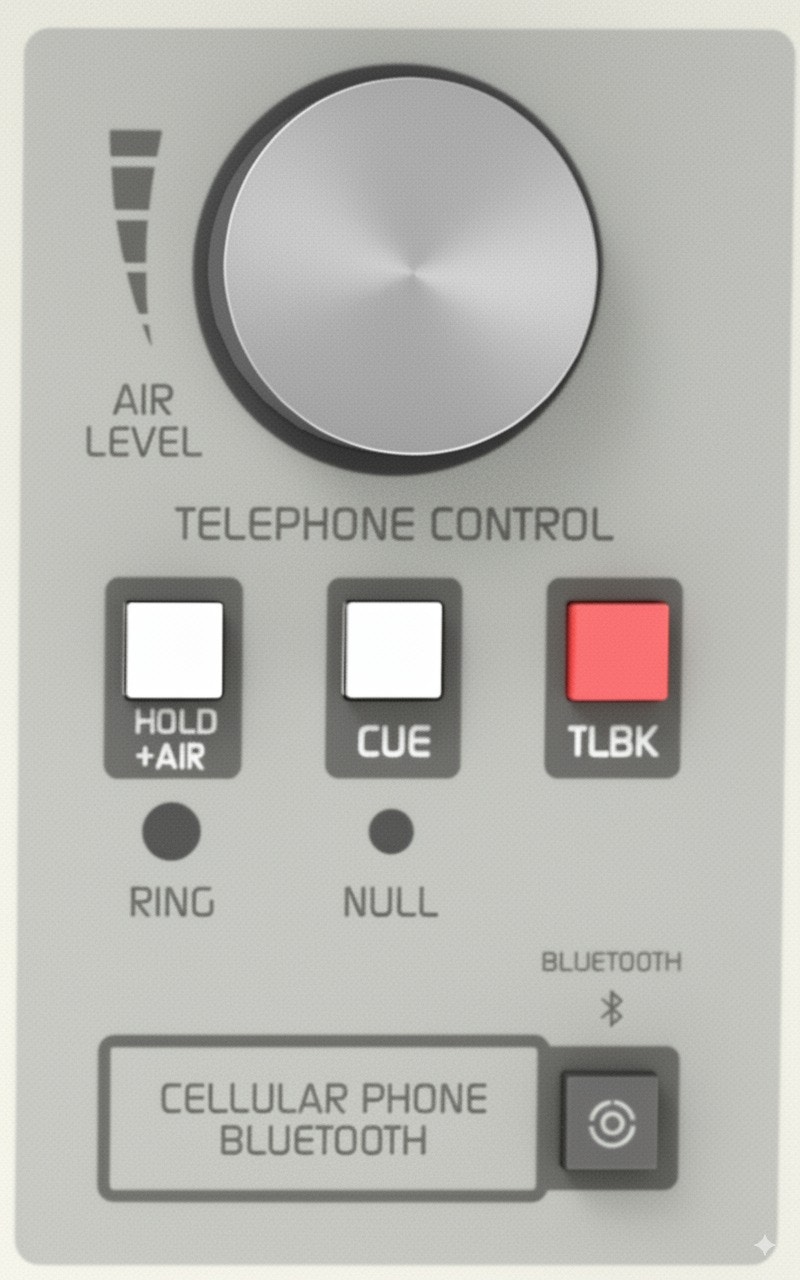 ## USING WITH LANDLINE
When a call comes in, a blue LED flashes with the ring cadence. You can answer:
* **From the associated telephone** (recommended).
* **From the console's hybrid**.
### Answering from the associated telephone
1. Pick up the handset connected to the D612's rear RJ11.
2. To put the call on air: press **HOLD/AIR** and hang up the phone.
### Answering from the console
1. Verify that the **AIR LEVEL** knob is closed before taking the line.
2. Press **HOLD/AIR**.
3. The line is taken and the pilot light turns off.
4. The caller receives PGM return and can go on air when **AIR LEVEL** is opened.
### Private communication
1. Press **CUE**: PGM to the line is interrupted and the caller is heard through the CUE speaker.
2. To talk: hold down **TALKBACK**, using the console's talkback microphone.
### Putting the call on air
1. Release **CUE**.
2. Turn **AIR LEVEL** and adjust to the appropriate level.
Adjustment is done by observing the PGM VU meter and listening to the on-air audio, because the bass-filtered audio of a telephone communication can match the loudness of studio voices even when showing lower levels on the VU meters.
In an analog hybrid, it's important **not to exceed the on-air line level** to avoid contaminating studio voices.
### Return to private mode
* Close **AIR LEVEL** and use **CUE** (listen) and **TALKBACK** (talk).
### Return to associated telephone
1. Lower **AIR LEVEL** to zero.
2. Pick up the handset.
3. Release **HOLD/AIR** on the console.
If the phone is hung up when releasing HOLD/AIR, the call will end.
### End the communication
To end the communication, close AIR LEVEL and **release HOLD/AIR**.
***
## USING WITH MOBILE PHONE
The mobile phone must be [paired with the D612 console](/en/612/612-telco) via Bluetooth.
### Daily connection
1. Verify that **AIR LEVEL** is closed and **CUE** is pressed.
2. **Activate Bluetooth on the console**: hold down **CELLULAR PHONE BLUETOOTH** for about 5s until the green LED (located on the VU meter panel) flashes slowly.
3. Activate Bluetooth on the mobile phone.
* If previously paired, the connection is automatically restored.
* Incoming calls are transferred directly to the console.
If the console is used only with mobile phone, it's convenient to keep it always linked and handle calls from the hybrid. For cases where there is continuous use of both lines, either alternately or simultaneously (conferences), some operational particularities arise that are detailed in [Conferences](#conferencias).
### Incoming call (mobile)
* When a call comes in, it rings on the mobile phone and CUE speaker (if CUE is pressed).
* Verify that **AIR LEVEL** is closed.
* Answer with a short press on **CELLULAR PHONE BLUETOOTH** (or from the mobile screen).
### Call handling
* With **CUE** pressed, the call is heard on CUE speaker (without PGM return).
* To talk: hold **TALKBACK**.
* When releasing **CUE**, the caller hears PGM, but won't go on air until **AIR LEVEL** is opened.
* To put on air: open **AIR LEVEL** and adjust level on VU meters.
### Return to mobile
* On the mobile phone, exit *Headset/Bluetooth* mode and switch to *Speaker*.
* To transfer back to console: return to *Headset*.
Depending on the model, the menu may show "Headset" icons, dropdown buttons or different combinations. Check the phone's manual.
### End the communication
* Short press **CELLULAR PHONE BLUETOOTH**, or end from the mobile phone.
### Calling from mobile
1. On the mobile phone, switch to *Headset* mode to disconnect from console.
2. Dial the number and press **SEND**.
3. To transfer the call to console: return to *Bluetooth/Headset* mode.
4. **On the console:** release **CUE** to send PGM return to mobile.
5. Open **AIR LEVEL** to put on air.
You can also call without exiting Bluetooth mode, using Talkback:
* Tone and voice are heard in CUE.
* Talk with **Talkback**.
* For hold: keep **CUE** active.
* For air: open **AIR LEVEL**.
* To end: short press **CELLULAR PHONE BLUETOOTH** or end from mobile.
***
## CONFERENCES
When using landline and mobile simultaneously:
* On mobile: Disconnect Bluetooth from console after each call. This way, if a call comes in, it rings on the phone.
* If mobile Bluetooth remains connected to console, an incoming call could ring on air while landline is open.
The procedure to establish a conference depends on which line is on air:
* Receive or make call through telephone associated with landline.
* Talk and warn they'll go directly on air.
* Press **HOLD/AIR** to send to air and hang up phone.
* If phone allows, you can mute microphone before hanging up to avoid noise.
* Call enters conference with mobile already on air.
* On mobile: Bluetooth is on but disconnected (local speaker) while not in use.
* Make or receive call on mobile independently.
* To transfer: connect Bluetooth to console.
* Call goes immediately on air, in conference with landline.
* To end: finish from mobile.
* Then, disconnect Bluetooth on mobile if continuing with landline.
* To return to mobile: switch to *Headset* mode from mobile menu.
If call holding is required, install an external hybrid. The EXT HIB connector allows adding it to the Internal Hybrid without using an extra console channel.
***
## PGM send to phone line
The hybrid built into D612 has no line return level control.
* Send is automatic, with AGC and limiter.
* Send signal is limited to **400-2200 Hz** band, optimized for intelligibility.
* This prevents distortion caused by excess return.
* To ensure quality: maintain VU meter at **0 VU** with occasional peaks above zero.
To verify: measure with oscilloscope in parallel to line → signal should be **2V peak to peak**.
## USING WITH LANDLINE
When a call comes in, a blue LED flashes with the ring cadence. You can answer:
* **From the associated telephone** (recommended).
* **From the console's hybrid**.
### Answering from the associated telephone
1. Pick up the handset connected to the D612's rear RJ11.
2. To put the call on air: press **HOLD/AIR** and hang up the phone.
### Answering from the console
1. Verify that the **AIR LEVEL** knob is closed before taking the line.
2. Press **HOLD/AIR**.
3. The line is taken and the pilot light turns off.
4. The caller receives PGM return and can go on air when **AIR LEVEL** is opened.
### Private communication
1. Press **CUE**: PGM to the line is interrupted and the caller is heard through the CUE speaker.
2. To talk: hold down **TALKBACK**, using the console's talkback microphone.
### Putting the call on air
1. Release **CUE**.
2. Turn **AIR LEVEL** and adjust to the appropriate level.
Adjustment is done by observing the PGM VU meter and listening to the on-air audio, because the bass-filtered audio of a telephone communication can match the loudness of studio voices even when showing lower levels on the VU meters.
In an analog hybrid, it's important **not to exceed the on-air line level** to avoid contaminating studio voices.
### Return to private mode
* Close **AIR LEVEL** and use **CUE** (listen) and **TALKBACK** (talk).
### Return to associated telephone
1. Lower **AIR LEVEL** to zero.
2. Pick up the handset.
3. Release **HOLD/AIR** on the console.
If the phone is hung up when releasing HOLD/AIR, the call will end.
### End the communication
To end the communication, close AIR LEVEL and **release HOLD/AIR**.
***
## USING WITH MOBILE PHONE
The mobile phone must be [paired with the D612 console](/en/612/612-telco) via Bluetooth.
### Daily connection
1. Verify that **AIR LEVEL** is closed and **CUE** is pressed.
2. **Activate Bluetooth on the console**: hold down **CELLULAR PHONE BLUETOOTH** for about 5s until the green LED (located on the VU meter panel) flashes slowly.
3. Activate Bluetooth on the mobile phone.
* If previously paired, the connection is automatically restored.
* Incoming calls are transferred directly to the console.
If the console is used only with mobile phone, it's convenient to keep it always linked and handle calls from the hybrid. For cases where there is continuous use of both lines, either alternately or simultaneously (conferences), some operational particularities arise that are detailed in [Conferences](#conferencias).
### Incoming call (mobile)
* When a call comes in, it rings on the mobile phone and CUE speaker (if CUE is pressed).
* Verify that **AIR LEVEL** is closed.
* Answer with a short press on **CELLULAR PHONE BLUETOOTH** (or from the mobile screen).
### Call handling
* With **CUE** pressed, the call is heard on CUE speaker (without PGM return).
* To talk: hold **TALKBACK**.
* When releasing **CUE**, the caller hears PGM, but won't go on air until **AIR LEVEL** is opened.
* To put on air: open **AIR LEVEL** and adjust level on VU meters.
### Return to mobile
* On the mobile phone, exit *Headset/Bluetooth* mode and switch to *Speaker*.
* To transfer back to console: return to *Headset*.
Depending on the model, the menu may show "Headset" icons, dropdown buttons or different combinations. Check the phone's manual.
### End the communication
* Short press **CELLULAR PHONE BLUETOOTH**, or end from the mobile phone.
### Calling from mobile
1. On the mobile phone, switch to *Headset* mode to disconnect from console.
2. Dial the number and press **SEND**.
3. To transfer the call to console: return to *Bluetooth/Headset* mode.
4. **On the console:** release **CUE** to send PGM return to mobile.
5. Open **AIR LEVEL** to put on air.
You can also call without exiting Bluetooth mode, using Talkback:
* Tone and voice are heard in CUE.
* Talk with **Talkback**.
* For hold: keep **CUE** active.
* For air: open **AIR LEVEL**.
* To end: short press **CELLULAR PHONE BLUETOOTH** or end from mobile.
***
## CONFERENCES
When using landline and mobile simultaneously:
* On mobile: Disconnect Bluetooth from console after each call. This way, if a call comes in, it rings on the phone.
* If mobile Bluetooth remains connected to console, an incoming call could ring on air while landline is open.
The procedure to establish a conference depends on which line is on air:
* Receive or make call through telephone associated with landline.
* Talk and warn they'll go directly on air.
* Press **HOLD/AIR** to send to air and hang up phone.
* If phone allows, you can mute microphone before hanging up to avoid noise.
* Call enters conference with mobile already on air.
* On mobile: Bluetooth is on but disconnected (local speaker) while not in use.
* Make or receive call on mobile independently.
* To transfer: connect Bluetooth to console.
* Call goes immediately on air, in conference with landline.
* To end: finish from mobile.
* Then, disconnect Bluetooth on mobile if continuing with landline.
* To return to mobile: switch to *Headset* mode from mobile menu.
If call holding is required, install an external hybrid. The EXT HIB connector allows adding it to the Internal Hybrid without using an extra console channel.
***
## PGM send to phone line
The hybrid built into D612 has no line return level control.
* Send is automatic, with AGC and limiter.
* Send signal is limited to **400-2200 Hz** band, optimized for intelligibility.
* This prevents distortion caused by excess return.
* To ensure quality: maintain VU meter at **0 VU** with occasional peaks above zero.
To verify: measure with oscilloscope in parallel to line → signal should be **2V peak to peak**.