> ## Documentation Index
> Fetch the complete documentation index at: https://docs.solidyne.ar/llms.txt
> Use this file to discover all available pages before exploring further.
# Monitoring Section
> Operation of speakers and headphones
## Control Description
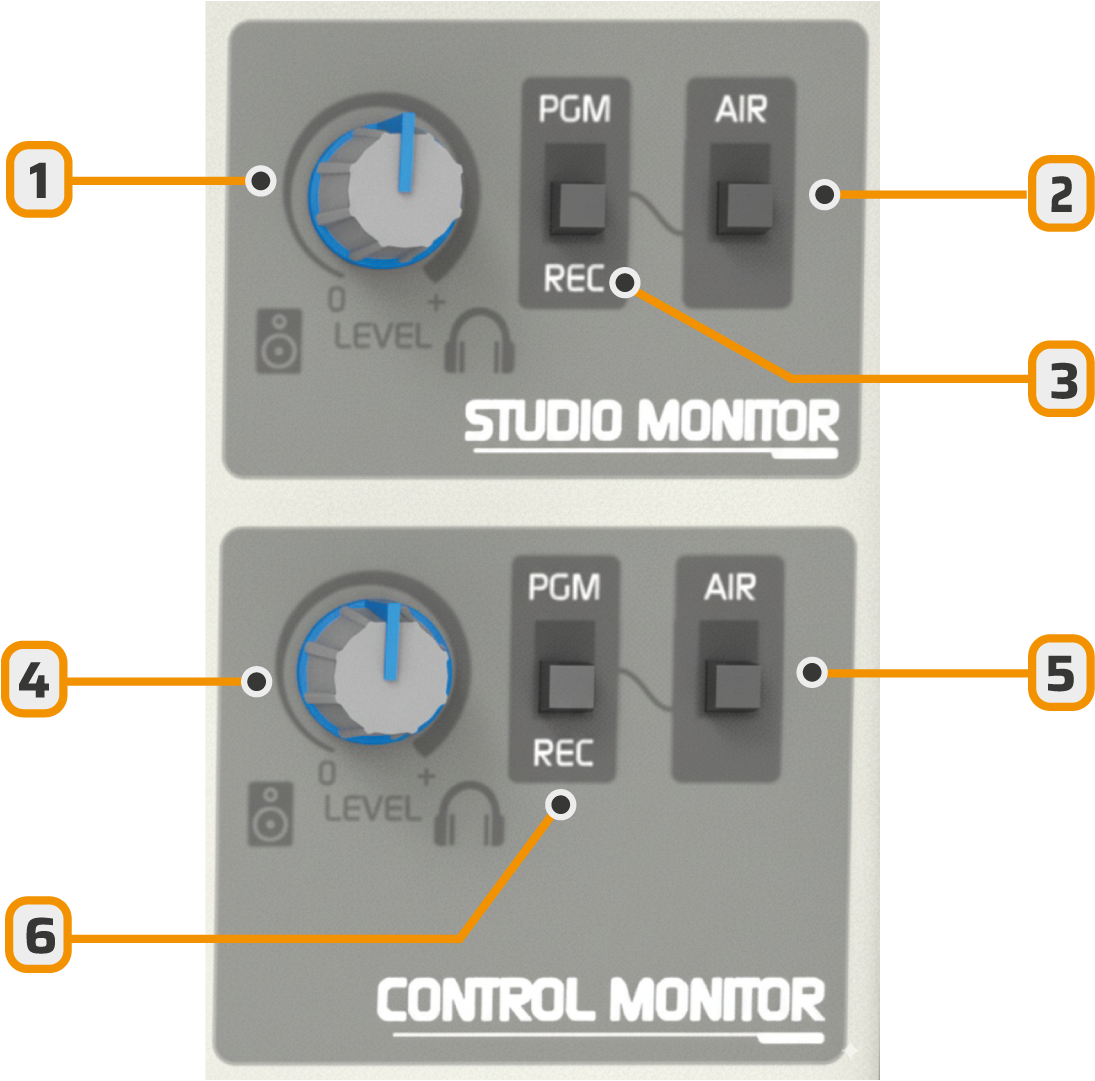 1. Studio monitors and headphones level
2. Studio monitoring switch between external 'ON AIR' input (external tuner) and PGM/REC
3. Assigns PGM or REC mix to Studio monitoring
4. Control Room monitors and headphones level
5. Control Room monitoring switch between 'ON AIR' (external tuner) and PGM/REC
6. Assigns PGM or REC mix to Control Room monitoring
1. Studio monitors and headphones level
2. Studio monitoring switch between external 'ON AIR' input (external tuner) and PGM/REC
3. Assigns PGM or REC mix to Studio monitoring
4. Control Room monitors and headphones level
5. Control Room monitoring switch between 'ON AIR' (external tuner) and PGM/REC
6. Assigns PGM or REC mix to Control Room monitoring
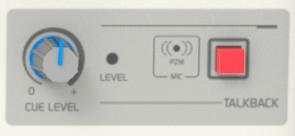 * **CUE:** adjusts the CUE signal preview level.
The built-in speaker can be disabled and the CUE signal routed to the control room headphones.\
This requires modifying an internal connection. See [Installation - Speakers and headphones](/en/612/612-monitoreo)
## Level Adjustment
A single level control manages both **studio headphones** and **studio monitor speakers**.
* First adjust the headphones level.
* Then adjust the speaker level using the active monitors control.
### Individual Headphone Control Options
* **External amplifier/distributor (recommended):** for example the **Solidyne Studio Box HD5** which handles 5 headphones.
* **Headphones with built-in volume control.**
* **Custom individual control:** mount a 1 kΩ potentiometer on the announcer's desk (see Installation chapter).
***
## Studio and Control Room Speakers
* The **Studio Monitor** output is designed for **active speakers** (0 dBu level, 0.775 Vrms).
* When microphones are activated, **studio speakers are automatically muted** to prevent feedback.
* The **Control Monitor** output also has a single level control.
### Monitor Signal Selection
The selection switches choose which signal to monitor in Studio and Control Room
* **PGM:** program signal.
* **REC:** channels assigned to recording output.
* **AIR:** external input (tuner) for monitoring on-air transmission.
***
## Operation in Integrated Studios
In modern studios, console, announcers and journalists share the same room, reducing construction and acoustic costs.
* Connect a pair of active speakers to the **Studio Monitor** output.
* These are automatically muted when microphones are opened.
* Journalists' and guests' headphones connect to the **Studio** output.
* Operator's headphones connect to the **Control Monitor** output.
***
## Preview Monitoring (CUE)
* The console includes an **internal speaker** for CUE.
* Each channel has a **CUE** button to preview the signal without going on-air (fader closed).
* If multiple CUE buttons are pressed, signals are summed.
In integrated studios:
* CUE configuration must be modified to send the signal to Control Room headphones and mute the built-in speaker. See [Installation - Speakers and headphones](/en/612/612-monitoreo)
The CUE knob adjusts the CUE speaker level or Control Room headphones send level.
***
## Studio Talkback
The talkback channel allows the operator to communicate with the announcer in the Studio:
* Press **Talkback**.
* Audio is interrupted in Control Room speakers (to prevent feedback).
* In the Studio, the operator is heard through the **left channel** of speakers and headphones.
* The **right channel** continues with program audio so announcers and journalists maintain reference.
* To hear the response, the operator must activate **CUE** on the microphone channel.
The talkback microphone level comes factory calibrated.\
Only if necessary, it can be adjusted with the **LEVEL** preset on the console panel using a trimmer tool.
* **CUE:** adjusts the CUE signal preview level.
The built-in speaker can be disabled and the CUE signal routed to the control room headphones.\
This requires modifying an internal connection. See [Installation - Speakers and headphones](/en/612/612-monitoreo)
## Level Adjustment
A single level control manages both **studio headphones** and **studio monitor speakers**.
* First adjust the headphones level.
* Then adjust the speaker level using the active monitors control.
### Individual Headphone Control Options
* **External amplifier/distributor (recommended):** for example the **Solidyne Studio Box HD5** which handles 5 headphones.
* **Headphones with built-in volume control.**
* **Custom individual control:** mount a 1 kΩ potentiometer on the announcer's desk (see Installation chapter).
***
## Studio and Control Room Speakers
* The **Studio Monitor** output is designed for **active speakers** (0 dBu level, 0.775 Vrms).
* When microphones are activated, **studio speakers are automatically muted** to prevent feedback.
* The **Control Monitor** output also has a single level control.
### Monitor Signal Selection
The selection switches choose which signal to monitor in Studio and Control Room
* **PGM:** program signal.
* **REC:** channels assigned to recording output.
* **AIR:** external input (tuner) for monitoring on-air transmission.
***
## Operation in Integrated Studios
In modern studios, console, announcers and journalists share the same room, reducing construction and acoustic costs.
* Connect a pair of active speakers to the **Studio Monitor** output.
* These are automatically muted when microphones are opened.
* Journalists' and guests' headphones connect to the **Studio** output.
* Operator's headphones connect to the **Control Monitor** output.
***
## Preview Monitoring (CUE)
* The console includes an **internal speaker** for CUE.
* Each channel has a **CUE** button to preview the signal without going on-air (fader closed).
* If multiple CUE buttons are pressed, signals are summed.
In integrated studios:
* CUE configuration must be modified to send the signal to Control Room headphones and mute the built-in speaker. See [Installation - Speakers and headphones](/en/612/612-monitoreo)
The CUE knob adjusts the CUE speaker level or Control Room headphones send level.
***
## Studio Talkback
The talkback channel allows the operator to communicate with the announcer in the Studio:
* Press **Talkback**.
* Audio is interrupted in Control Room speakers (to prevent feedback).
* In the Studio, the operator is heard through the **left channel** of speakers and headphones.
* The **right channel** continues with program audio so announcers and journalists maintain reference.
* To hear the response, the operator must activate **CUE** on the microphone channel.
The talkback microphone level comes factory calibrated.\
Only if necessary, it can be adjusted with the **LEVEL** preset on the console panel using a trimmer tool.