> ## Documentation Index
> Fetch the complete documentation index at: https://docs.solidyne.ar/llms.txt
> Use this file to discover all available pages before exploring further.
# Monitoring
> Speaker and Headphone Connections in Studio and Control Room
## Control Room Monitoring
The **CONTROL** outputs feature **1/8" female TRS (mini-jack)** connectors for speakers and headphones. The speaker output operates at a nominal level of **0 dBu**, designed for connection to active monitors.\
In the console's MONITOR section, you'll find the controls for signal routing and level adjustment for both speakers and headphones.
The **Control Speaker** output is automatically muted when **Talk-back** is engaged, preventing feedback with the announcer microphone.
***
## Studio Monitoring
The console delivers monitoring signals to the Studio via **STUDIO MONITOR OUT**, with an RJ45 connector. The connection is made using **straight-through STP RJ45-RJ45 cable** to the optional **Solidyne Studiobox HD3/HD5** monitor units.
This output **must not be connected** using standard audio output RJ45 cables.\
It is **not compatible** with the **StudioHub** standard.
 Features:
* Studio speakers **automatically mute** when microphones are opened.
* The headphone signal **is never muted**. It always receives the console-assigned signal and the talkback microphone audio.
For details, see the **Studiobox HD3 / HD5 Monitoring Modules** section.
## Single-Booth Monitoring
When the console is used in an integrated or single-booth studio, it is advisable to connect the speakers to the **STUDIO MONITOR** output.
The CONTROL speaker output **is not muted when microphones are activated**, creating a risk of feedback if microphones and speakers are in the same room.
***
## Optional Studiobox Connection
The console includes a **Y-cable adapter** (RJ45 to dual TRS jack) for connecting generic headphone distribution amplifiers and powered monitors.
* The **STUDIO MONITOR** output delivers fixed-level signals
* When not using Studiobox, speaker level is adjusted from the monitors' own controls
* A dual-input headphone distribution amplifier may be used to control monitor volume from the console
* Input A → headphone signal
* Input B → speaker signal
Features:
* Studio speakers **automatically mute** when microphones are opened.
* The headphone signal **is never muted**. It always receives the console-assigned signal and the talkback microphone audio.
For details, see the **Studiobox HD3 / HD5 Monitoring Modules** section.
## Single-Booth Monitoring
When the console is used in an integrated or single-booth studio, it is advisable to connect the speakers to the **STUDIO MONITOR** output.
The CONTROL speaker output **is not muted when microphones are activated**, creating a risk of feedback if microphones and speakers are in the same room.
***
## Optional Studiobox Connection
The console includes a **Y-cable adapter** (RJ45 to dual TRS jack) for connecting generic headphone distribution amplifiers and powered monitors.
* The **STUDIO MONITOR** output delivers fixed-level signals
* When not using Studiobox, speaker level is adjusted from the monitors' own controls
* A dual-input headphone distribution amplifier may be used to control monitor volume from the console
* Input A → headphone signal
* Input B → speaker signal
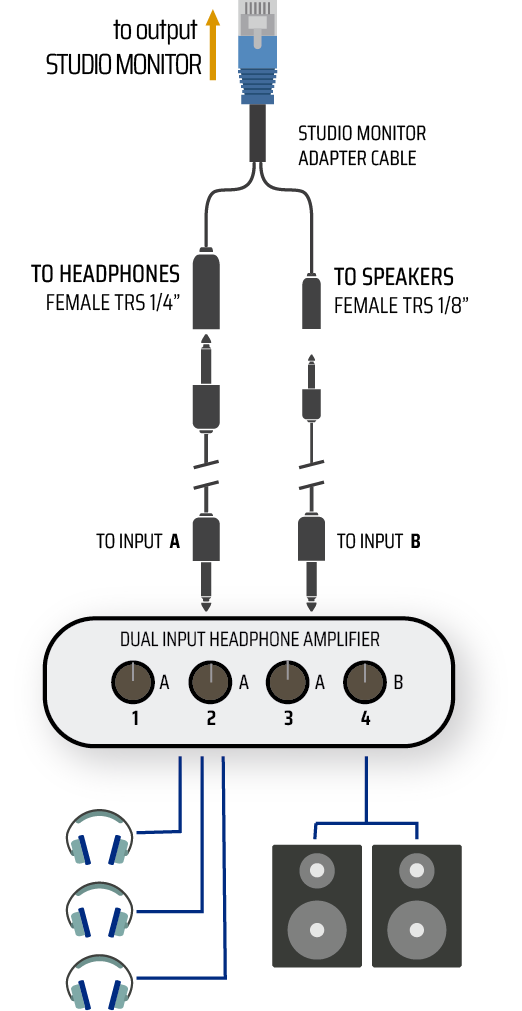 Speaker volume control is assigned to Input B, allowing a single unit to control both studio headphones and monitors.
### Studio Monitor Out
Speaker volume control is assigned to Input B, allowing a single unit to control both studio headphones and monitors.
### Studio Monitor Out
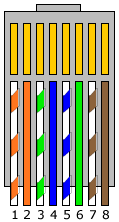 | # | Signal |
| :-: | ------------------------ |
| 1 | Headphones Left (+4 dBu) |
| 2 | Headphones Right |
| 3 | GND |
| 4 | ON-AIR (+14 V) |
| 5 | Talkback to Control Room |
| 6 | VCC + 14 V |
| 7 | Speakers Left (+4 dBu) |
| 8 | Speakers Right |
Chassis = GND
| # | Signal |
| :-: | ------------------------ |
| 1 | Headphones Left (+4 dBu) |
| 2 | Headphones Right |
| 3 | GND |
| 4 | ON-AIR (+14 V) |
| 5 | Talkback to Control Room |
| 6 | VCC + 14 V |
| 7 | Speakers Left (+4 dBu) |
| 8 | Speakers Right |
Chassis = GND