> ## Documentation Index
> Fetch the complete documentation index at: https://docs.solidyne.ar/llms.txt
> Use this file to discover all available pages before exploring further.
# Monitoring and Headphones
> Monitoring on speakers and headphones. Talkback communication.
## Monitor Section
This section contains the controls:
* **Studio Monitor**: determines which signal will be heard in the studio monitors and headphones.
* **Control Monitor**: assigns the signal to the control room monitors and headphones.
* **CUE volume** control.
* **Talk-Back** button and microphone to the studio.
* Master "**ON-AIR Mics**" button. Activates the microphone channels and "ON-AIR" signals.
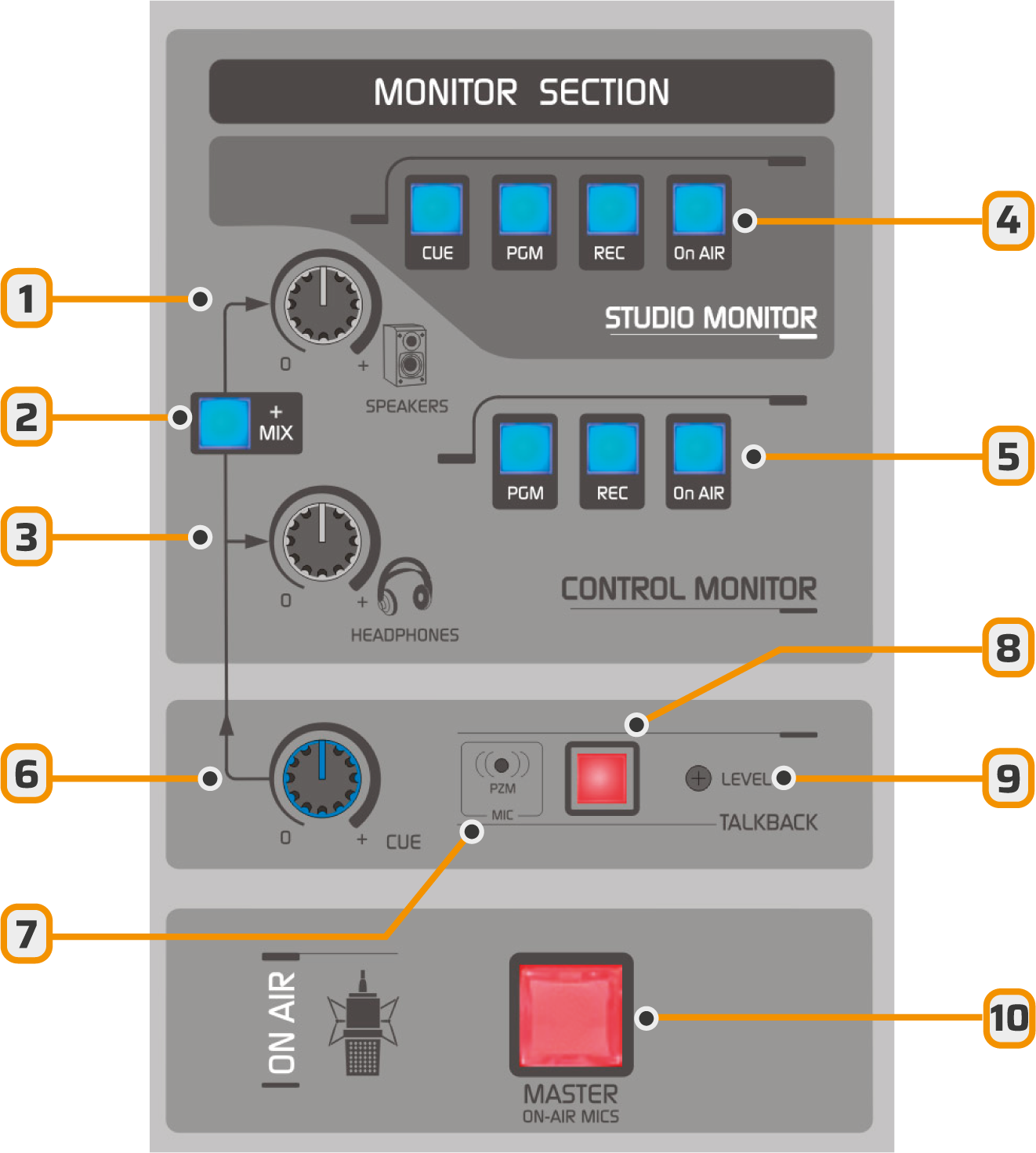 1. Control room speaker level control.
2. Adds CUE audio to the control room speakers.
3. Operator headphone level control.
4. Signal assignment to the studio monitor output (headphones and speakers).
5. Signal assignment to the control room monitor output (headphones and speakers).
6. Level at which the CUE signal is added to the control room headphones and speakers.
7. Talk-Back microphone (studio communication and intercom).
8. Talk-Back button
9. Talk-Back microphone sensitivity
10. Microphone master button.
### **Studio Monitor**
* Provides four signal sources: CUE, PGM, REC, and ON-AIR \[4].
* The console delivers fixed-level signals to both headphones and studio monitors.
* For level distribution and control in the studio, a **headphone distribution system** is required, such as the optional Solidyne HD3 and HD5 modules.
See wiring in Installation ⟶ [Monitoring](/DX816/816-monitoring)
### **Control Monitor**
* The headphone \[3] and speaker \[1] levels are managed with independent controls.
* Using the selection buttons \[5], choose the signal to monitor:
* **PGM**: signal sent on-air.
* **REC**: signal from the REC auxiliary bus.
* **ON-AIR**: signal from an external tuner, recommended for on-air monitoring.
Adjust the monitor speaker volume to a comfortable level with the **SPEAKERS** control in the center position.
If the Studio–Transmitter link or the audio processor introduces an audible delay, it is recommended to process the **ON-AIR** monitor signal with a delay-free processor, connected directly to a PGM output of the console.
***
## Pre-fader Listen (CUE)
Each channel features a **CUE** button that allows monitoring the signal before the fader (off-air). When multiple CUEs are activated, the signals are summed.
The CUE signal can be routed to:
* Control Room monitor speakers: press the **MIX** button \[2].
* Control Room headphones. This routing is fixed. CUE is summed with the signal assigned by the monitor selection.
* Studio Monitor. It's available as a signal source in STUDIO MONITOR.
CUE level is controlled exclusively by the **CUE** knob \[6], for both headphones and speakers.
If the **CUE \[6]** knob is turned down, the CUE signal won't be heard even if the headphone and speaker knobs are open.\
Conversely, if **SPEAKERS \[1]** and **HEADPHONES \[3]** are turned down, CUE will still be audible if the CUE knob is open.
Additional features:
* CUE routing is **monophonic**.
* To isolate CUE monitoring:
* Lower the **SPEAKERS** or **HEADPHONES** level as needed.
* Release PGM, REC and ON-AIR buttons.
We recommend monitoring the on-air signal at moderate volume and CUE at a higher level to clearly distinguish between them.
***
## Talkback to Studio
The talkback channel allows the operator to communicate with the announcer in the studio.
* Press the **TALK-BACK** button.
* Program audio in Control Room speakers is interrupted to prevent feedback.
* The operator is heard on the studio's **left channel**.
* The **right channel** maintains the on-air signal for announcers' and reporters' reference.
* It's also possible to activate **CUE** on the microphone channel to communicate with the announcer.
The talkback microphone level is factory-calibrated.\
It should only be adjusted when strictly necessary, using the **LEVEL** preset.
1. Control room speaker level control.
2. Adds CUE audio to the control room speakers.
3. Operator headphone level control.
4. Signal assignment to the studio monitor output (headphones and speakers).
5. Signal assignment to the control room monitor output (headphones and speakers).
6. Level at which the CUE signal is added to the control room headphones and speakers.
7. Talk-Back microphone (studio communication and intercom).
8. Talk-Back button
9. Talk-Back microphone sensitivity
10. Microphone master button.
### **Studio Monitor**
* Provides four signal sources: CUE, PGM, REC, and ON-AIR \[4].
* The console delivers fixed-level signals to both headphones and studio monitors.
* For level distribution and control in the studio, a **headphone distribution system** is required, such as the optional Solidyne HD3 and HD5 modules.
See wiring in Installation ⟶ [Monitoring](/DX816/816-monitoring)
### **Control Monitor**
* The headphone \[3] and speaker \[1] levels are managed with independent controls.
* Using the selection buttons \[5], choose the signal to monitor:
* **PGM**: signal sent on-air.
* **REC**: signal from the REC auxiliary bus.
* **ON-AIR**: signal from an external tuner, recommended for on-air monitoring.
Adjust the monitor speaker volume to a comfortable level with the **SPEAKERS** control in the center position.
If the Studio–Transmitter link or the audio processor introduces an audible delay, it is recommended to process the **ON-AIR** monitor signal with a delay-free processor, connected directly to a PGM output of the console.
***
## Pre-fader Listen (CUE)
Each channel features a **CUE** button that allows monitoring the signal before the fader (off-air). When multiple CUEs are activated, the signals are summed.
The CUE signal can be routed to:
* Control Room monitor speakers: press the **MIX** button \[2].
* Control Room headphones. This routing is fixed. CUE is summed with the signal assigned by the monitor selection.
* Studio Monitor. It's available as a signal source in STUDIO MONITOR.
CUE level is controlled exclusively by the **CUE** knob \[6], for both headphones and speakers.
If the **CUE \[6]** knob is turned down, the CUE signal won't be heard even if the headphone and speaker knobs are open.\
Conversely, if **SPEAKERS \[1]** and **HEADPHONES \[3]** are turned down, CUE will still be audible if the CUE knob is open.
Additional features:
* CUE routing is **monophonic**.
* To isolate CUE monitoring:
* Lower the **SPEAKERS** or **HEADPHONES** level as needed.
* Release PGM, REC and ON-AIR buttons.
We recommend monitoring the on-air signal at moderate volume and CUE at a higher level to clearly distinguish between them.
***
## Talkback to Studio
The talkback channel allows the operator to communicate with the announcer in the studio.
* Press the **TALK-BACK** button.
* Program audio in Control Room speakers is interrupted to prevent feedback.
* The operator is heard on the studio's **left channel**.
* The **right channel** maintains the on-air signal for announcers' and reporters' reference.
* It's also possible to activate **CUE** on the microphone channel to communicate with the announcer.
The talkback microphone level is factory-calibrated.\
It should only be adjusted when strictly necessary, using the **LEVEL** preset.