> ## Documentation Index
> Fetch the complete documentation index at: https://docs.solidyne.ar/llms.txt
> Use this file to discover all available pages before exploring further.
# Studio-Transmitter Link
> Connection and configuration of the streamer module as an STL link.
## Studio–Transmitter Link
* In studios, the console with **/AoIP** option operates as an **encoder** and generates an audio stream to the transmitter site.
* At the transmitter site, a **decoder** receives the stream and sends it to the **audio processor** (for example Solidyne **ADA102**).
Some FM processors can receive and decode the audio stream (for example Solidyne 542APC /AoIP)
**Network requirements:**
* Studio and Transmitter on the **same LAN** with a point-to-point link (physical or wireless), or
* **VPN** over high-performance Internet (consult with network technician).
***
## Connection and Access
**Procedure:**
1. Connect the console to the network using an **Ethernet** cable.
2. Check the **LEDs** on the Ethernet connector: they indicate that the AoIP modules are **powered by USB** (at least one USB to PC powered on or an external USB source). The LEDs should blink.
3. The network assigns an **IP via DHCP**. With the obtained IP, the green RJ45 LED will blink.\
If there is no DHCP, the module will search for a **free IP** (this may take a few minutes).
4. Obtain the IP using **Solidyne Multi-Discovery**.
**Solidyne Multi-Discovery**
If physical access to the console is not available, you can [**download the Multi-Discovery tool**](/en-US/DX816/816-discovery) which detects Solidyne devices connected to the network.
5. Open a browser (Firefox/Chrome) and enter the **IP** found. The **IP Control Panel** will appear.
***
## Streaming Configuration
### **Destination IP (Basic settings)**
The initial status screen shows the IP port configuration. The factory default setting is *Encoder: Studio Encoder* (option "Location" → 'Studio Encoder').
To verify the configuration, access the **"Configuration"** option and select **"Basic settings"** from the left menu.
 | Parameter | Configuration / Description |
| -------------------- | ----------------------------------------------------------- |
| Location (Site type) | Factory default set to **Studio Encoder** (studio encoder). |
| Stream method | **Push (RTP)** |
| URL | Enter **destination IP or DNS** and **streaming port**. |
| Apply | Press to confirm values. |
### Audio Options
Access: **Configuration → Audio**.
| Parameter | Configuration / Description |
| -------------------- | ----------------------------------------------------------- |
| Location (Site type) | Factory default set to **Studio Encoder** (studio encoder). |
| Stream method | **Push (RTP)** |
| URL | Enter **destination IP or DNS** and **streaming port**. |
| Apply | Press to confirm values. |
### Audio Options
Access: **Configuration → Audio**.
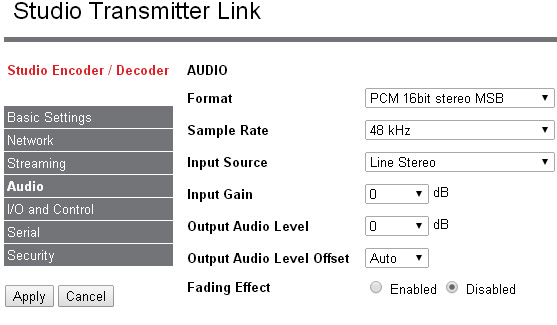 | Parameter | Factory Default / Recommended | Notes |
| ------------- | ----------------------------- | ------------------------------ |
| Input source | Line Stereo | Do not modify. |
| Format | PCM 16-bit stereo | Default. |
| Sample rate | 44.1 kHz | Default. 48 kHz not supported. |
| Bitrate (PCM) | \~1.6 Mbit/s | For PCM16\@48 kHz stereo. |
### Status Screen
| Field | Description |
| ------------------------ | ---------------------------------------------------------------------------- |
| Site type | Operation mode (e.g., **Studio Encoder** for Studio). |
| Stream mode | Event/method configured to initiate transmission to remote. |
| Keep-alive | Active connection maintenance strategy. |
| Connection status | Link status. **Green** = OK with destination IP; **Red** = connection issue. |
| Incoming Stream | Status of incoming stream (inactive in unidirectional encoder). |
| Outgoing Stream | Status of outgoing stream (active in encoder). |
| Audio input | Audio source used (analog). |
| Audio format | Format applied to transmitted audio (e.g., PCM16/48k). |
| Input/Output audio level | Actual audio levels (dBFS) for input/output. |
| Relay 1 .. 4 | Not implemented. |
| Remote inputs | Not implemented. |
| Local inputs | Status of local inputs. |
| Local relays | Not implemented. |
## Microwave Digital Link
For distances of **up to 45 km**, a point-to-point data link in **5.8 GHz** (or **2.4 GHz** depending on the country), **802.11.x** standard, can be used:
* **License-free** band, no special authorizations required.
* Allows transport of **PCM 16-bit / 44.1 kHz** audio (uncompressed) or **encoded** audio.
* Supports **bidirectional connection** for special applications.
For more details: [**info@solidynepro.com**](mailto:info@solidynepro.com)
***
## AoIP Module Power Supply
* AoIP modules are powered via **USB**; they require at least **one USB** connection to a **powered-on PC**.
* Without a USB-connected PC, or with the PC turned off, the IP service **will not be available**.
If no PC is connected, you may use a **standard USB power supply (5 V)** to power the AoIP modules.
| Parameter | Factory Default / Recommended | Notes |
| ------------- | ----------------------------- | ------------------------------ |
| Input source | Line Stereo | Do not modify. |
| Format | PCM 16-bit stereo | Default. |
| Sample rate | 44.1 kHz | Default. 48 kHz not supported. |
| Bitrate (PCM) | \~1.6 Mbit/s | For PCM16\@48 kHz stereo. |
### Status Screen
| Field | Description |
| ------------------------ | ---------------------------------------------------------------------------- |
| Site type | Operation mode (e.g., **Studio Encoder** for Studio). |
| Stream mode | Event/method configured to initiate transmission to remote. |
| Keep-alive | Active connection maintenance strategy. |
| Connection status | Link status. **Green** = OK with destination IP; **Red** = connection issue. |
| Incoming Stream | Status of incoming stream (inactive in unidirectional encoder). |
| Outgoing Stream | Status of outgoing stream (active in encoder). |
| Audio input | Audio source used (analog). |
| Audio format | Format applied to transmitted audio (e.g., PCM16/48k). |
| Input/Output audio level | Actual audio levels (dBFS) for input/output. |
| Relay 1 .. 4 | Not implemented. |
| Remote inputs | Not implemented. |
| Local inputs | Status of local inputs. |
| Local relays | Not implemented. |
## Microwave Digital Link
For distances of **up to 45 km**, a point-to-point data link in **5.8 GHz** (or **2.4 GHz** depending on the country), **802.11.x** standard, can be used:
* **License-free** band, no special authorizations required.
* Allows transport of **PCM 16-bit / 44.1 kHz** audio (uncompressed) or **encoded** audio.
* Supports **bidirectional connection** for special applications.
For more details: [**info@solidynepro.com**](mailto:info@solidynepro.com)
***
## AoIP Module Power Supply
* AoIP modules are powered via **USB**; they require at least **one USB** connection to a **powered-on PC**.
* Without a USB-connected PC, or with the PC turned off, the IP service **will not be available**.
If no PC is connected, you may use a **standard USB power supply (5 V)** to power the AoIP modules.