> ## Documentation Index
> Fetch the complete documentation index at: https://docs.solidyne.ar/llms.txt
> Use this file to discover all available pages before exploring further.
# Operation
> Operation and on-air procedures
## Landlines
Telephone lines are controlled with a **button** and a **level knob**:
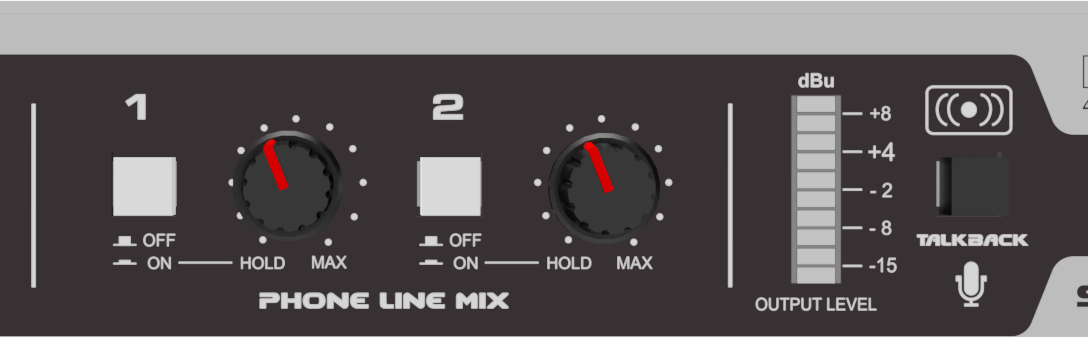 * **ON**: Picks up the phone line.
* **Rotary-HOLD**: In this position (fully left) holds the call with program audio.
* **Rotary-AIR**: Towards the right, adjusts the level in the output mix.
* **OFF**: Releases the line back to the associated telephone.
When a call comes in, the line button flashes in sync with the ring pattern.\
The call will also ring on the associated telephone.
* To **answer from the HL240-VQ**, press the line button.
* To **call from the studio**, dial on the telephone and then transfer to the HL240-VQ by pressing the line button and hanging up.
**For conference calls:** if there's a call on-air, put the second call on **HOLD** before picking up, to prevent it from going directly on-air.\
While on HOLD, the caller hears the program that's on-air.
***
## Mobile phones via Bluetooth
HL240-VQ handles up to **two mobile phones connected via Bluetooth**.
* **ON**: Picks up the phone line.
* **Rotary-HOLD**: In this position (fully left) holds the call with program audio.
* **Rotary-AIR**: Towards the right, adjusts the level in the output mix.
* **OFF**: Releases the line back to the associated telephone.
When a call comes in, the line button flashes in sync with the ring pattern.\
The call will also ring on the associated telephone.
* To **answer from the HL240-VQ**, press the line button.
* To **call from the studio**, dial on the telephone and then transfer to the HL240-VQ by pressing the line button and hanging up.
**For conference calls:** if there's a call on-air, put the second call on **HOLD** before picking up, to prevent it from going directly on-air.\
While on HOLD, the caller hears the program that's on-air.
***
## Mobile phones via Bluetooth
HL240-VQ handles up to **two mobile phones connected via Bluetooth**.
 Operation is similar to working with landlines:
* Press and hold the **BLT** button to turn on the channel (LED flashing).
* Enable Bluetooth on the previously paired mobile phone.
* Connect the mobile to the Solidyne BLT-1 or BLT-2 device.
* Incoming or outgoing mobile calls route through the Bluetooth channel.
To avoid interference, keep the distance between the mobile phone and the HL240-VQ as short as possible.
***
## Receiving a call
Incoming calls (landline or mobile) can be answered from either the associated telephone or the HL240-VQ.\
The **LINE** and **BLT** buttons flash in sync with the ring pattern.
* **Bluetooth**: a single press of the BLT button answers the call on the mobile. To answer and talk from the phone, first disconnect from Bluetooth then reconnect to transfer to the hybrid.
* **Landlines**: press **ON/OFF** for the hybrid to pick up the line. You can also answer from the associated telephone and transfer to the HL240-VQ by pressing ON/OFF before hanging up.
***
## Call hold and talk-back
The unit always sends return audio to the remote telephone, regardless of the level knob position.
* With the knob in **HOLD** position and an active call, the line audio is not mixed to the output, but the other end hears the current program (**AUDIO IN** signal).
* In this state, you can talk to the lines using the built-in **Talkback** microphone.
Pressing **Talkback** temporarily interrupts the AUDIO IN signal and sends the operator's voice **to all lines**.
Operation is similar to working with landlines:
* Press and hold the **BLT** button to turn on the channel (LED flashing).
* Enable Bluetooth on the previously paired mobile phone.
* Connect the mobile to the Solidyne BLT-1 or BLT-2 device.
* Incoming or outgoing mobile calls route through the Bluetooth channel.
To avoid interference, keep the distance between the mobile phone and the HL240-VQ as short as possible.
***
## Receiving a call
Incoming calls (landline or mobile) can be answered from either the associated telephone or the HL240-VQ.\
The **LINE** and **BLT** buttons flash in sync with the ring pattern.
* **Bluetooth**: a single press of the BLT button answers the call on the mobile. To answer and talk from the phone, first disconnect from Bluetooth then reconnect to transfer to the hybrid.
* **Landlines**: press **ON/OFF** for the hybrid to pick up the line. You can also answer from the associated telephone and transfer to the HL240-VQ by pressing ON/OFF before hanging up.
***
## Call hold and talk-back
The unit always sends return audio to the remote telephone, regardless of the level knob position.
* With the knob in **HOLD** position and an active call, the line audio is not mixed to the output, but the other end hears the current program (**AUDIO IN** signal).
* In this state, you can talk to the lines using the built-in **Talkback** microphone.
Pressing **Talkback** temporarily interrupts the AUDIO IN signal and sends the operator's voice **to all lines**.
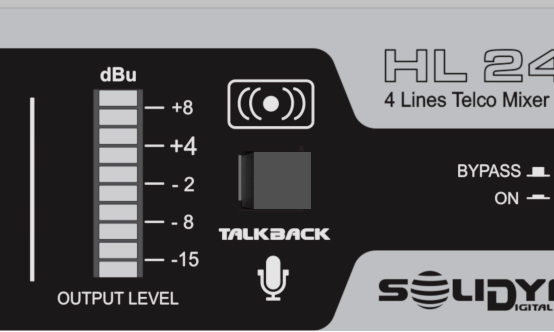 Talkback **should not be used when a call is on-air**, as it interrupts the program audio to the caller.
Lines can be monitored through the HL240-VQ channel on the mixing console. Headphones connected to "HEADPHONES" on the rear panel can also be used.
***
## Going on-air
The HL240-VQ includes an internal conference mixer.\
The mix is adjusted with the front panel knobs and sent to the console through **AUDIO OUT**.
Set the level knob to center position. If talking privately with the line off-air, use this moment to adjust the level.
Open the console channel assigned to the HL240-VQ.
If there was no previous chat (or it was from the telephone), make the final level adjustment live from the HL240-VQ. Peaks on the **OUTPUT LEVEL** indicator at +4 dBu.
***
## Ending the call
* **On telephone lines**:
* OFF disconnects the line from the hybrid and returns it to the associated telephone.
* If OFF is pressed with the telephone on-hook during a call, the communication ends.
* To transfer to the telephone, first take the call off-air, pick up the handset and then press OFF.
* **On Bluetooth channels**:
* Briefly press the BLT button or end from the mobile phone.
* Before ending, take the call off-air.
* If ended directly from HL240-VQ, an end *beep* will sound that could go on-air.
***
## Send level to lines
Audio sent to the lines enters through **AUDIO IN**.\
The **INPUT LEVEL (Send to Lines)** control adjusts this level.
The send level should maintain peaks between **–2 and +4 dBu**.
Excessive send level deteriorates rejection, generating signal feedback through the line and contaminating direct voice.
***
## Output level
The balanced output delivers the mix of lines and Bluetooth channels.\
Adjust the level knobs so the **OUTPUT LEVEL** indicator shows peaks at **+4 dBu**.
This ensures proper drive to the **VQR** processing.
When operating with Bluetooth, verify the mobile phone volume is at maximum.
### Direct outputs
The **PH-1** and **BLT-1** outputs deliver **pre-fader** signal at fixed level.\
They allow monitoring Line-1 and Bluetooth-1 on the console, even if other lines are on-air.
Even when using direct outputs, the signals remain available in the main HL240-VQ mix.
Talkback **should not be used when a call is on-air**, as it interrupts the program audio to the caller.
Lines can be monitored through the HL240-VQ channel on the mixing console. Headphones connected to "HEADPHONES" on the rear panel can also be used.
***
## Going on-air
The HL240-VQ includes an internal conference mixer.\
The mix is adjusted with the front panel knobs and sent to the console through **AUDIO OUT**.
Set the level knob to center position. If talking privately with the line off-air, use this moment to adjust the level.
Open the console channel assigned to the HL240-VQ.
If there was no previous chat (or it was from the telephone), make the final level adjustment live from the HL240-VQ. Peaks on the **OUTPUT LEVEL** indicator at +4 dBu.
***
## Ending the call
* **On telephone lines**:
* OFF disconnects the line from the hybrid and returns it to the associated telephone.
* If OFF is pressed with the telephone on-hook during a call, the communication ends.
* To transfer to the telephone, first take the call off-air, pick up the handset and then press OFF.
* **On Bluetooth channels**:
* Briefly press the BLT button or end from the mobile phone.
* Before ending, take the call off-air.
* If ended directly from HL240-VQ, an end *beep* will sound that could go on-air.
***
## Send level to lines
Audio sent to the lines enters through **AUDIO IN**.\
The **INPUT LEVEL (Send to Lines)** control adjusts this level.
The send level should maintain peaks between **–2 and +4 dBu**.
Excessive send level deteriorates rejection, generating signal feedback through the line and contaminating direct voice.
***
## Output level
The balanced output delivers the mix of lines and Bluetooth channels.\
Adjust the level knobs so the **OUTPUT LEVEL** indicator shows peaks at **+4 dBu**.
This ensures proper drive to the **VQR** processing.
When operating with Bluetooth, verify the mobile phone volume is at maximum.
### Direct outputs
The **PH-1** and **BLT-1** outputs deliver **pre-fader** signal at fixed level.\
They allow monitoring Line-1 and Bluetooth-1 on the console, even if other lines are on-air.
Even when using direct outputs, the signals remain available in the main HL240-VQ mix.