> ## Documentation Index
> Fetch the complete documentation index at: https://docs.solidyne.ar/llms.txt
> Use this file to discover all available pages before exploring further.
# BotNews
> Breaking news automation
## General Concepts
**BotNews** is a powerful on-air news report manager and generator, designed for stations with a high level of **automation**.
* Works **autonomously**, without operator intervention.\
Interrupts programming to broadcast a news block and then resumes transmission adjusting timing.
* Supports playback of **remotely sent audio files**.
* Uses **text-to-speech (TTS)** and **AI-generated** voices to read remotely sent texts.
* Generates its own reports based on **predefined topics** through **web syndication (RSS)**, which are read on-air by virtual voices.
During automated programming (AutoDJ), BotNews monitors for incoming **remote news**.\
When a news item arrives, it is **immediately** scheduled for broadcast, with opener, separators and closer.
News files can be received from **synchronized FTP folders** or email attachments through **AUDICOM WebTools** functions.
To avoid interrupting commercial breaks, BotNews evaluates the **remaining time of the current title**:
* Only inserts the news if there are **more than 25 seconds** left to finish.
Additionally, there is a **confirmation time** before validating a file as suitable:
* Default: **30 seconds** (configurable).
* This allows a journalist to modify or replace a file, for example, in telephone recordings or FTP transfers.
BotNews was **not** designed to be used while the **On-Air Screen** is in a **LIVE** block.
***
## Screen and Configuration
The module is manually launched from the **"+"** menu in the toolbar.\
When started, the following window appears:
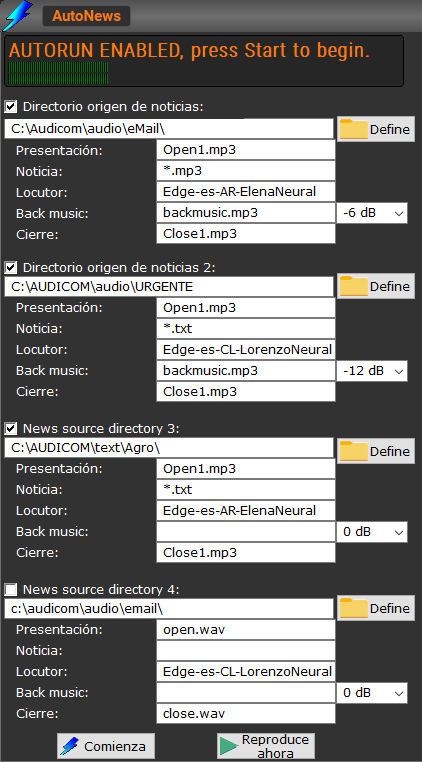 * **News source directory**:\
Up to **4 system folders** can be defined as news sources.
* If not needed, leave fields empty.
* Recommended to keep them within the **AUDICOM** folder.
* Can be local or network folders (`UNC`).
Broadcasted files are moved to the `\Audicom\Audio\OldNews` folder, renamed as:
DayOfWeek\_Hour\_Minute.wav
This prevents them from being rebroadcast.
If the source folder is on a network drive, **write permission** is required. Otherwise, the news will loop and be scheduled indefinitely.
* **Opening**: File played before the report.\
Must be in the **source folder** and included with full name and extension.\
If left empty, it won't play even if it exists.
* **News**: Allows defining a **filter** to select news files.\
Example:
urgent\*.mp3
Only files whose name begins with "urgent" will be scheduled.
* **Announcer**: Defines the **system voice** that will read the texts.
* The field on the right adjusts the **attenuation in dB** for background music.
* **Back music**: Audio loop used as **background** for read news.
* **Closing**: File played after the news (same logic as Opening).
* **Safe Time**:\
Wait time (in minutes) before validating a newly generated news item.
* Useful when a journalist needs to **review, confirm or re-record** a story.
***
## Main Controls
* **Start**: Activates BotNews in the background.
* When it detects and validates a news item, it inserts a **PAUSE** in CyberPlay after the currently playing title.
* When that title ends, BotNews emerges in the On-Air Screen and plays the news block.
* Once finished, AUDICOM resumes programming adjusting timing.
Broadcasted files are moved to `\Audicom\Audio\OldNews` and are also recorded in the **broadcast logs**.
* **Play**:\
Allows during configuration to **preview** TTS voices and adjust background music level.
* **Stop**:\
Interrupts current audio playback or TTS reading.
The BotNews module supports **Autorun** mode.\
If this is enabled in AUDICOM (General Configuration Panel), BotNews will automatically activate if, after launching it, no operation is performed within one minute.
* **News source directory**:\
Up to **4 system folders** can be defined as news sources.
* If not needed, leave fields empty.
* Recommended to keep them within the **AUDICOM** folder.
* Can be local or network folders (`UNC`).
Broadcasted files are moved to the `\Audicom\Audio\OldNews` folder, renamed as:
DayOfWeek\_Hour\_Minute.wav
This prevents them from being rebroadcast.
If the source folder is on a network drive, **write permission** is required. Otherwise, the news will loop and be scheduled indefinitely.
* **Opening**: File played before the report.\
Must be in the **source folder** and included with full name and extension.\
If left empty, it won't play even if it exists.
* **News**: Allows defining a **filter** to select news files.\
Example:
urgent\*.mp3
Only files whose name begins with "urgent" will be scheduled.
* **Announcer**: Defines the **system voice** that will read the texts.
* The field on the right adjusts the **attenuation in dB** for background music.
* **Back music**: Audio loop used as **background** for read news.
* **Closing**: File played after the news (same logic as Opening).
* **Safe Time**:\
Wait time (in minutes) before validating a newly generated news item.
* Useful when a journalist needs to **review, confirm or re-record** a story.
***
## Main Controls
* **Start**: Activates BotNews in the background.
* When it detects and validates a news item, it inserts a **PAUSE** in CyberPlay after the currently playing title.
* When that title ends, BotNews emerges in the On-Air Screen and plays the news block.
* Once finished, AUDICOM resumes programming adjusting timing.
Broadcasted files are moved to `\Audicom\Audio\OldNews` and are also recorded in the **broadcast logs**.
* **Play**:\
Allows during configuration to **preview** TTS voices and adjust background music level.
* **Stop**:\
Interrupts current audio playback or TTS reading.
The BotNews module supports **Autorun** mode.\
If this is enabled in AUDICOM (General Configuration Panel), BotNews will automatically activate if, after launching it, no operation is performed within one minute.