> ## Documentation Index
> Fetch the complete documentation index at: https://docs.solidyne.ar/llms.txt
> Use this file to discover all available pages before exploring further.
# CyberPlay Editor
> Content programming.
## About the programming schedule
**Commercial breaks** and **programs** are created separately and stored in different files:
* `.LOG` for commercial breaks.
* `.PGM` for program blocks.
Commercial breaks can be created **manually** with **CyberPlay Editor** (this chapter) or **automatically** with the **ADMICOM Traffic module** (see **ADMICOM** chapter).\
**Program blocks** are defined in **CyberPlay Editor** in different time segments: live programs, **AutoDJ**, pre-built playlists, satellite blocks, etc.
Breaks and blocks are created using **AUDICOM's own instructions**. No need to memorize them: there are **wizards** (e.g., *Magic Programming*) and visual editing tools that streamline scheduling.
### General description
Access the AUDICOM desktop and open **CyberPlay Editor** from the dropdown menu.\
Requires permission in your **user profile** (see **Access Levels**).
AUDICOM builds the schedule from:
* **.LOG** (commercial breaks)
* **.PGM** (music blocks, live, satellite, etc.)
The **commands** for breaks and programs and **filenames** (promos, songs, spots, etc.) are edited in CyberPlay Editor's **LOG** and **PGM** windows.\
Many commands can be managed **graphically** from **CyberPlay-Test** or with wizards like **Magic Programming**.
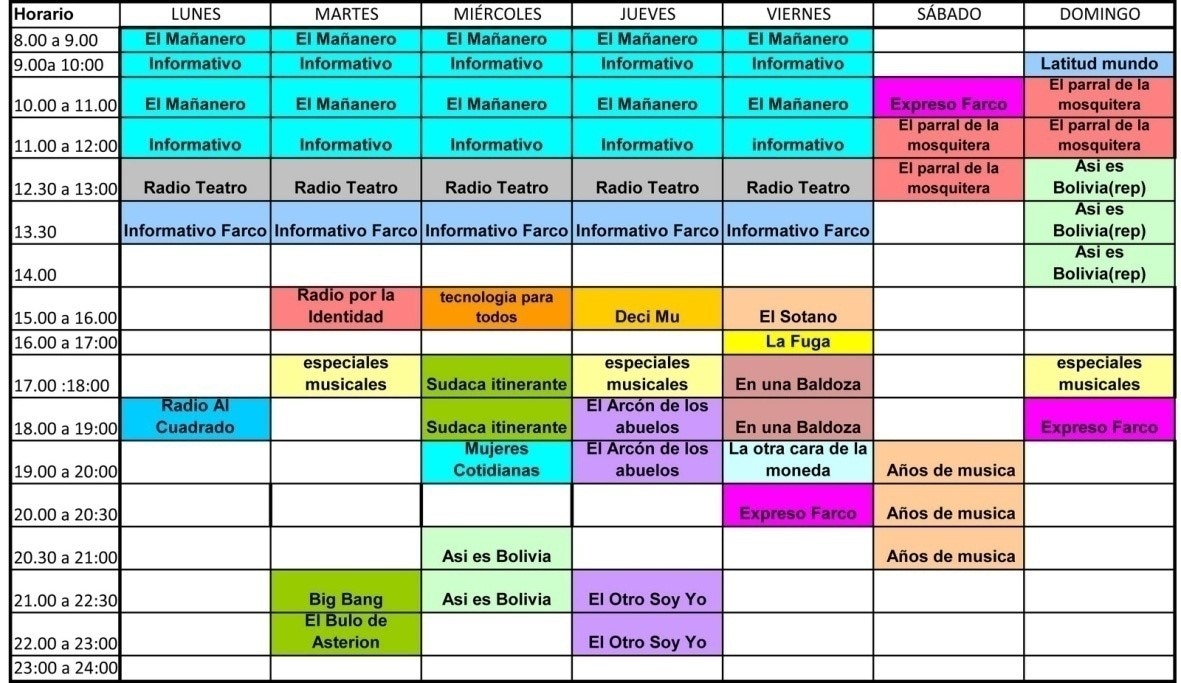
Think of the **classic radio grid**: programming by day **00:00 to 24:00**. That's what you'll define in CyberPlay Editor.
 ### Content scheduling instructions
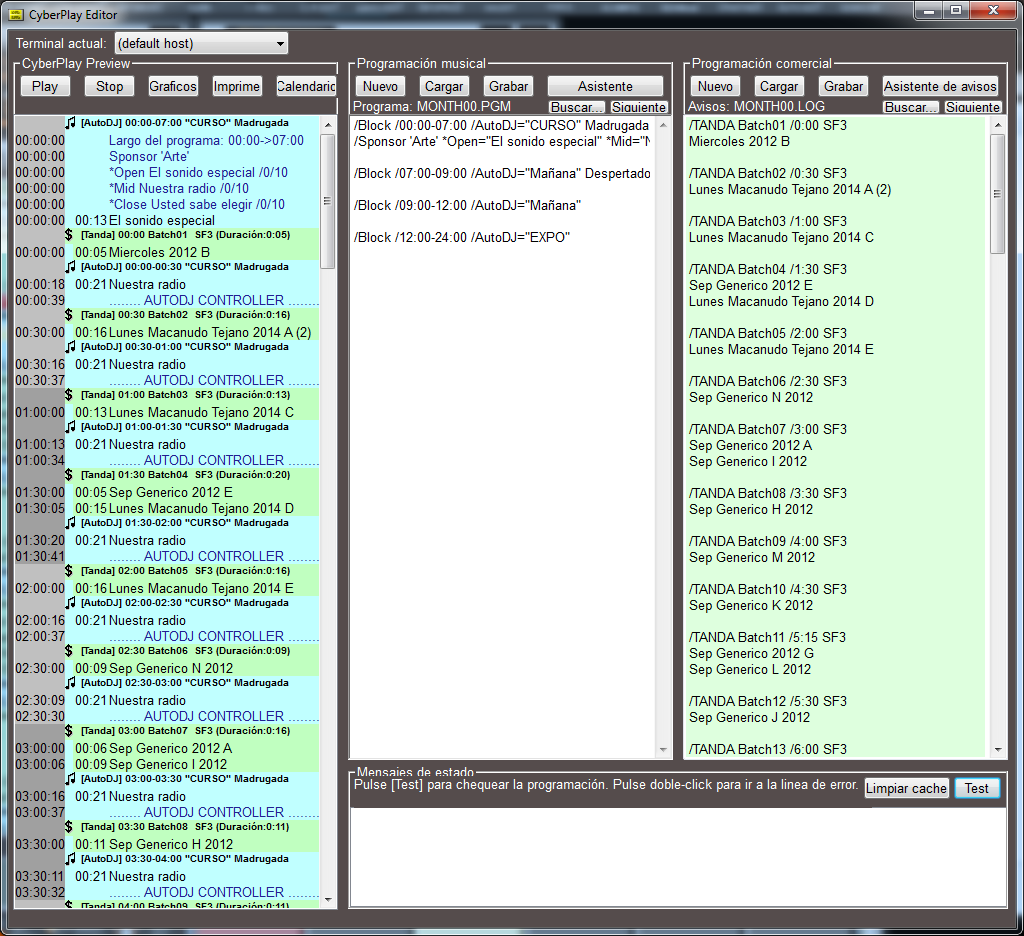
Below are the **commands** or instructions that generate the different content blocks. Instructions begin with **/ (slash)** unless otherwise noted.\
Each instruction goes on **a single line**.
* The **first block** must **start at 00:00** and the **last end at 24:00**.
* **Upper/lowercase** usage is indistinct.
* If there's a time slot **without a block**, CyberPlay will show a **gray** block with **EMPTY**.
If the schedule doesn't start at **00:00** or end at **24:00**, the system **won't identify** the day change and programming will be **incorrect**.
The **status window** reports: syntax errors, empty blocks, time overlaps, missing **AutoDJ** formats and other issues.
### Content scheduling instructions
Below are the **commands** or instructions that generate the different content blocks. Instructions begin with **/ (slash)** unless otherwise noted.\
Each instruction goes on **a single line**.
* The **first block** must **start at 00:00** and the **last end at 24:00**.
* **Upper/lowercase** usage is indistinct.
* If there's a time slot **without a block**, CyberPlay will show a **gray** block with **EMPTY**.
If the schedule doesn't start at **00:00** or end at **24:00**, the system **won't identify** the day change and programming will be **incorrect**.
The **status window** reports: syntax errors, empty blocks, time overlaps, missing **AutoDJ** formats and other issues.
 ***
## LOG and PGM Files – Programming Schedule
Air dates for **breaks (.LOG)** and **programs (.PGM)** can be defined as:
* For a **specific date** (e.g.: 1998-12-25).
* For a **weekday of a month** (e.g.: all **Mondays in April**).
* For a **fixed weekday** (e.g.: **every Monday** of the year).
* For a **month** (e.g.: **August**).
* For an **entire year**.
### PGM/LOG Loading Priority Order
When **CyberPlay** on-air module builds programming, it loads **PGM** and **LOG** in this order:
1. `YYYYMMDD.LOG` / `YYYYMMDD.PGM`\
Year-Month-Day (e.g.: `20040501`) for **May 1st, 2004**.
2. `WED11.LOG` / `WED11.PGM`\
All **Wednesdays in November**.
3. `SUN00.LOG` / `SUN00.PGM`\
**Any Sunday** of the year (`00` means "all").
4. `MONTH04.LOG` / `MONTH04.PGM`\
**All April**.
5. `MONTH00.LOG` / `MONTH00.PGM`\
**Every day of the year**.
Abbreviations: **SUN** Sunday, **MON** Monday, **TUE** Tuesday, **WED** Wednesday, **THU** Thursday, **FRI** Friday, **SAT** Saturday, **MONTH** Month.
***
## Programming in the On-Air Manager
The **On-Air** module loads each day the programming for the **next day** using **LOG/PGM** and the previous **priority order**. E.g.: on **08/14/2005** it can load `980814.LOG` (day's breaks) and `MONTH08.PGM` (August program blocks).
**Automatic** loading occurs at **18:00** (configurable in **Configuration Panel**).
If modified:
* **Current day files**
* **Next day files** after automatic reload time
The programming manager **must notify** the **On-Air operator** to execute a **manual reload** of files (see **Reload** in CyberPlay section).
Perform **periodic backups** of `C:\Audicom\LOG` and `C:\Audicom\PGM` (default locations).\
If accidentally deleted, **programming is lost**.
***
## LOG and PGM Files – Programming Schedule
Air dates for **breaks (.LOG)** and **programs (.PGM)** can be defined as:
* For a **specific date** (e.g.: 1998-12-25).
* For a **weekday of a month** (e.g.: all **Mondays in April**).
* For a **fixed weekday** (e.g.: **every Monday** of the year).
* For a **month** (e.g.: **August**).
* For an **entire year**.
### PGM/LOG Loading Priority Order
When **CyberPlay** on-air module builds programming, it loads **PGM** and **LOG** in this order:
1. `YYYYMMDD.LOG` / `YYYYMMDD.PGM`\
Year-Month-Day (e.g.: `20040501`) for **May 1st, 2004**.
2. `WED11.LOG` / `WED11.PGM`\
All **Wednesdays in November**.
3. `SUN00.LOG` / `SUN00.PGM`\
**Any Sunday** of the year (`00` means "all").
4. `MONTH04.LOG` / `MONTH04.PGM`\
**All April**.
5. `MONTH00.LOG` / `MONTH00.PGM`\
**Every day of the year**.
Abbreviations: **SUN** Sunday, **MON** Monday, **TUE** Tuesday, **WED** Wednesday, **THU** Thursday, **FRI** Friday, **SAT** Saturday, **MONTH** Month.
***
## Programming in the On-Air Manager
The **On-Air** module loads each day the programming for the **next day** using **LOG/PGM** and the previous **priority order**. E.g.: on **08/14/2005** it can load `980814.LOG` (day's breaks) and `MONTH08.PGM` (August program blocks).
**Automatic** loading occurs at **18:00** (configurable in **Configuration Panel**).
If modified:
* **Current day files**
* **Next day files** after automatic reload time
The programming manager **must notify** the **On-Air operator** to execute a **manual reload** of files (see **Reload** in CyberPlay section).
Perform **periodic backups** of `C:\Audicom\LOG` and `C:\Audicom\PGM` (default locations).\
If accidentally deleted, **programming is lost**.