> ## Documentation Index
> Fetch the complete documentation index at: https://docs.solidyne.ar/llms.txt
> Use this file to discover all available pages before exploring further.
# iLink
> Relay broadcasting for repeater stations
With an interface similar to **CyberPlay**, **iLink** recreates the **continuous on-air playlist**. iLink is a **display control**: when AUDICOM operates in iLink mode, **all** programming is relayed from the **head station**, **except**:
* **commercial break blocks** (green blocks), and
* the head station's **imaging**, which is **automatically replaced** with **local** equivalents.
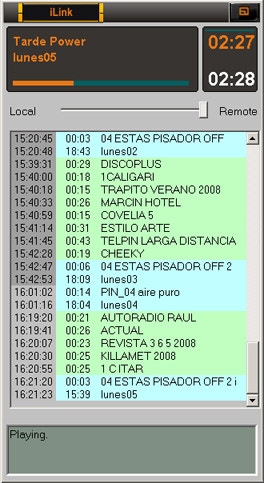 The information displayed by iLink corresponds to the **files scheduled in the head station's CyberPlay**. With this data, the control knows **when** to switch from **Remote** to **Local**, play local audio and **return** exactly when the program continues at the head station.
Besides connecting via Internet to a remote head station, iLink allows **precise replacement of variable-length breaks**, filling with **music tracks**, **promos** or **stingers** to reach the **exact duration** required.
**Local imaging:** iLink replaces head station imaging with **local** elements of **equal duration**, in **real-time**, imperceptibly to listeners.
**Fallback:** if Internet connection is lost, iLink triggers a **music block** with a **predefined music format** by schedule. **Regional commercial breaks** continue airing at their **scheduled times**. When connection is restored, iLink **waits** for the current song to end and **resumes** the link.
**Requirements at repeater:**
* AUDICOM **Multicast** installed.
* **Broadband** Internet access.
***
## iLink playback channel
iLink streaming playback uses Windows' **default playback device**.\
To change it, adjust the **default device** in **Windows sound settings**.
***
## Programming iLink events in CyberPlay Editor
At the repeater, schedule an **iLink event** within the **programming (PGM)** with the **time** for linking to the head station. You can create **a single iLink block** for the whole day or **multiple blocks** at different times.
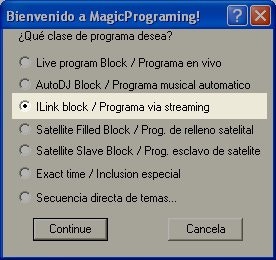
The iLink block is similar to **Live**, **AutoDj** or **Satellite** blocks. Create it using the **Magic Programming** wizard, **"iLink Block"** option.
### STEPS
1. **Create iLink block (Wizard)**\
Open **Magic Programming** and choose **"iLink Block"**.
The information displayed by iLink corresponds to the **files scheduled in the head station's CyberPlay**. With this data, the control knows **when** to switch from **Remote** to **Local**, play local audio and **return** exactly when the program continues at the head station.
Besides connecting via Internet to a remote head station, iLink allows **precise replacement of variable-length breaks**, filling with **music tracks**, **promos** or **stingers** to reach the **exact duration** required.
**Local imaging:** iLink replaces head station imaging with **local** elements of **equal duration**, in **real-time**, imperceptibly to listeners.
**Fallback:** if Internet connection is lost, iLink triggers a **music block** with a **predefined music format** by schedule. **Regional commercial breaks** continue airing at their **scheduled times**. When connection is restored, iLink **waits** for the current song to end and **resumes** the link.
**Requirements at repeater:**
* AUDICOM **Multicast** installed.
* **Broadband** Internet access.
***
## iLink playback channel
iLink streaming playback uses Windows' **default playback device**.\
To change it, adjust the **default device** in **Windows sound settings**.
***
## Programming iLink events in CyberPlay Editor
At the repeater, schedule an **iLink event** within the **programming (PGM)** with the **time** for linking to the head station. You can create **a single iLink block** for the whole day or **multiple blocks** at different times.
The iLink block is similar to **Live**, **AutoDj** or **Satellite** blocks. Create it using the **Magic Programming** wizard, **"iLink Block"** option.
### STEPS
1. **Create iLink block (Wizard)**\
Open **Magic Programming** and choose **"iLink Block"**.
 2. **Program name (link address)**\
Enter the **streaming access address** generated by iRDS at the head station (**iLink address** field).
2. **Program name (link address)**\
Enter the **streaming access address** generated by iRDS at the head station (**iLink address** field).
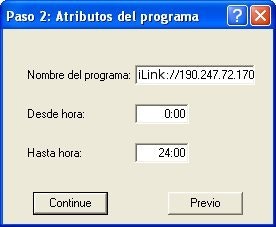 * Example by **IP and port**: `iLink://190.247.72.170:8081`
* Example by **server** (if iRDS publishes to a server): `iLink://encoder.iviplanet.com/AUDICOM`
**From / To:** define the **start** and **end** of the iLink block.
3. **Unused intermediate step**\
Click **Continue**.
4. **Music format (fill and contingency)**\
Select the **AutoDj format** that iLink will use when:\
a) The **head station break is longer** than the **regional break** → adjusted with **songs**.\
b) **Internet is lost** → iLink schedules **music** and maintains **regional breaks** until reconnection.
* Example by **IP and port**: `iLink://190.247.72.170:8081`
* Example by **server** (if iRDS publishes to a server): `iLink://encoder.iviplanet.com/AUDICOM`
**From / To:** define the **start** and **end** of the iLink block.
3. **Unused intermediate step**\
Click **Continue**.
4. **Music format (fill and contingency)**\
Select the **AutoDj format** that iLink will use when:\
a) The **head station break is longer** than the **regional break** → adjusted with **songs**.\
b) **Internet is lost** → iLink schedules **music** and maintains **regional breaks** until reconnection.
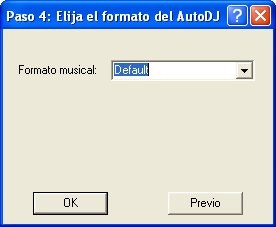 **Recommendation:** the format should include **songs of diverse durations** to facilitate **time compensation**. Avoid **Induced Mode** if it overly restricts selection (e.g., a rigid sequence **Hits-80 → Hits-90 → Hits-00** limits duration matches).
5. **Unused final step**\
Click **Continue** and **save**.
**Example of iLink block instruction (in PGM):**
\
`/Block /00:00-24:00 /ILink="AutoDj Jazz" iLink://190.247.72.170:8080`
You can create **multiple iLink blocks** with **different fill formats** according to each head station program's content.
***
## iLink event with xLink protocol (zero delay)
When **delay-free repeater** is required, the head station transmits **metadata only** via **xLink**, and **audio** reaches the repeater through a **physical connection** (analog or digital) to its **line input**. The repeater receives **metadata via LAN** and replaces **spots** and **imaging** locally.
In the repeater's **PGM**, schedule an iLink instruction in **xLink** mode:
`/Block /08:00-14:00 /ILink="autodj format" xLink://url/soundCard/input`
**Parameters:**
* **URL** → IP of server with iRDS/xLink active. Ex.: `192.168.0.50` (default port `8088`).
* **Sound card** → name of **input device**. Ex.: `Realtek High Definition Audio`.
* **Input** → device's **source**. Ex.: `Line In`.
You can also define xLink device and input in the configuration file to avoid repeating them in each block.\
`\[Hardware]` section with:
\
`xLinkDeviceIn=HD Audio device`
`xLinkLineInName=Line In`
**Complete instruction — example:**\
`/Block /08:00-14:00 /ILink="Latinos" xLink://192.168.0.50/Realtek High Definition Audio/Line In`
## Commercial break replacement (iLink)
During an **iLink event**, AUDICOM plays the head station's **stream**.\
When the head station enters a **commercial break**, iLink **interrupts** the stream and airs the **regional break**.
> There must be the **same number of breaks** at the head station and regional station.
## Number of breaks: behaviors
* **Head station has more breaks than regional:** when all regional breaks finish, it **returns** to head station audio; regional breaks are **not** repeated nor additional fill generated.
* **Head station has fewer breaks than regional:** remaining **regional breaks** are **ignored**.
## Individual break duration: automatic adjustments
Usually break durations are pre-agreed. If they don't match, iLink acts as follows:
### Head station **longer** than regional → fill remaining time
**Level 1 (Music):** attempts to cover the difference with **songs** according to the **AutoDj format** defined for the iLink block. If **exact adjustment** isn't achieved (very common if difference is \< \~3 min), moves to Level 2.\
**Level 2 (Promos):** fills with `Class=Promo` files based on remaining time. If remainder is too **short** for a promo (usually >2-3 s), moves to Level 3.\
**Level 3 (Fills):** fills with `Class=Fill` (stingers/effects of **1-5 s** approx.). Being brief effects, AUDICOM can **trim them finely** if needed (rare).
### Head station **shorter** than regional
iLink **plays the complete regional break** then returns to head station.
Avoid this scenario: the head station block will "join in progress".
***
## Programming against "classic" streaming
You can link to a head station **without AUDICOM** (or an Internet program). The block is set up like iLink, with these exceptions:
* Use `mms://` scheme instead of `iLink://`.
* No remote break control: **local breaks** air at **exact times** per **LOG/PGM**.
**Block example:**\
`/Block /22:00-23:59 /ILink="Pop Fill" mms://encoder.your-server.com:8080/RadioDemo`
***
## Promotional cut replacement (head station imaging)
You can define **replacement of promos/IDs** from head station with **regional imaging**.\
Ex.: when `BsAs_identification-1` plays at head station, `Cba_identification-1` plays in Córdoba.
**Prefix rule:** head station files to replace share a **prefix**, e.g. `BsAs_`.\
Regional files use another prefix (e.g. `Cba_`) and must have **equal duration** (tolerance **±0.5 s**). If duration doesn't match, replacement **doesn't** occur.
Only files **scheduled** in programming and those **launched from Live Assist on main channel** (not in MIX mode) are replaced. If triggered "over" music, replacement **doesn't** occur.
### Where to place regional files
Place replacements in:\
`C:\Audicom\Audio\Replace`
> Know the **duration** of head station cuts to replace and prepare **at least** one **equivalent** regional file.
***
## `/replace` instruction within iLink block
Only **one** `/replace` criterion per iLink block. Variants:
* `/replace ORIGINAL=`\
Replaces exact `ORIGINAL` file with **any** file in `Replace` of **equal duration**.
* `/replace ORIGINAL*=`\
Replaces **all** starting with `ORIGINAL` with **any** in `Replace` of **equal duration**.
* `/replace ORIGINAL*=REPLACEMENT`\
Replaces all starting with `ORIGINAL` with **specific** `REPLACEMENT` file (same duration).
* `/replace ORIGINAL*=REPLACEMENT*`\
Replaces all starting with `ORIGINAL` with **any** in `Replace` **starting** with `REPLACEMENT` (same duration).
* `/replace ORIGINAL=REPLACEMENT`\
Replaces `ORIGINAL` with `REPLACEMENT` (same duration).
**Duration matching:** if `REPLACEMENT` **doesn't** match, searches for **any** file in `Replace` with **equal duration** (±0.5 s). If none found, replacement **aborts**.
**Example by prefixes:**\
`/replace BsAs_*=Cba_*`\
Replaces everything starting with `BsAs_` with files starting with `Cba_` of **equal duration**.
Though only one `/replace` per block, you can create **multiple iLink blocks** per day, **each** with its own replacement criterion.
**Recommendation:** the format should include **songs of diverse durations** to facilitate **time compensation**. Avoid **Induced Mode** if it overly restricts selection (e.g., a rigid sequence **Hits-80 → Hits-90 → Hits-00** limits duration matches).
5. **Unused final step**\
Click **Continue** and **save**.
**Example of iLink block instruction (in PGM):**
\
`/Block /00:00-24:00 /ILink="AutoDj Jazz" iLink://190.247.72.170:8080`
You can create **multiple iLink blocks** with **different fill formats** according to each head station program's content.
***
## iLink event with xLink protocol (zero delay)
When **delay-free repeater** is required, the head station transmits **metadata only** via **xLink**, and **audio** reaches the repeater through a **physical connection** (analog or digital) to its **line input**. The repeater receives **metadata via LAN** and replaces **spots** and **imaging** locally.
In the repeater's **PGM**, schedule an iLink instruction in **xLink** mode:
`/Block /08:00-14:00 /ILink="autodj format" xLink://url/soundCard/input`
**Parameters:**
* **URL** → IP of server with iRDS/xLink active. Ex.: `192.168.0.50` (default port `8088`).
* **Sound card** → name of **input device**. Ex.: `Realtek High Definition Audio`.
* **Input** → device's **source**. Ex.: `Line In`.
You can also define xLink device and input in the configuration file to avoid repeating them in each block.\
`\[Hardware]` section with:
\
`xLinkDeviceIn=HD Audio device`
`xLinkLineInName=Line In`
**Complete instruction — example:**\
`/Block /08:00-14:00 /ILink="Latinos" xLink://192.168.0.50/Realtek High Definition Audio/Line In`
## Commercial break replacement (iLink)
During an **iLink event**, AUDICOM plays the head station's **stream**.\
When the head station enters a **commercial break**, iLink **interrupts** the stream and airs the **regional break**.
> There must be the **same number of breaks** at the head station and regional station.
## Number of breaks: behaviors
* **Head station has more breaks than regional:** when all regional breaks finish, it **returns** to head station audio; regional breaks are **not** repeated nor additional fill generated.
* **Head station has fewer breaks than regional:** remaining **regional breaks** are **ignored**.
## Individual break duration: automatic adjustments
Usually break durations are pre-agreed. If they don't match, iLink acts as follows:
### Head station **longer** than regional → fill remaining time
**Level 1 (Music):** attempts to cover the difference with **songs** according to the **AutoDj format** defined for the iLink block. If **exact adjustment** isn't achieved (very common if difference is \< \~3 min), moves to Level 2.\
**Level 2 (Promos):** fills with `Class=Promo` files based on remaining time. If remainder is too **short** for a promo (usually >2-3 s), moves to Level 3.\
**Level 3 (Fills):** fills with `Class=Fill` (stingers/effects of **1-5 s** approx.). Being brief effects, AUDICOM can **trim them finely** if needed (rare).
### Head station **shorter** than regional
iLink **plays the complete regional break** then returns to head station.
Avoid this scenario: the head station block will "join in progress".
***
## Programming against "classic" streaming
You can link to a head station **without AUDICOM** (or an Internet program). The block is set up like iLink, with these exceptions:
* Use `mms://` scheme instead of `iLink://`.
* No remote break control: **local breaks** air at **exact times** per **LOG/PGM**.
**Block example:**\
`/Block /22:00-23:59 /ILink="Pop Fill" mms://encoder.your-server.com:8080/RadioDemo`
***
## Promotional cut replacement (head station imaging)
You can define **replacement of promos/IDs** from head station with **regional imaging**.\
Ex.: when `BsAs_identification-1` plays at head station, `Cba_identification-1` plays in Córdoba.
**Prefix rule:** head station files to replace share a **prefix**, e.g. `BsAs_`.\
Regional files use another prefix (e.g. `Cba_`) and must have **equal duration** (tolerance **±0.5 s**). If duration doesn't match, replacement **doesn't** occur.
Only files **scheduled** in programming and those **launched from Live Assist on main channel** (not in MIX mode) are replaced. If triggered "over" music, replacement **doesn't** occur.
### Where to place regional files
Place replacements in:\
`C:\Audicom\Audio\Replace`
> Know the **duration** of head station cuts to replace and prepare **at least** one **equivalent** regional file.
***
## `/replace` instruction within iLink block
Only **one** `/replace` criterion per iLink block. Variants:
* `/replace ORIGINAL=`\
Replaces exact `ORIGINAL` file with **any** file in `Replace` of **equal duration**.
* `/replace ORIGINAL*=`\
Replaces **all** starting with `ORIGINAL` with **any** in `Replace` of **equal duration**.
* `/replace ORIGINAL*=REPLACEMENT`\
Replaces all starting with `ORIGINAL` with **specific** `REPLACEMENT` file (same duration).
* `/replace ORIGINAL*=REPLACEMENT*`\
Replaces all starting with `ORIGINAL` with **any** in `Replace` **starting** with `REPLACEMENT` (same duration).
* `/replace ORIGINAL=REPLACEMENT`\
Replaces `ORIGINAL` with `REPLACEMENT` (same duration).
**Duration matching:** if `REPLACEMENT` **doesn't** match, searches for **any** file in `Replace` with **equal duration** (±0.5 s). If none found, replacement **aborts**.
**Example by prefixes:**\
`/replace BsAs_*=Cba_*`\
Replaces everything starting with `BsAs_` with files starting with `Cba_` of **equal duration**.
Though only one `/replace` per block, you can create **multiple iLink blocks** per day, **each** with its own replacement criterion.