> ## Documentation Index
> Fetch the complete documentation index at: https://docs.solidyne.ar/llms.txt
> Use this file to discover all available pages before exploring further.
> Remote signal handling. Peripheral control.
# GPIO Signals
## USB Control
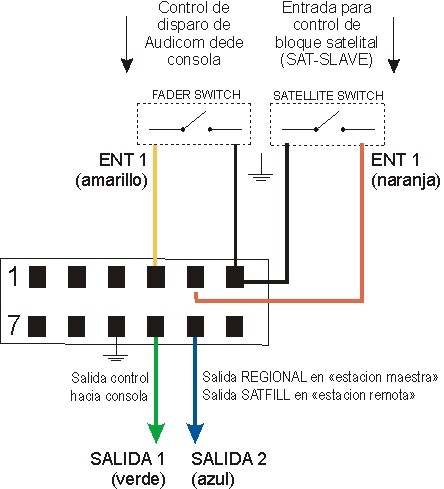
The **USB I/O (GPIO USB) interface** is an accessory sold separately (consult your dealer).
* Features 2 inputs and 2 outputs for control.
* Allows external control of AUDICOM transport functions.
* AUDICOM can also send commands to control external devices.
Example: for consoles that transmit control signals, these can be used to control playback in AUDICOM.
* When opening the fader or enabling the on-air button, AUDICOM starts playback.
* When closing it, playback stops.
Command sending and receiving must be enabled from AUDICOM's configuration panel.
 ### Warning
The ground terminals of the USB interface share the ground with the PC's USB port.\
Not being internally isolated, they may expose the computer's USB ground potential.
* Verify circuits before making connections.
* Reverse voltage or high spikes can damage the interface or computer.
* Outputs provide 5V with 250 Ohm internal resistance to limit current.
* Inputs are **dry contact**, switched by direct connection to ground.
***
## Remote Signal Handling Options
### Internet Link
A "head" station can control a "relay" station that only replaces commercial breaks with local content.\
More details in the **Internet Tools** chapter.
### Remote Blocks
Previously called "satellite". Automates switching between local audio and an external source (satellite, streaming decoder, etc.).\
Also allows controlling relay stations.
Available modes:
* **SatFill**: time-based switching.
* **SatSlave (Master-Slave)**: centralized control of remote terminals.
The **Multicast** module handles direct transmissions to stations via Internet (see Internet Tools).
### SatFill Remote Block
* Used when switching between local programming and external sources (satellite, point-to-point links, etc.) is needed.
* These blocks appear as **SYNC** in the On-Air Screen.
* While the SYNC event is active, the external signal plays.
* When finished, AUDICOM resumes local CyberPlay programming.
### SatSlave Remote Block (Master-Slave)
* Allows linking AUDICOM terminals in different locations.
* Master terminal sends command using **/REGIONAL** instruction, generating a pulse via USB I/O (e.g. GPO).
* Slave terminals switch between Master programming and local programming.
* Last block can be programmed as **Syncro**, ensuring time-based switching if pulse is not received.
### External Signal Retransmission with SatFill
Example: an on-air terminal switching between local and satellite signal.
Switching methods:
**a) Controlling console modules via USB port**
* External signal enters a console module.
* AUDICOM sends commands through USB interface to activate/deactivate VCA modules.
* Connections:
* **Data**: USB interface ↔ console.
* **Audio**: satellite signal and local signal to console modules.
**b) Software switching of line input**
* External signal enters a soundcard line input.
* AUDICOM switches between that input and local audio.
* Controls only one input; multicard required for more signals.
* On console: PGM-1 output for local audio, line input for satellite.
### Streaming Retransmission with SatFill
AUDICOM supports **iLink** blocks for direct audio streaming playback.
### Remote Station Control from Master Terminal
Configuration based on SatSlave blocks:
* **Master Terminal**: sends program signal and control pulses.
* **Slave Terminal**: receives programming and switching commands.
Master finds /REGIONAL and changes a port output (USB or parallel), transmitting the order to Slave.\
Slave switches between satellite signal and local programming.
#### Central Terminal (satellite uplink)
### Warning
The ground terminals of the USB interface share the ground with the PC's USB port.\
Not being internally isolated, they may expose the computer's USB ground potential.
* Verify circuits before making connections.
* Reverse voltage or high spikes can damage the interface or computer.
* Outputs provide 5V with 250 Ohm internal resistance to limit current.
* Inputs are **dry contact**, switched by direct connection to ground.
***
## Remote Signal Handling Options
### Internet Link
A "head" station can control a "relay" station that only replaces commercial breaks with local content.\
More details in the **Internet Tools** chapter.
### Remote Blocks
Previously called "satellite". Automates switching between local audio and an external source (satellite, streaming decoder, etc.).\
Also allows controlling relay stations.
Available modes:
* **SatFill**: time-based switching.
* **SatSlave (Master-Slave)**: centralized control of remote terminals.
The **Multicast** module handles direct transmissions to stations via Internet (see Internet Tools).
### SatFill Remote Block
* Used when switching between local programming and external sources (satellite, point-to-point links, etc.) is needed.
* These blocks appear as **SYNC** in the On-Air Screen.
* While the SYNC event is active, the external signal plays.
* When finished, AUDICOM resumes local CyberPlay programming.
### SatSlave Remote Block (Master-Slave)
* Allows linking AUDICOM terminals in different locations.
* Master terminal sends command using **/REGIONAL** instruction, generating a pulse via USB I/O (e.g. GPO).
* Slave terminals switch between Master programming and local programming.
* Last block can be programmed as **Syncro**, ensuring time-based switching if pulse is not received.
### External Signal Retransmission with SatFill
Example: an on-air terminal switching between local and satellite signal.
Switching methods:
**a) Controlling console modules via USB port**
* External signal enters a console module.
* AUDICOM sends commands through USB interface to activate/deactivate VCA modules.
* Connections:
* **Data**: USB interface ↔ console.
* **Audio**: satellite signal and local signal to console modules.
**b) Software switching of line input**
* External signal enters a soundcard line input.
* AUDICOM switches between that input and local audio.
* Controls only one input; multicard required for more signals.
* On console: PGM-1 output for local audio, line input for satellite.
### Streaming Retransmission with SatFill
AUDICOM supports **iLink** blocks for direct audio streaming playback.
### Remote Station Control from Master Terminal
Configuration based on SatSlave blocks:
* **Master Terminal**: sends program signal and control pulses.
* **Slave Terminal**: receives programming and switching commands.
Master finds /REGIONAL and changes a port output (USB or parallel), transmitting the order to Slave.\
Slave switches between satellite signal and local programming.
#### Central Terminal (satellite uplink)
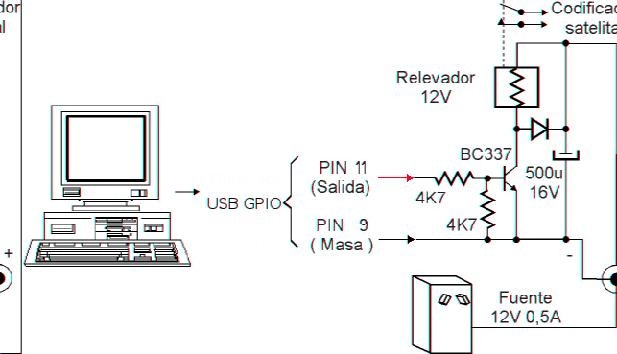 * USB interface connections described in **USB Control Signals**.
* /REGIONAL input changes state (e.g. SAT-1 DataBit 2) and can switch audio console.
* Can also input directly to audio card without console.
#### Remote Terminals (satellite downlink)
* USB interface connections described in **USB Control Signals**.
* /REGIONAL input changes state (e.g. SAT-1 DataBit 2) and can switch audio console.
* Can also input directly to audio card without console.
#### Remote Terminals (satellite downlink)
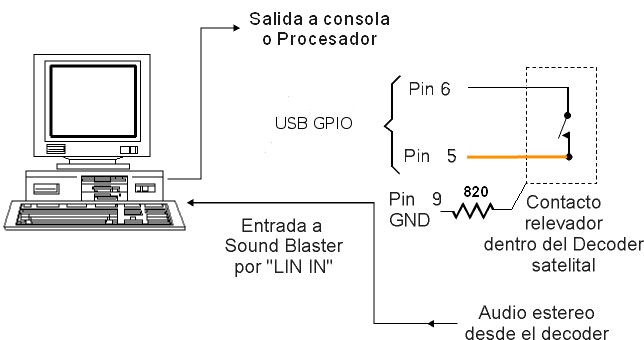 * USB interface connections described in **Parallel Port Control**.
#### Control Command Configuration
* With multiple sound cards, you can define which line input will be used for satellite blocks.
* Configure in `Audicom.ini` under `[Hardware]` section:
```ini theme={null}
[Hardware]
LineInID=0
```
* Value `0` indicates Windows default card.
* Value `1` corresponds to second card, though order may vary by Windows enumeration.
* In some cases, trial and error may be needed to determine desired input.
* USB interface connections described in **Parallel Port Control**.
#### Control Command Configuration
* With multiple sound cards, you can define which line input will be used for satellite blocks.
* Configure in `Audicom.ini` under `[Hardware]` section:
```ini theme={null}
[Hardware]
LineInID=0
```
* Value `0` indicates Windows default card.
* Value `1` corresponds to second card, though order may vary by Windows enumeration.
* In some cases, trial and error may be needed to determine desired input.