> ## Documentation Index
> Fetch the complete documentation index at: https://docs.solidyne.ar/llms.txt
> Use this file to discover all available pages before exploring further.
# Operation: Controls
> Description of controls and operation
## General Description
Different audio sources —microphones, computer and telephone lines— enter the console through the input channels.\
The MiniMixer combines all signals to generate the main signal called **Program (PGM)**.
Each audio source is controlled by its respective faders.
The console functions are grouped into different zones:
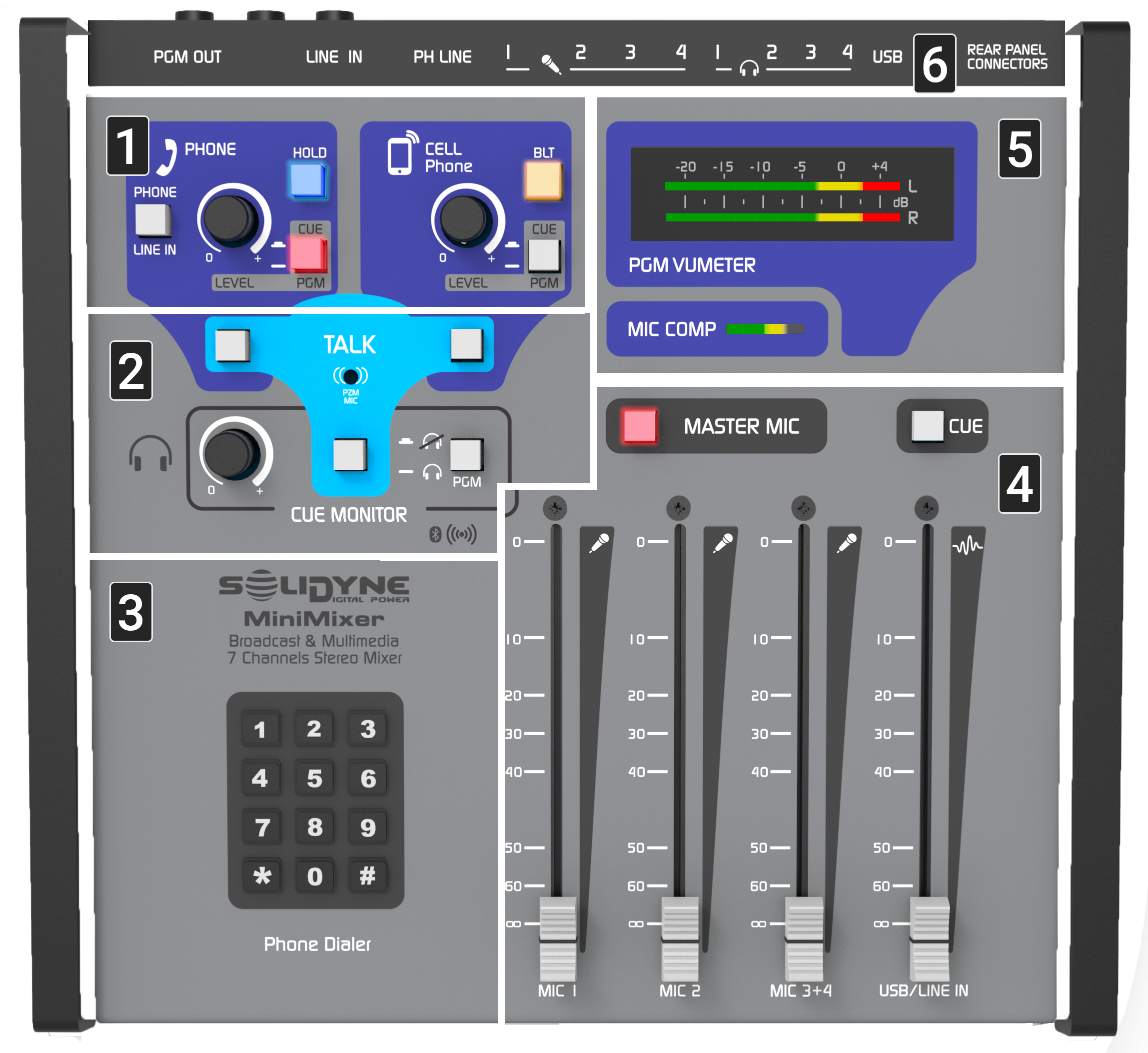 1. **Telecommunications**: controls for managing landline and Bluetooth mobile phone.
2. **Intercom**: enables communication with telephone lines and headphones using the internal microphone.
3. **DTMF Keypad**: enables direct dialing on landline from the console.
4. **Faders**: control microphone and line signal levels.
5. **Level Meters**: display PGM level and microphone compressor action.
6. **Connections**: indicate connector locations on the rear panel.
## Telephone Lines
The MiniMixer includes a hybrid channel to handle both landline and Bluetooth mobile phone.\
Its operation is simple and error-proof, thanks to safety logic and automatic circuits.
### Hybrid Channel Controls
1. **Telecommunications**: controls for managing landline and Bluetooth mobile phone.
2. **Intercom**: enables communication with telephone lines and headphones using the internal microphone.
3. **DTMF Keypad**: enables direct dialing on landline from the console.
4. **Faders**: control microphone and line signal levels.
5. **Level Meters**: display PGM level and microphone compressor action.
6. **Connections**: indicate connector locations on the rear panel.
## Telephone Lines
The MiniMixer includes a hybrid channel to handle both landline and Bluetooth mobile phone.\
Its operation is simple and error-proof, thanks to safety logic and automatic circuits.
### Hybrid Channel Controls
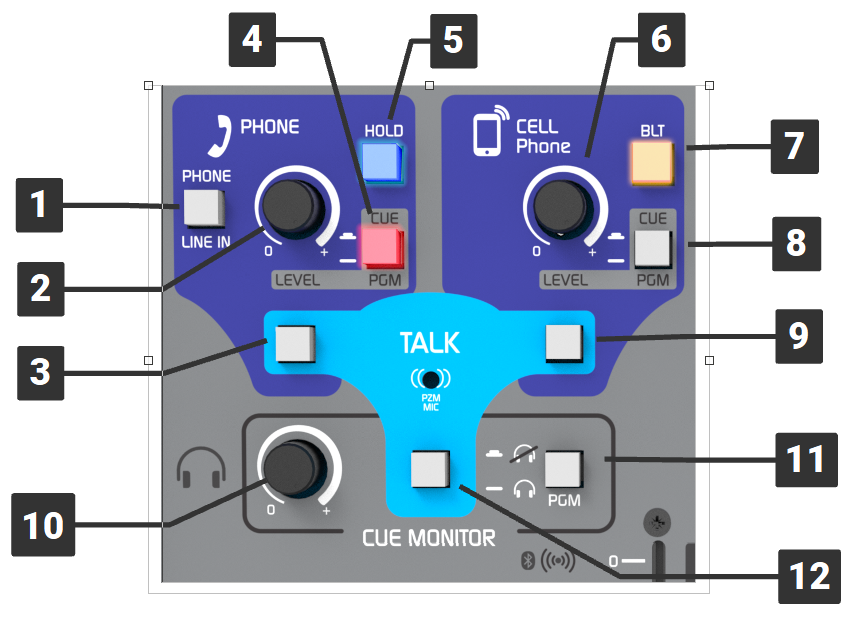 1. **PHONE/LINE IN**\
Switches between stereo line input and auxiliary line.
* When the hybrid is not in use, all 4 microphones and both input lines can be used simultaneously.
* If a call comes in while in LINE-IN mode, the **HOLD** button will flash to notify the operator. Switch to PHONE to answer.
2. **LEVEL (landline / auxiliary)**\
Controls the level of landline and auxiliary input, both in CUE and on-air signal.
3. **TALK (landline)**\
Momentary button that enables the internal microphone to talk off-air with the telephone line.
4. **CUE/PGM (landline / auxiliary)**\
Selects whether the signal is sent to headphone preview (**CUE**) or main on-air output (**PGM**).
5. **HOLD**
* Flashes when receiving a call.
* When pressed, answers the call and puts it on hold with PGM return.
* Also used to put the call on-air.
6. **LEVEL (Bluetooth)**\
Adjusts the audio level from the Bluetooth-linked mobile phone.
7. **BLT (Bluetooth ON/OFF / Pairing)**
* Turns Bluetooth connection on or off.
* Hold to enter pairing mode.
* LED indicates status:
* Slow flash = active.
* Fast flash = discovery mode.
8. **CUE/PGM (Bluetooth)**\
Switches Bluetooth signal between private headphone monitoring (**CUE**) or main output (**PGM**).
9. **TALK (Bluetooth)**\
Enables private communication with mobile phone using the internal talkback microphone.
10. **LEVEL master headphones**\
Master headphone level control.
11. **PGM MUTE**\
Mutes program signal in headphones, allowing monitoring of CUE only.
12. **TALK TO HEADPHONES**\
Button that enables the internal microphone to talk directly to headphones (intercom).
1. **PHONE/LINE IN**\
Switches between stereo line input and auxiliary line.
* When the hybrid is not in use, all 4 microphones and both input lines can be used simultaneously.
* If a call comes in while in LINE-IN mode, the **HOLD** button will flash to notify the operator. Switch to PHONE to answer.
2. **LEVEL (landline / auxiliary)**\
Controls the level of landline and auxiliary input, both in CUE and on-air signal.
3. **TALK (landline)**\
Momentary button that enables the internal microphone to talk off-air with the telephone line.
4. **CUE/PGM (landline / auxiliary)**\
Selects whether the signal is sent to headphone preview (**CUE**) or main on-air output (**PGM**).
5. **HOLD**
* Flashes when receiving a call.
* When pressed, answers the call and puts it on hold with PGM return.
* Also used to put the call on-air.
6. **LEVEL (Bluetooth)**\
Adjusts the audio level from the Bluetooth-linked mobile phone.
7. **BLT (Bluetooth ON/OFF / Pairing)**
* Turns Bluetooth connection on or off.
* Hold to enter pairing mode.
* LED indicates status:
* Slow flash = active.
* Fast flash = discovery mode.
8. **CUE/PGM (Bluetooth)**\
Switches Bluetooth signal between private headphone monitoring (**CUE**) or main output (**PGM**).
9. **TALK (Bluetooth)**\
Enables private communication with mobile phone using the internal talkback microphone.
10. **LEVEL master headphones**\
Master headphone level control.
11. **PGM MUTE**\
Mutes program signal in headphones, allowing monitoring of CUE only.
12. **TALK TO HEADPHONES**\
Button that enables the internal microphone to talk directly to headphones (intercom).