> ## Documentation Index
> Fetch the complete documentation index at: https://docs.solidyne.ar/llms.txt
> Use this file to discover all available pages before exploring further.
# On Air Operation
> Microphone channels, lines and monitoring
## Microphones
The MiniMixer allows connecting up to **4 dynamic microphones**.\
**MIC 3** and **MIC 4** inputs share the same fader.
* The **MASTER MIC** button enables all microphones on air and activates the **Tally Light** output.
* The microphone mix is internally compressed.
* The compressor acts when the signal reaches **0 VU**.
* It is important that the **MIC 3+4** channel reaches 0 VU so the compressor can compensate for level differences between voices.
* The compressor action is displayed on the **MIC COMP** indicator.
***
## Lines
* The **USB/LINE IN** fader controls the **USB** digital input when the computer is connected.
* If USB is not connected, this fader controls the **LINE IN** signal.
* When USB is in use, the LINE IN input can also be used as an alternative input from the **PHONE** zone controls, which allow switching between **PHONE** and **LINE IN**.
* This allows mixing on air: 4 microphones + 2 stereo lines + Bluetooth.
To send **USB/LINE IN** on air:
* Raise the fader directly.
* The correct working level is achieved when peaks reach **0 VU**.
The **USB/LINE IN** signal can also be previewed in CUE with the fader closed by pressing the **CUE** button located above it.
The **USB** port generates a program signal feed to the computer.\
This audio stream is used for **Internet streaming**.
## Monitoring
The headphone control in the **CUE MONITOR** zone sets the level for all four headphone outputs.
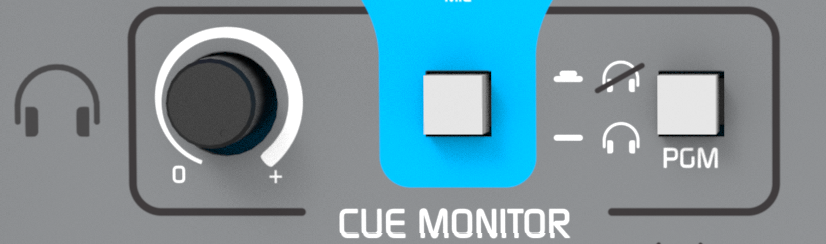 * For individual volume control on each headphone, use headphones with built-in level control or connect an external headphone distributor to any of the outputs.
* When a signal is sent to **CUE**, it is distributed to all headphone outputs.
* The **PGM** button in the **CUE MONITOR** zone allows muting the program signal in headphones to hear only the signals in **CUE**.
***
### Monitor speakers output
* Headphone output #1 can function as a monitor speakers output, with automatic muting when the Tally Light output is connected.
* When microphones are enabled, the Tally Light activation automatically mutes headphone output #1, preventing feedback between speakers and microphones.
* Audio remains available on the other headphone outputs.
***
### Talk
* The **TALK** button momentarily interrupts the headphone signal and sends the voice from the built-in internal microphone in the console.
* This allows the operator to communicate directly with all headphones, even if team members are far away.
* This avoids visual signals or the need to remove headphones (which are receiving program signal) to be able to talk.
* For individual volume control on each headphone, use headphones with built-in level control or connect an external headphone distributor to any of the outputs.
* When a signal is sent to **CUE**, it is distributed to all headphone outputs.
* The **PGM** button in the **CUE MONITOR** zone allows muting the program signal in headphones to hear only the signals in **CUE**.
***
### Monitor speakers output
* Headphone output #1 can function as a monitor speakers output, with automatic muting when the Tally Light output is connected.
* When microphones are enabled, the Tally Light activation automatically mutes headphone output #1, preventing feedback between speakers and microphones.
* Audio remains available on the other headphone outputs.
***
### Talk
* The **TALK** button momentarily interrupts the headphone signal and sends the voice from the built-in internal microphone in the console.
* This allows the operator to communicate directly with all headphones, even if team members are far away.
* This avoids visual signals or the need to remove headphones (which are receiving program signal) to be able to talk.