> ## Documentation Index
> Fetch the complete documentation index at: https://docs.solidyne.ar/llms.txt
> Use this file to discover all available pages before exploring further.
# Laptop + Internet Link
> Operation description when broadcasting using an external computer
## Case 1: Real-time Remote Broadcasting
 ### About Broadcasting
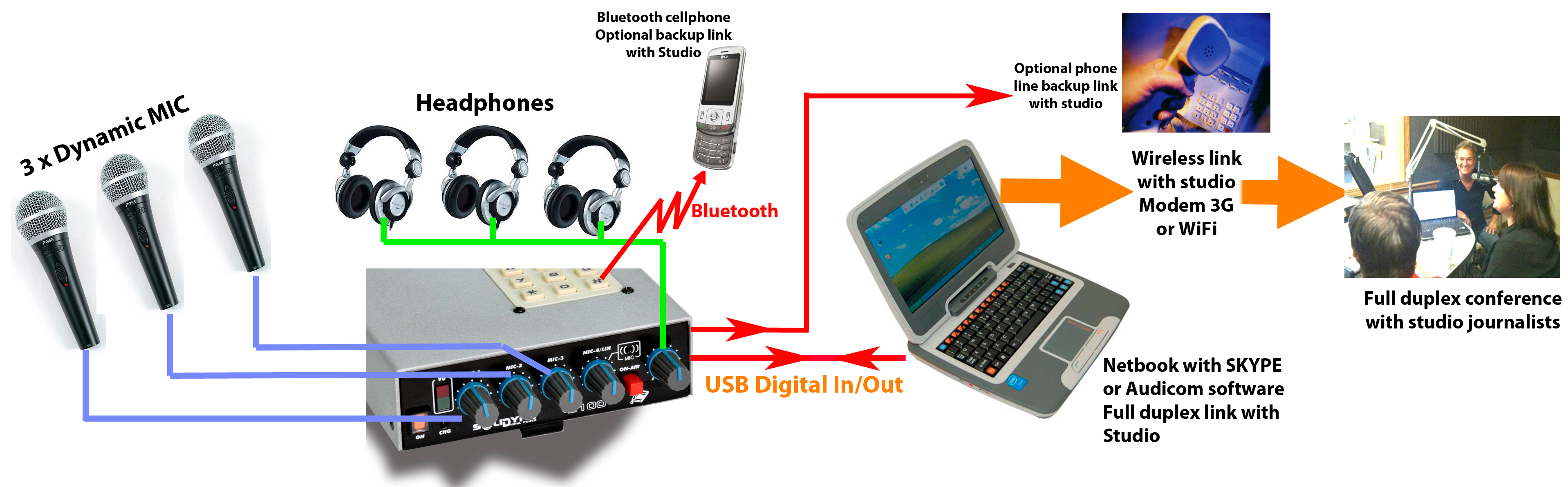
* Communication with the radio station is established from a **laptop connected via USB** to the MX2100.
* Alternatively, a **tablet or smartphone connected via Bluetooth** can be used.
* The mobile device uses a communications application, such as **Skype®** to communicate with the Studio.
* Cellular connections via Bluetooth or landline can be used as **backup** for the Internet link.
At the Studio, the operator should **NOT send background music in the return feed**. \
Only voices should be sent.\
In applications like Skype®, communication is *half-duplex*, and background music could cause interruptions in the remote audio.
If Bluetooth is used to communicate with the radio station in an emergency, the **MIC-4/LIN/Bluetooth** control must remain closed to avoid a feedback loop.\
The Bluetooth return feeds directly into the headphone mix.
### About Studio Return Feed
* The mix generated in the console is sent via USB to the laptop, which transmits it to the Studio.
* From the laptop, the Studio return enters the console via USB, directly to the **headphone mix**.
* Connecting a microphone to the **MIC-3** input triggers the **USB return switching** to the headphone mix.
* In headphones, the operator hears both the Studio return and the program mix (**MIC-1, MIC-2, MIC-3**).
In a two-way communication with Studio via Internet, a microphone must **ALWAYS be connected to the MIC-3 input**. This ensures the USB return is routed to the headphones.\
If no microphone is connected to MIC-3:
* The Studio return will not be heard.
* The USB signal on the *MIC-3/USB* control cannot be used, as it would send the Studio return to air.
***
## Case 2: High-Quality One-Way Communication
The diagram shows a scenario where the portable console operates as a **remote studio**, broadcasting to the main Studio through **high-quality audio streaming**.
### About Broadcasting
* Communication with the radio station is established from a **laptop connected via USB** to the MX2100.
* Alternatively, a **tablet or smartphone connected via Bluetooth** can be used.
* The mobile device uses a communications application, such as **Skype®** to communicate with the Studio.
* Cellular connections via Bluetooth or landline can be used as **backup** for the Internet link.
At the Studio, the operator should **NOT send background music in the return feed**. \
Only voices should be sent.\
In applications like Skype®, communication is *half-duplex*, and background music could cause interruptions in the remote audio.
If Bluetooth is used to communicate with the radio station in an emergency, the **MIC-4/LIN/Bluetooth** control must remain closed to avoid a feedback loop.\
The Bluetooth return feeds directly into the headphone mix.
### About Studio Return Feed
* The mix generated in the console is sent via USB to the laptop, which transmits it to the Studio.
* From the laptop, the Studio return enters the console via USB, directly to the **headphone mix**.
* Connecting a microphone to the **MIC-3** input triggers the **USB return switching** to the headphone mix.
* In headphones, the operator hears both the Studio return and the program mix (**MIC-1, MIC-2, MIC-3**).
In a two-way communication with Studio via Internet, a microphone must **ALWAYS be connected to the MIC-3 input**. This ensures the USB return is routed to the headphones.\
If no microphone is connected to MIC-3:
* The Studio return will not be heard.
* The USB signal on the *MIC-3/USB* control cannot be used, as it would send the Studio return to air.
***
## Case 2: High-Quality One-Way Communication
The diagram shows a scenario where the portable console operates as a **remote studio**, broadcasting to the main Studio through **high-quality audio streaming**.
 ### About Broadcasting
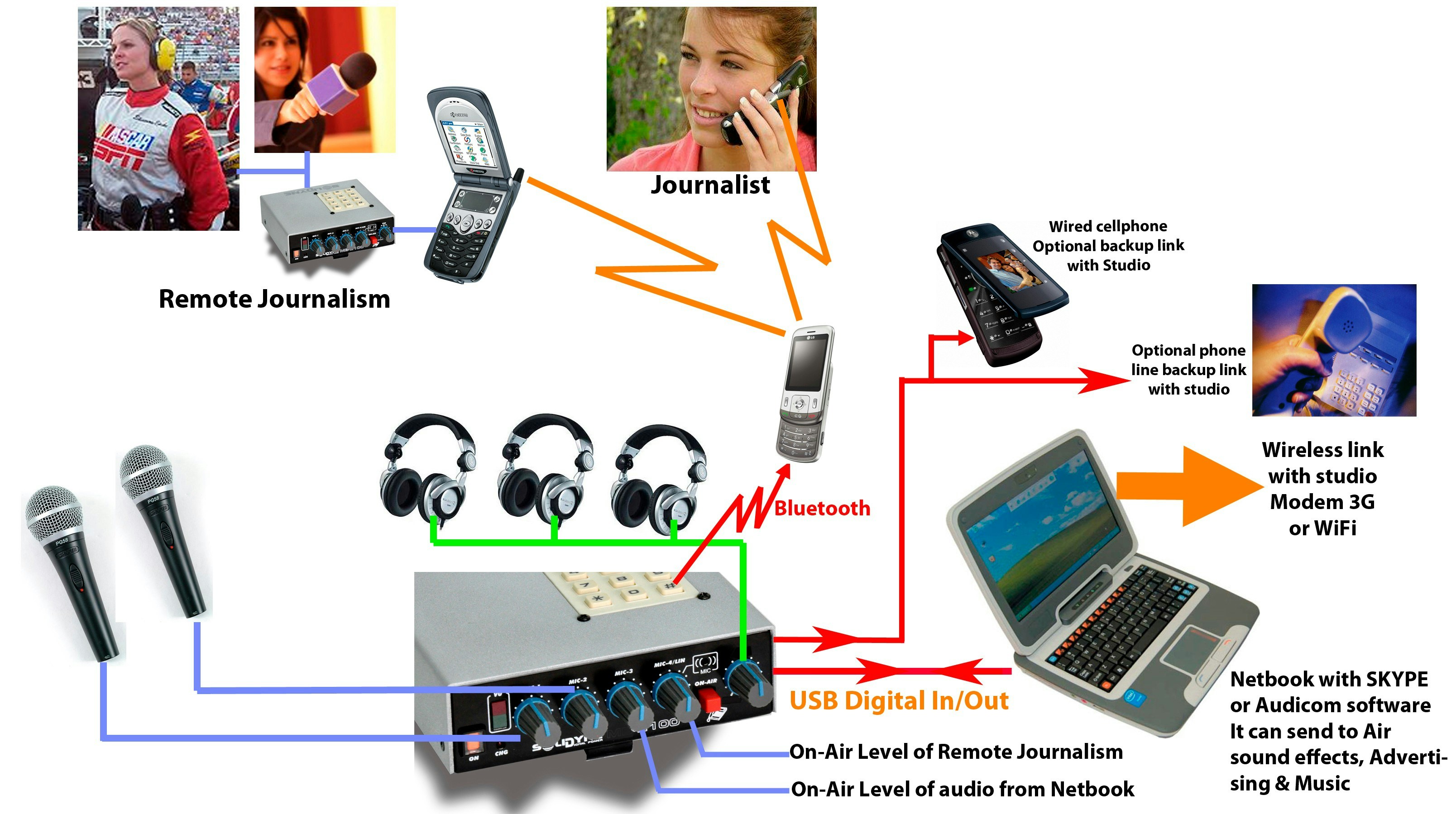
* The console connects via **USB to a laptop with Internet access**.
* Communication with the Studio is established from the laptop:
* Using **Solidyne Audicom®** to generate the stream.
* Or any other compatible encoding software.
Skype® or other VoIP apps do not apply in this case, as they are voice-only, while here **stereo audio** high quality transmission is required.
* As **backup** options you can use:
* A wired cell phone.
* Or a landline connected to the console's RJ-11.
### About Studio Return Feed
* The one-way data flow allows sending **high-quality** audio, but dialogue with the Studio is not possible due to streaming delays.
* In this condition, **all signal is generated from the MX2100**.
* If Studio return feed is mandatory, it is recommended to do it through:
* Cell phone (wired or via Bluetooth).
* The return is heard in headphones, without delay.
### About Available Signals
**Microphones and Lines**
* Available: MIC-1 and MIC-2.
* **MIC-3 remains unconnected**, to enable sending the USB input to air (audio from computer).
Connecting a microphone to MIC-3 **triggers the USB return switching to the headphone mix**, which only applies to two-way communication with Studio.
**Cell Phone**
* A cell phone linked via **Bluetooth** allows broadcasting a remote interviewer or journalist (using *MIC-4/LIN/Bluetooth* control).
* A second MX2100 can also be linked via cell phone.
When the console is connected via USB (to computer or charger), the internal **MIC-4 is disabled**, and the Bluetooth return appears instead.\
This allows broadcasting a phone call when Bluetooth is not being used to link the MX2100 with Studio (assuming the main link is done through the computer).
The Bluetooth signal is always present in the headphone mix at a fixed level.\
When sending Bluetooth to air through the *MIC-4/LIN/Bluetooth* control, adjust by monitoring the console's VU meter.
### About Broadcasting
* The console connects via **USB to a laptop with Internet access**.
* Communication with the Studio is established from the laptop:
* Using **Solidyne Audicom®** to generate the stream.
* Or any other compatible encoding software.
Skype® or other VoIP apps do not apply in this case, as they are voice-only, while here **stereo audio** high quality transmission is required.
* As **backup** options you can use:
* A wired cell phone.
* Or a landline connected to the console's RJ-11.
### About Studio Return Feed
* The one-way data flow allows sending **high-quality** audio, but dialogue with the Studio is not possible due to streaming delays.
* In this condition, **all signal is generated from the MX2100**.
* If Studio return feed is mandatory, it is recommended to do it through:
* Cell phone (wired or via Bluetooth).
* The return is heard in headphones, without delay.
### About Available Signals
**Microphones and Lines**
* Available: MIC-1 and MIC-2.
* **MIC-3 remains unconnected**, to enable sending the USB input to air (audio from computer).
Connecting a microphone to MIC-3 **triggers the USB return switching to the headphone mix**, which only applies to two-way communication with Studio.
**Cell Phone**
* A cell phone linked via **Bluetooth** allows broadcasting a remote interviewer or journalist (using *MIC-4/LIN/Bluetooth* control).
* A second MX2100 can also be linked via cell phone.
When the console is connected via USB (to computer or charger), the internal **MIC-4 is disabled**, and the Bluetooth return appears instead.\
This allows broadcasting a phone call when Bluetooth is not being used to link the MX2100 with Studio (assuming the main link is done through the computer).
The Bluetooth signal is always present in the headphone mix at a fixed level.\
When sending Bluetooth to air through the *MIC-4/LIN/Bluetooth* control, adjust by monitoring the console's VU meter.