> ## Documentation Index
> Fetch the complete documentation index at: https://docs.solidyne.ar/llms.txt
> Use this file to discover all available pages before exploring further.
# Phone Link
> Communication with Studio via mobile phone or landline.
Communication is established from the phone connected to the console, either landline or mobile.\
The operation for both cases is described below.
### Mobile Phone
* **Via Bluetooth:**
1. From the mobile phone, call the radio station.
2. Once communication is established, use the microphones and headphones connected to the MX2100 to talk with Studios.
3. If the radio station calls the journalist, the **ring** is heard in headphones and the call signal on the mobile.
4. The call can be answered from the mobile phone itself or by briefly pressing **# 9** on the console.
* **Via hands-free cable (deprecated):**
1. Make the call from the mobile phone.
2. Once established, press the **PHONE** button on the console.
3. Connect the "hands-free" cable (already connected to the **Cellular & Phone** input of the MX2100) to the mobile connector.
4. From this point on, dialogue is conducted using the console's microphones and headphones.
To end communication from a mobile phone, hang up and disconnect using the mobile keypad (refer to phone manual).
***
### Landline
1. Press the **PHONE** button to take the line.
2. Dial the radio station number using the console's DTMF keypad.
3. Once communication is established:
* Speak through the microphones connected to the MX2100.
* Listen to Studios through the headphones.
* The program signal (console output) is sent to the radio through the line.
4. To end communication: press the **PHONE** button again, which will remain in the out position, ending the call.
5. For incoming calls from the radio station:
* The call **RING** is heard in headphones.
* The call is answered directly from the console.
***
### If communication is interrupted...
* **Mobile Phone:**
* The mobile phone itself terminates the call.
* The MX2100 operator can wait for the radio station to call back and answer from the mobile, or press **# 9** on the console to answer.
* The link with the radio station is reestablished.
* **Landline:**
* If the call drops, release the **ON-AIR** button to initiate or receive new communication.
* For incoming calls from the radio station:
* The **RING** is heard in headphones.
* Answer directly from the console by pressing **ON-AIR**.
***
## Diagram: transmission via Bluetooth mobile
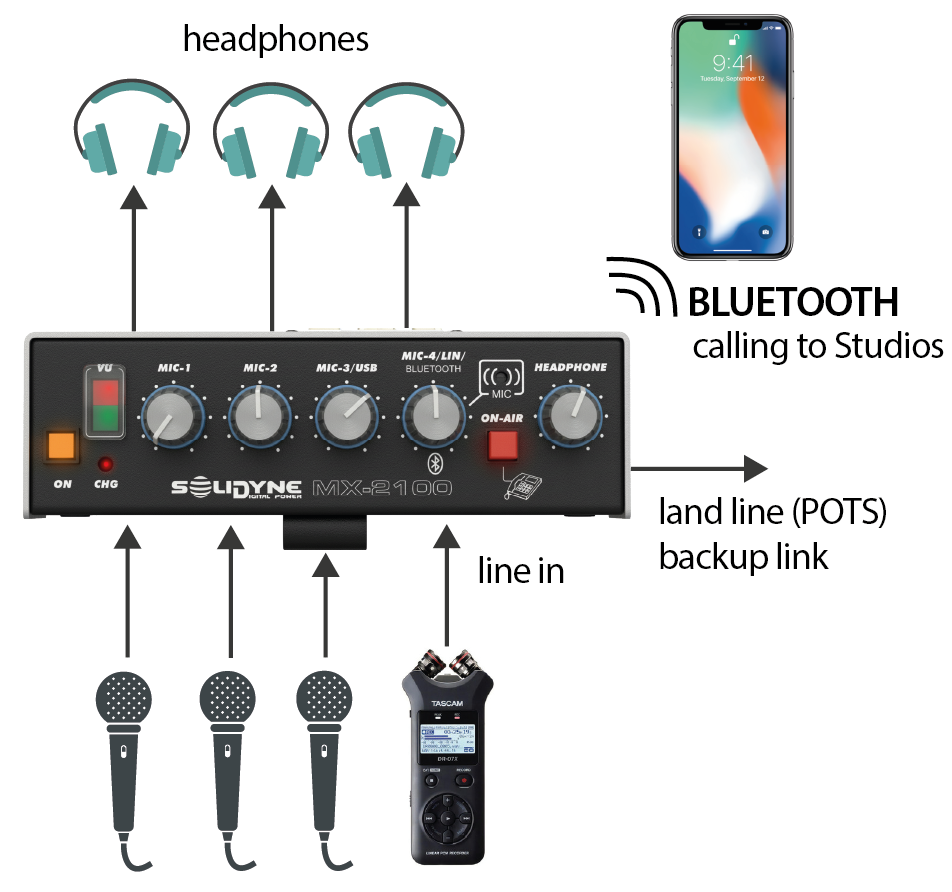 * The console transmits to Studios using a **Bluetooth-paired mobile phone**.
* A **landline** can be connected as transmission backup.
* The Studios return feed enters via Bluetooth directly into the **headphone mix**.
* The mix of up to **three microphones** and **one line input** (which allows connecting, for example, a portable recorder) is sent on air.
Connecting the line input **disables the internal microphone (MIC-4)**.
* The console transmits to Studios using a **Bluetooth-paired mobile phone**.
* A **landline** can be connected as transmission backup.
* The Studios return feed enters via Bluetooth directly into the **headphone mix**.
* The mix of up to **three microphones** and **one line input** (which allows connecting, for example, a portable recorder) is sent on air.
Connecting the line input **disables the internal microphone (MIC-4)**.