> ## Documentation Index
> Fetch the complete documentation index at: https://docs.solidyne.ar/llms.txt
> Use this file to discover all available pages before exploring further.
# Connections and startup
> Description of connection options and initial setup.
## Rear Panel Connectors
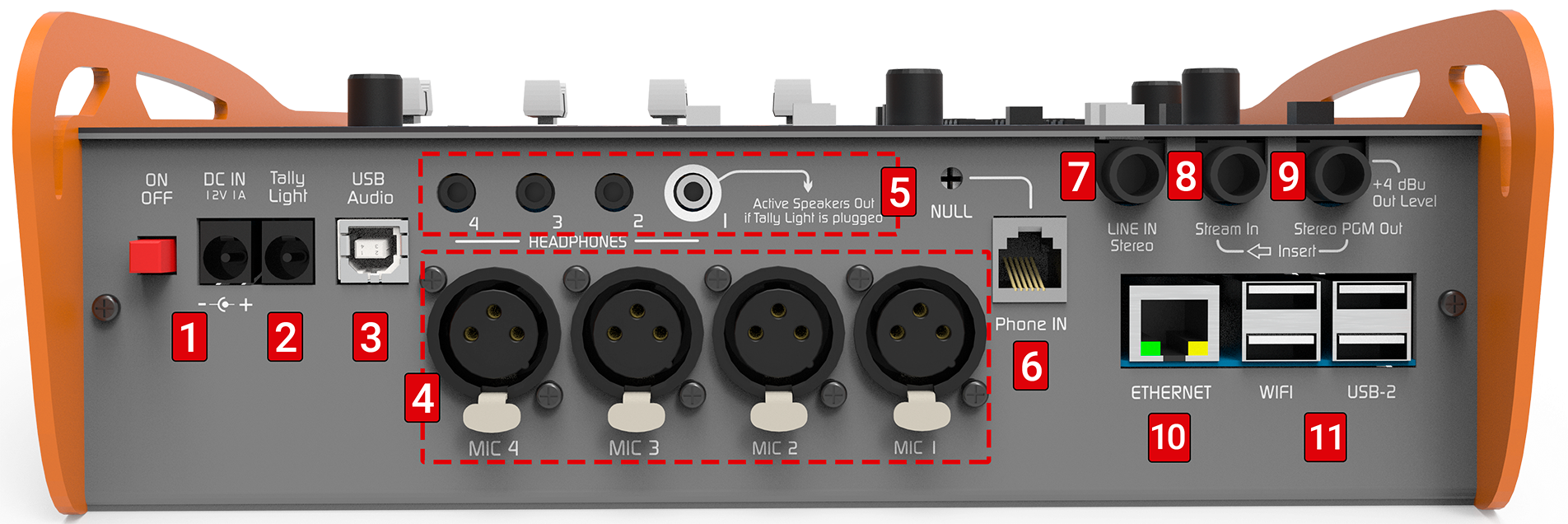 ### Power Supply (1)
1. **External power input**: 2 mm barrel connector (pin +).
* Switching power supply 90/240 V → output **12 V / 1.5 A**.
* Also accepts 12 V external battery (observe polarity).
2. **Internal battery**: approx. **4 hours** autonomy (SIP call via Ethernet, without Wi-Fi or Bluetooth).
3. **Charging**: occurs with unit **powered on and connected** to external supply.
* Full charging time (completely discharged battery): **10 hours**.
Using **power supplies not provided by factory** will void the **warranty**.
***
### On-Air Light (2)
* 2.5 mm barrel connector (pin +).
* Provides **12 VDC**, supports up to **200 mA**.
* When an on-air light is connected:
* **Headphones #1** output becomes **monitor speakers** output.
* Automatically mutes when microphones are activated to prevent feedback.
***
### USB Audio (3)
* Digital connection to computer via USB A/B cable (use provided cable).
* Recommendation: do not exceed **4 m** length.
Ensure the computer is **properly grounded**.\
If not, the console or computer USB input could be damaged.
* Compatible with Windows 7 to 11, Linux Ubuntu and macOS (automatic recognition).
* System detects:
* **USB Playback Device** → LINE USB input on console.
* **USB Recording Device** → audio output from PGM.
In Windows, manage through: **Control Panel → Sound → Audio** → select playback and recording devices.
***
### Microphones (4)
* Four balanced inputs (XLR) for dynamic microphones.
* **MIC 3 and MIC 4** share the same fader.
* Recommendation: use microphones of same brand and model on shared inputs.
***
### Headphones (5)
* Four 1/8" TRS outputs (minijack).
* All deliver same level, controlled by **CUE MONITOR** knob.
* Output #1 can be used as **monitor speakers** output:
* Automatically mutes when **on-air light** is connected and microphones are sent to PGM.
***
### Landline Phone (6)
* RJ11 connector for POTS line connection.
* Can connect directly to public network or PBX (private exchange).
* Internal surge protection with varistors.
Additional protection recommended in storm-prone areas (gas arrestors and fuses).\
Lightning damage is **not covered by warranty**.
* **NULL Preset** allows hybrid rejection adjustment.
Performed when connecting console to line. If console is disconnected and later reconnected to same phone line, adjustment is not necessary. \
However, readjustment is required each time connected to a different line.
Send spoken content to PGM from computer. If spoken content unavailable, live microphone speech can be used.
Make a call using landline (PHONE).
Ask other end to activate **mute** or remain silent. \
You can call your own mobile phone and mute its microphone.
Remove PGM from headphones (PGM button in CUE released).
Listen to line in CUE.
Turn NULL preset until finding point of **minimum return**.
End the call.
***
### Stereo Line Input (7)
* Unbalanced 1/4" TRS connector.
* Controlled by LINE fader when **USB is not connected**.
* If USB is active, LINE becomes secondary input (from PHONE section).
If link is via Bluetooth, **LINE IN cannot be added** from PHONE section.\
Only available through LINE fader if USB Audio is not connected.
***
### Program Insert (8)
* **Stream-In** 1/4" TRS with interruption contact.
* When connected, **replaces internal PGM mix** in **streaming and USB**.
* Allows external processors: *PGM Out → Processor → Stream-In*.
***
### Program Output (9)
* **Stereo PGM Out** (1/4" TRS).
* Sends complete mix: microphones, USB, auxiliary line and phone lines.
***
### Ethernet (Wired Network) (10)
* RJ45 port for local network connection.
* Uses:
* Web access to CODEC configuration.
* Internet connection for SIP and streaming.
* Web access to recordings.
* Factory setting: **DHCP enabled**.
***
### USB Ports (Wi-Fi and Modem) (11)
* USB 2.0 type A ports.
* Allow connection of:
* **Wi-Fi antenna**.
* **4G modem** (requires 1 m extension cable).
**Do not connect USB modem directly to port**. Can cause **audible interference**.\
Always use extension cable to separate modem from console.\
This also allows reorienting modem if weak signal indication is received.
### Power Supply (1)
1. **External power input**: 2 mm barrel connector (pin +).
* Switching power supply 90/240 V → output **12 V / 1.5 A**.
* Also accepts 12 V external battery (observe polarity).
2. **Internal battery**: approx. **4 hours** autonomy (SIP call via Ethernet, without Wi-Fi or Bluetooth).
3. **Charging**: occurs with unit **powered on and connected** to external supply.
* Full charging time (completely discharged battery): **10 hours**.
Using **power supplies not provided by factory** will void the **warranty**.
***
### On-Air Light (2)
* 2.5 mm barrel connector (pin +).
* Provides **12 VDC**, supports up to **200 mA**.
* When an on-air light is connected:
* **Headphones #1** output becomes **monitor speakers** output.
* Automatically mutes when microphones are activated to prevent feedback.
***
### USB Audio (3)
* Digital connection to computer via USB A/B cable (use provided cable).
* Recommendation: do not exceed **4 m** length.
Ensure the computer is **properly grounded**.\
If not, the console or computer USB input could be damaged.
* Compatible with Windows 7 to 11, Linux Ubuntu and macOS (automatic recognition).
* System detects:
* **USB Playback Device** → LINE USB input on console.
* **USB Recording Device** → audio output from PGM.
In Windows, manage through: **Control Panel → Sound → Audio** → select playback and recording devices.
***
### Microphones (4)
* Four balanced inputs (XLR) for dynamic microphones.
* **MIC 3 and MIC 4** share the same fader.
* Recommendation: use microphones of same brand and model on shared inputs.
***
### Headphones (5)
* Four 1/8" TRS outputs (minijack).
* All deliver same level, controlled by **CUE MONITOR** knob.
* Output #1 can be used as **monitor speakers** output:
* Automatically mutes when **on-air light** is connected and microphones are sent to PGM.
***
### Landline Phone (6)
* RJ11 connector for POTS line connection.
* Can connect directly to public network or PBX (private exchange).
* Internal surge protection with varistors.
Additional protection recommended in storm-prone areas (gas arrestors and fuses).\
Lightning damage is **not covered by warranty**.
* **NULL Preset** allows hybrid rejection adjustment.
Performed when connecting console to line. If console is disconnected and later reconnected to same phone line, adjustment is not necessary. \
However, readjustment is required each time connected to a different line.
Send spoken content to PGM from computer. If spoken content unavailable, live microphone speech can be used.
Make a call using landline (PHONE).
Ask other end to activate **mute** or remain silent. \
You can call your own mobile phone and mute its microphone.
Remove PGM from headphones (PGM button in CUE released).
Listen to line in CUE.
Turn NULL preset until finding point of **minimum return**.
End the call.
***
### Stereo Line Input (7)
* Unbalanced 1/4" TRS connector.
* Controlled by LINE fader when **USB is not connected**.
* If USB is active, LINE becomes secondary input (from PHONE section).
If link is via Bluetooth, **LINE IN cannot be added** from PHONE section.\
Only available through LINE fader if USB Audio is not connected.
***
### Program Insert (8)
* **Stream-In** 1/4" TRS with interruption contact.
* When connected, **replaces internal PGM mix** in **streaming and USB**.
* Allows external processors: *PGM Out → Processor → Stream-In*.
***
### Program Output (9)
* **Stereo PGM Out** (1/4" TRS).
* Sends complete mix: microphones, USB, auxiliary line and phone lines.
***
### Ethernet (Wired Network) (10)
* RJ45 port for local network connection.
* Uses:
* Web access to CODEC configuration.
* Internet connection for SIP and streaming.
* Web access to recordings.
* Factory setting: **DHCP enabled**.
***
### USB Ports (Wi-Fi and Modem) (11)
* USB 2.0 type A ports.
* Allow connection of:
* **Wi-Fi antenna**.
* **4G modem** (requires 1 m extension cable).
**Do not connect USB modem directly to port**. Can cause **audible interference**.\
Always use extension cable to separate modem from console.\
This also allows reorienting modem if weak signal indication is received.