> ## Documentation Index
> Fetch the complete documentation index at: https://docs.solidyne.ar/llms.txt
> Use this file to discover all available pages before exploring further.
# Telephone Lines
> Fixed and cellular (Bluetooth) telephone lines. Description and controls.
## General Description
The **MX2200** handles:
* One conventional landline telephone (POTS).
* One mobile phone connected via **Bluetooth**.
The main function of both lines is to serve as a **backup link** for the Internet connection.\
They can also be used:
* As the main broadcast channel when Internet is not available.
* As an audio source to add a call to the broadcast.
***
## Using Lines "On Air"
* Participants (reporters or interviewees) can be added to the broadcast.
* This can be done with landline or Bluetooth mobile, even while the console is broadcasting via Internet.
* The line can interact privately with the console operator, and also with the studios when sent to program (PGM).
* The studio return signal (SIP) is injected into monitoring (CUE) and sent to both landline and Bluetooth.
* The SIP link return level is adjusted from the screen, in **SETUP → RX VOLUME**.
**Warning!**\
Conference between landline and Bluetooth mobile is **not supported**.\
It is possible to put both lines on air, but they will not hear each other or be able to dialogue.
***
## Line as Studio Link
* Once the call is established, the studios always receive the **PGM mix** through the telephone line.
* In **CUE position**, the return signal sent by the Studio is heard only in monitoring. If the TALK button for that line is pressed, the talkback microphone is sent to the studios.
* In **PGM position**, the Studio return is removed from CUE and added to PGM.
* The line send is **mix-minus**: the Studio return is not added to the PGM being sent back, avoiding feedback.
* In PGM position, the talkback microphone is not sent to the studio.
* Therefore, when using the line as a link, it should always be set to **PGM**, preventing the TALK mic from accidentally going on air.
* The studio return (audio from the other end) can be heard in headphones by mixing PGM with the telephone line (verify that PGM monitoring is enabled in CUE).
* If return monitoring is not needed, keep the PGM knob closed.
***
## Controls (Landline and Bluetooth)
The following controls apply both for adding calls to local broadcast and for using lines as studio link:
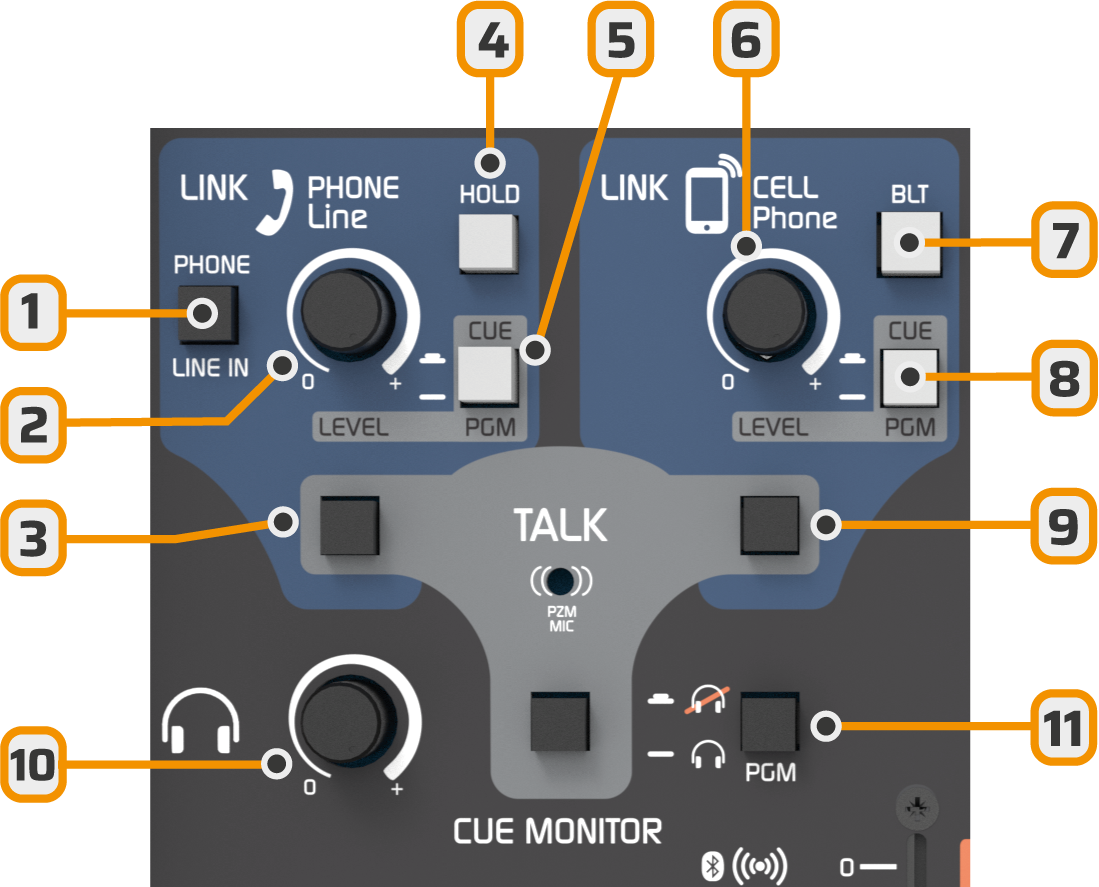 1. **PHONE/LINE IN**
* Switches between telephone line and stereo line input.
* With Internet link it's possible to operate with 4 microphones and 2 audio sources (LINE IN and USB).
* If a call comes in on landline, the **HOLD** button flashes. The operator can switch from LINE IN to PHONE and answer the call.
When there is no Internet and the link is made via Bluetooth, it is not possible to add either PHONE LINE or LINE IN, since **PHONE LINE is not added to the mix sent to Bluetooth**.\
LINE IN can only be used from its own fader if there is no USB audio.
2. **Telephone line / LINE IN level knob**
* Adjusts level in both CUE and PGM.
3. **TALK button (landline)**
* Allows talking privately with the landline using the built-in TALK microphone.
4. **HOLD**
* Indicates incoming call (flashes with ring).
* Allows answering and putting the line on hold or sending it to PGM.
5. **CUE/PGM**
* Switches the signal (telephone or LINE IN) between preview monitoring (CUE) and program output (PGM).
6. **Bluetooth mobile audio level control**
7. **Bluetooth on/off**
* Also activates pairing mode to link a mobile phone.
8. **CUE/PGM Bluetooth**
* Switches Bluetooth signal between CUE monitoring and PGM output.
9. **TALK button (Bluetooth)**
* Allows talking privately with the Bluetooth line using the built-in TALK mic.
10. **Master headphones control**
11. **PGM to Headphones**
* Removes PGM signal from headphones, leaving only what's present in CUE.
* Useful for dialoguing with a telephone line or listening only to studio return on SIP call.
12. **TALK to headphones button**
* Sends the built-in talkback microphone voice to headphones.
1. **PHONE/LINE IN**
* Switches between telephone line and stereo line input.
* With Internet link it's possible to operate with 4 microphones and 2 audio sources (LINE IN and USB).
* If a call comes in on landline, the **HOLD** button flashes. The operator can switch from LINE IN to PHONE and answer the call.
When there is no Internet and the link is made via Bluetooth, it is not possible to add either PHONE LINE or LINE IN, since **PHONE LINE is not added to the mix sent to Bluetooth**.\
LINE IN can only be used from its own fader if there is no USB audio.
2. **Telephone line / LINE IN level knob**
* Adjusts level in both CUE and PGM.
3. **TALK button (landline)**
* Allows talking privately with the landline using the built-in TALK microphone.
4. **HOLD**
* Indicates incoming call (flashes with ring).
* Allows answering and putting the line on hold or sending it to PGM.
5. **CUE/PGM**
* Switches the signal (telephone or LINE IN) between preview monitoring (CUE) and program output (PGM).
6. **Bluetooth mobile audio level control**
7. **Bluetooth on/off**
* Also activates pairing mode to link a mobile phone.
8. **CUE/PGM Bluetooth**
* Switches Bluetooth signal between CUE monitoring and PGM output.
9. **TALK button (Bluetooth)**
* Allows talking privately with the Bluetooth line using the built-in TALK mic.
10. **Master headphones control**
11. **PGM to Headphones**
* Removes PGM signal from headphones, leaving only what's present in CUE.
* Useful for dialoguing with a telephone line or listening only to studio return on SIP call.
12. **TALK to headphones button**
* Sends the built-in talkback microphone voice to headphones.