> ## Documentation Index
> Fetch the complete documentation index at: https://docs.solidyne.ar/llms.txt
> Use this file to discover all available pages before exploring further.
# Streaming to a web server
> Broadcasting to Icecast/Shoutcast servers
A **multimedia web server** is a third-party service that receives the audio stream from the **MX2200** and forwards it through a public link accessible worldwide and simultaneously by multiple devices.
* Service plans are usually based on the **number of simultaneous users** allowed.
* Once access is configured on the console, usage is very simple: just ensure the MX2200 is connected to the Internet and start broadcasting.
* It is an ideal method when **mass signal distribution** is required.
The **delay** in this type of transmission can vary between **5 and 30 seconds**, depending on the platform and connection. For this reason, it is recommended only when the signal is generated from the remote location **without real-time interaction** with the studios.
***
Turn the **encoder** until the **CONNECTION CENTER** screen appears and press it to enter.
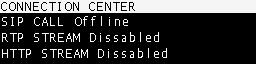 Navigate with the encoder, select **HTTP STREAM** and press to open the option.
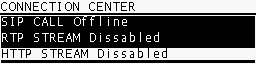 On the control screen, select **YES** to start the link with the web server.\
When the connection is established, both **CONNECTION CENTER** and **HOME** screens will show **HTTP STREAM ENABLED**.
Repeat the procedure and select **NO** to disable the transmission.
Receiving a web server transmission is the simplest method:
* The service provider supplies an **http link**.
* The link can be opened from **any web browser** on PC, tablet or smartphone.
* No additional configurations are required at the studios.
This method is ideal for **public streaming** of a radio station or event, allowing global access without requiring specialized software for listeners.
On the control screen, select **YES** to start the link with the web server.\
When the connection is established, both **CONNECTION CENTER** and **HOME** screens will show **HTTP STREAM ENABLED**.
Repeat the procedure and select **NO** to disable the transmission.
Receiving a web server transmission is the simplest method:
* The service provider supplies an **http link**.
* The link can be opened from **any web browser** on PC, tablet or smartphone.
* No additional configurations are required at the studios.
This method is ideal for **public streaming** of a radio station or event, allowing global access without requiring specialized software for listeners.