> ## Documentation Index
> Fetch the complete documentation index at: https://docs.solidyne.ar/llms.txt
> Use this file to discover all available pages before exploring further.
# Audio Processing
> Audio processors integrated in UX24 and UX18
## PROCESS SCREEN
Press **PROCESS** on the main screen to access. This also activates **SELECT mode** to choose a channel.
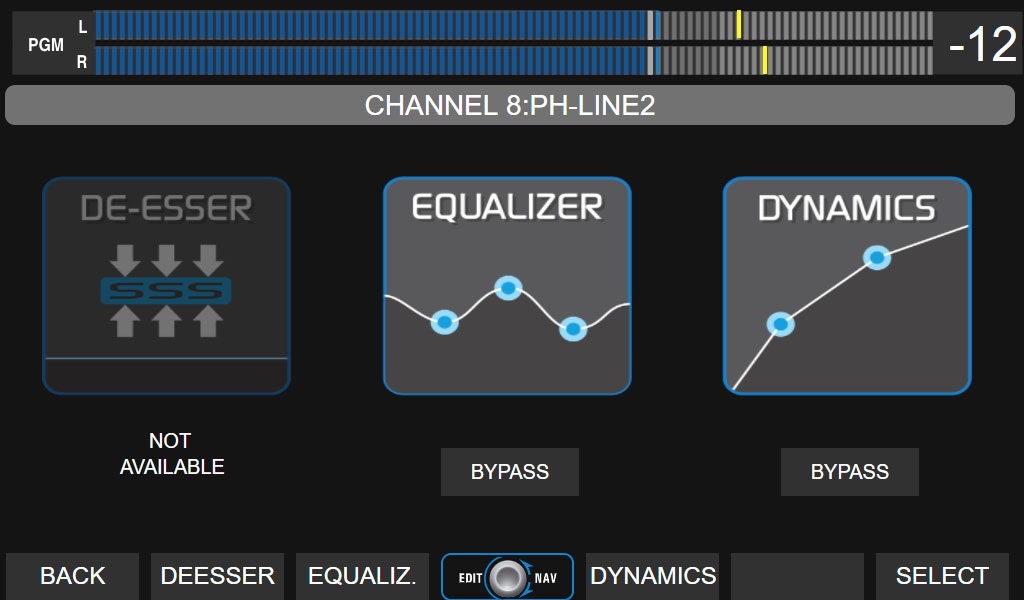 Processors are **fixed to each input**, not to the channel. They cannot be reassigned to other channels, buses or outputs. Available processes depend on the **input type** assigned to the channel.
| **INPUT** | **EQ + Filters** | **Comp. + Gate** | **De-esser** |
| :-------: | :--------------: | :--------------: | :----------: |
| MIC | 4 bands | **yes** | **yes** |
| UNIDEX | 3 bands | **yes** | no |
| USB | 3 bands | no | no |
| AES3 | 3 bands | no | no |
| BALANCED | 3 bands | no | no |
**PROCESS screen functions**
* View which processors are on the channel and if they are active or in **BYPASS**.
* Enable/disable a processor by touching **BYPASS**.
* Access settings by touching the icon or contextual button.
**Channel selection**
* In SELECT mode, use **CUE/SELECT** on the console or the **encoder** to scroll through all 24 channels (physical in cyan, virtual in purple).
* Any action in PROCESS cancels SELECT, applying changes to the active channel.
* SELECT can also be activated from PROCESS to choose another channel.
**Parameter adjustment:**\
Done by combining the **encoder** and **touch options**, as indicated for each processor.
Process settings can be **saved in the scene**.
***
## PARAMETRIC EQUALIZER
Processors are **fixed to each input**, not to the channel. They cannot be reassigned to other channels, buses or outputs. Available processes depend on the **input type** assigned to the channel.
| **INPUT** | **EQ + Filters** | **Comp. + Gate** | **De-esser** |
| :-------: | :--------------: | :--------------: | :----------: |
| MIC | 4 bands | **yes** | **yes** |
| UNIDEX | 3 bands | **yes** | no |
| USB | 3 bands | no | no |
| AES3 | 3 bands | no | no |
| BALANCED | 3 bands | no | no |
**PROCESS screen functions**
* View which processors are on the channel and if they are active or in **BYPASS**.
* Enable/disable a processor by touching **BYPASS**.
* Access settings by touching the icon or contextual button.
**Channel selection**
* In SELECT mode, use **CUE/SELECT** on the console or the **encoder** to scroll through all 24 channels (physical in cyan, virtual in purple).
* Any action in PROCESS cancels SELECT, applying changes to the active channel.
* SELECT can also be activated from PROCESS to choose another channel.
**Parameter adjustment:**\
Done by combining the **encoder** and **touch options**, as indicated for each processor.
Process settings can be **saved in the scene**.
***
## PARAMETRIC EQUALIZER
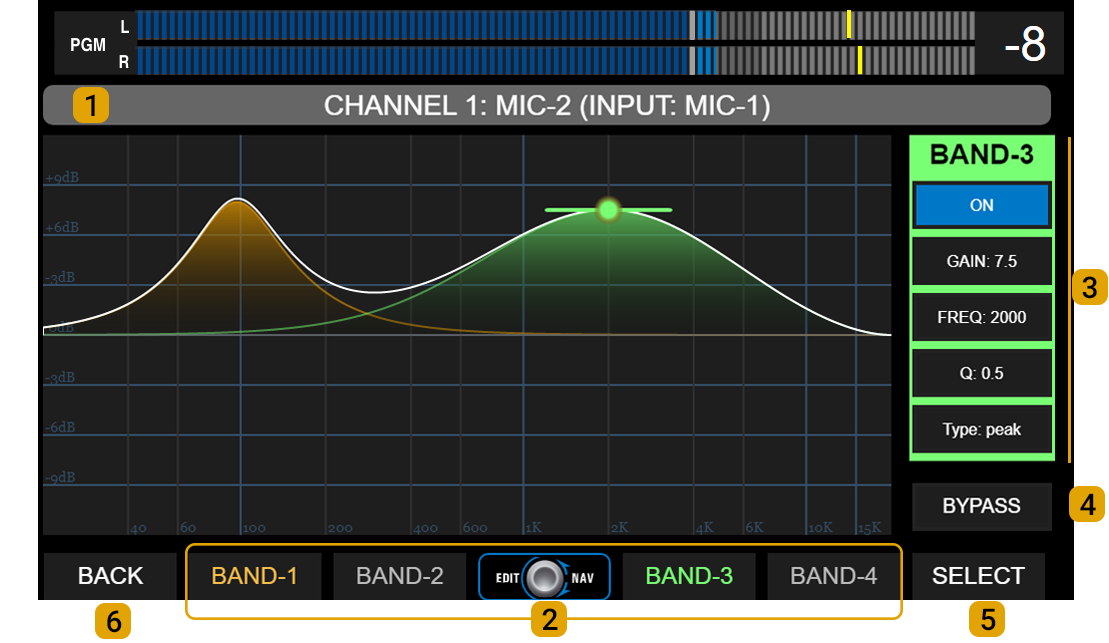 **1 - NAME:** Shows channel number and name. Virtual channels display the name area in purple.
**2 - BANDS:** Band selection. Screen shows parameters for one band at a time.\
Each band has a color that identifies it in the graph and parameter area.\
All inputs have 3 parametric bands, except MIC-1 to MIC-4 inputs which have four bands.
**3 - CONTROLS:** Parameters for each EQ band. Background color changes with selected band.
* **GAIN:** Gain in dB, with a range of ± 9 dB.
* **FREQ:** Adjusts working frequency. All bands cover 20 Hz to 20 kHz.
* **Q:** EQ bell width. Determines precision of applied correction.
* **TYPE:** Band operation mode. Toggle by touching TYPE on screen.
* Band #1: peak, low-shelf or HPF.
* Band #2 (and #3 on microphone inputs): peak or HPF/LPF.
* Band #3 (#4 on mic inputs): peak, hi-shelf or LPF.
* **ON/OFF:** Band enable/disable. Toggle by touching ON/OFF on screen.
**4 - BY-PASS:** Disables entire equalization stage. Also appears on PROCESS screen.\
Toggle by touching BY-PASS on screen.
**5 - SELECT:** Activates channel selection mode.
**6 - BACK:** Returns to previous screen.
### High-Pass / Low-Pass Filters
* Band #1 can function as 2nd order high-pass filter (HPF) (12 dB/oct).
* Band #3 (Band #4 on MIC-1 to MIC-4 inputs) can function as 2nd order low-pass filter (LPF) (12 dB/oct).
* Band #2 (and Band #3 on MIC-1 to MIC-4 inputs) can work as HPF or LPF.\
If two bands are configured as high-pass or low-pass at the same frequency, total cutoff attenuation will be **24 dB/oct**.
***
## DYNAMICS
The **DYNAMIC** processor includes a **noise gate** and a **compressor**.
**1 - NAME:** Shows channel number and name. Virtual channels display the name area in purple.
**2 - BANDS:** Band selection. Screen shows parameters for one band at a time.\
Each band has a color that identifies it in the graph and parameter area.\
All inputs have 3 parametric bands, except MIC-1 to MIC-4 inputs which have four bands.
**3 - CONTROLS:** Parameters for each EQ band. Background color changes with selected band.
* **GAIN:** Gain in dB, with a range of ± 9 dB.
* **FREQ:** Adjusts working frequency. All bands cover 20 Hz to 20 kHz.
* **Q:** EQ bell width. Determines precision of applied correction.
* **TYPE:** Band operation mode. Toggle by touching TYPE on screen.
* Band #1: peak, low-shelf or HPF.
* Band #2 (and #3 on microphone inputs): peak or HPF/LPF.
* Band #3 (#4 on mic inputs): peak, hi-shelf or LPF.
* **ON/OFF:** Band enable/disable. Toggle by touching ON/OFF on screen.
**4 - BY-PASS:** Disables entire equalization stage. Also appears on PROCESS screen.\
Toggle by touching BY-PASS on screen.
**5 - SELECT:** Activates channel selection mode.
**6 - BACK:** Returns to previous screen.
### High-Pass / Low-Pass Filters
* Band #1 can function as 2nd order high-pass filter (HPF) (12 dB/oct).
* Band #3 (Band #4 on MIC-1 to MIC-4 inputs) can function as 2nd order low-pass filter (LPF) (12 dB/oct).
* Band #2 (and Band #3 on MIC-1 to MIC-4 inputs) can work as HPF or LPF.\
If two bands are configured as high-pass or low-pass at the same frequency, total cutoff attenuation will be **24 dB/oct**.
***
## DYNAMICS
The **DYNAMIC** processor includes a **noise gate** and a **compressor**.
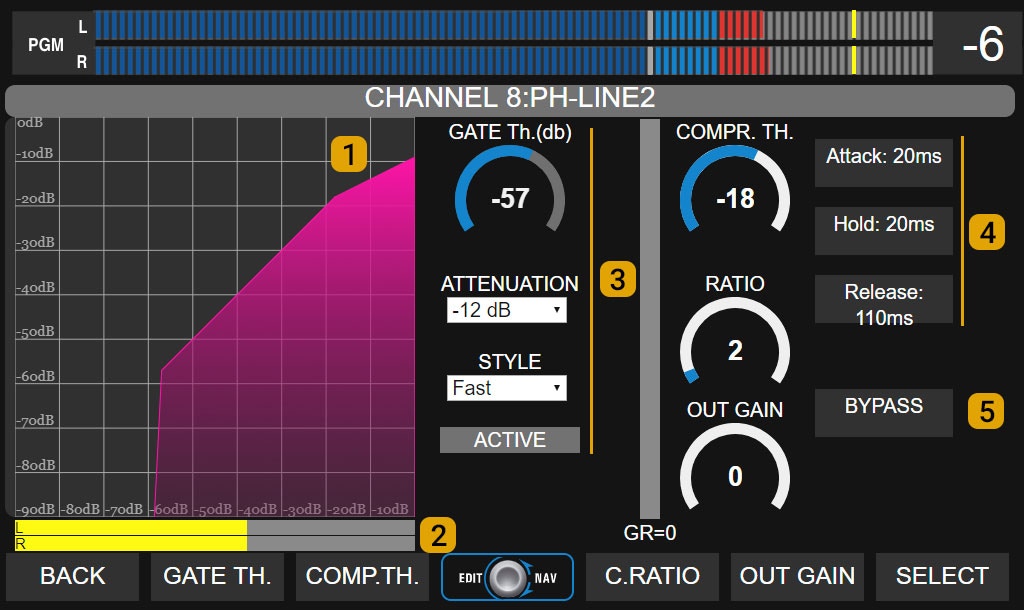 **1 - COMPRESSION CURVE:** Graphically shows input-output relationship of dynamic processor, including gate and compressor.
**2 - INPUT LEVEL:** Shows peak signal level at compressor input (dBfs).
### 3 - Noise Gate
* **Threshold:** Gate activation threshold (dB).
* **Attenuation:** Applied signal attenuation when gate is active.
* **Style:** Changes recovery time between preset values.
* **Active:** Indicator lights red when gate is closed.
### 4 - Dynamic Compressor
Controls for adjusting:
* Threshold
* Ratio
* Attack time
* Release time
* Hold
* Output gain
**5 - BYPASS:** Completely disables dynamic processing stage (gate + compressor).
***
## DE-ESSER
**1 - COMPRESSION CURVE:** Graphically shows input-output relationship of dynamic processor, including gate and compressor.
**2 - INPUT LEVEL:** Shows peak signal level at compressor input (dBfs).
### 3 - Noise Gate
* **Threshold:** Gate activation threshold (dB).
* **Attenuation:** Applied signal attenuation when gate is active.
* **Style:** Changes recovery time between preset values.
* **Active:** Indicator lights red when gate is closed.
### 4 - Dynamic Compressor
Controls for adjusting:
* Threshold
* Ratio
* Attack time
* Release time
* Hold
* Output gain
**5 - BYPASS:** Completely disables dynamic processing stage (gate + compressor).
***
## DE-ESSER
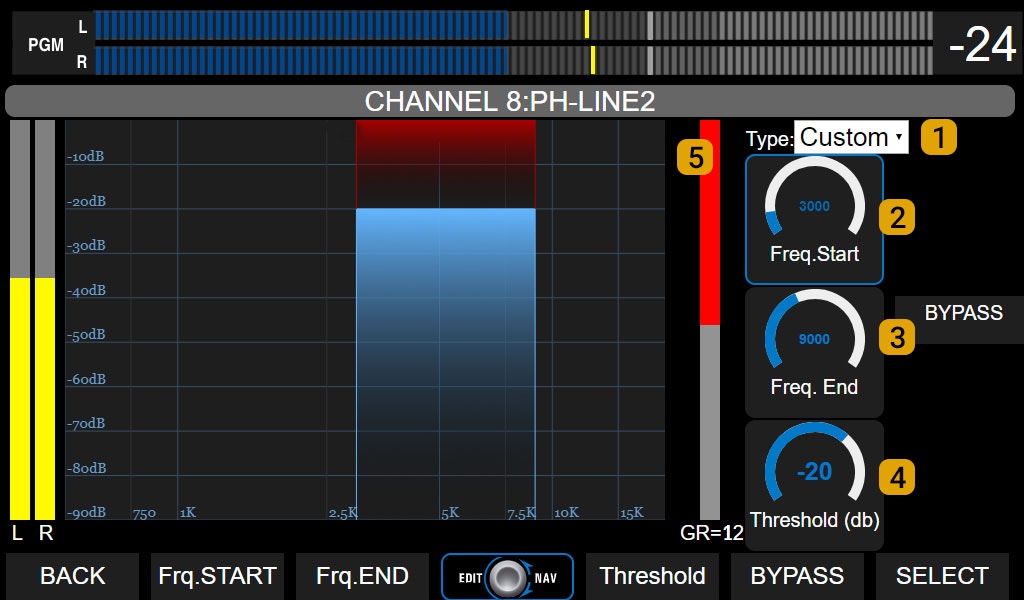 **MIC-1** to **MIC-4** inputs include a **de-esser** for sibilance reduction.\
This processor works as a multiband compressor, attenuating only the defined frequency range when signal level exceeds the set threshold.
**Controls:**
* **1 - Type:** Preset settings.
* **2 - Frequency start:** Lower cutoff frequency. Adjusted according to voice characteristics. Usually between 4,500 and 5,500 Hz.
* **3 - Frequency end:** Upper cutoff frequency. Adjusted according to voice characteristics. Usually between 7,000 and 10,000 Hz.
* **4 - Threshold:** Threshold level in dB. When signal in working band exceeds this value, it is attenuated with a **fixed 15:1 ratio**.
* **5 - Gain reduction:** Shows applied level reduction in dB.
**MIC-1** to **MIC-4** inputs include a **de-esser** for sibilance reduction.\
This processor works as a multiband compressor, attenuating only the defined frequency range when signal level exceeds the set threshold.
**Controls:**
* **1 - Type:** Preset settings.
* **2 - Frequency start:** Lower cutoff frequency. Adjusted according to voice characteristics. Usually between 4,500 and 5,500 Hz.
* **3 - Frequency end:** Upper cutoff frequency. Adjusted according to voice characteristics. Usually between 7,000 and 10,000 Hz.
* **4 - Threshold:** Threshold level in dB. When signal in working band exceeds this value, it is attenuated with a **fixed 15:1 ratio**.
* **5 - Gain reduction:** Shows applied level reduction in dB.