> ## Documentation Index
> Fetch the complete documentation index at: https://docs.solidyne.ar/llms.txt
> Use this file to discover all available pages before exploring further.
# Power On, Off and Resets
> Startup and shutdown. System module resets
## Startup Sequence
When powering on the console, UNIDEX starts its operating system. Once the startup sequence is complete, the **main screen** appears and loads:
1. The **default user profile.**
2. The **last active scene** before shutdown.
## User Profile and Permissions
The user profile determines the **access level to functions** within the console.\
From settings, you can define which profile loads automatically at startup.\
From factory, the console starts with the **ADMIN** profile, which has full access.
### Available User Levels
1. **BASIC** – Restricted access to essential functions
2. **EXPERT** – Advanced access (password required)
3. **ADMIN** – Full access (password required)
During startup, **no password is required**, even if the default profile has protection.\
For UX24 to start in restricted mode and require a password for advanced functions, you must **change the default profile** to one other than ADMIN.
For more information about user configuration, see:\
**SETTINGS → USERS**
## CPU Shutdown
UNIDEX consoles have an **internal CPU** that must be **safely shut down** before completely disconnecting the console.
### CPU Shutdown Procedure:
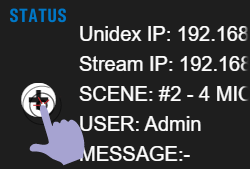
1. On the **main screen**, tap the **"+"** icon located in the **STATUS** section.
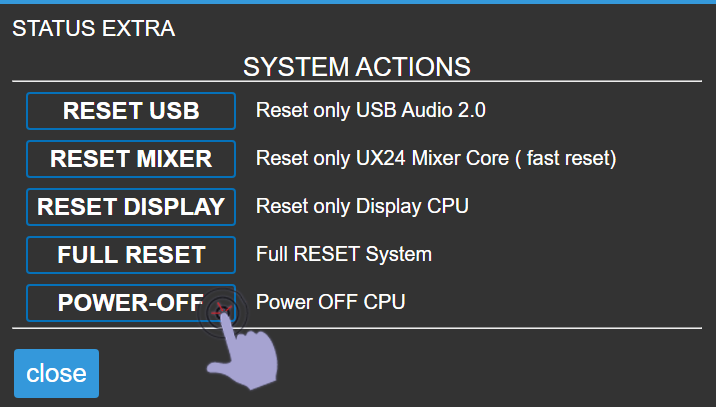
 2. In the popup window, select the **POWER-OFF** option.
 This function **does not power off the entire console**, it only shuts down the system's main CPU.\
Complete shutdown is done using the **mechanical power switch** (on the rear panel or external power supply depending on model).
After shutting down the CPU, **wait a few seconds** before completely powering off the unit to allow proper closure of internal processes.
## System Actions
System actions are available from the main screen by accessing **STATUS → "+"**.
These functions allow **separately restarting different system stages**, and are not used during normal operation.
Reset actions are technical maintenance tools.\
Under normal operating conditions, **it is not necessary to execute them**.
### Available Options
* **RESET USB**\
Restarts only the USB stage.\
Forces the operating system to re-recognize connected USB devices.
* **RESET MIXER**\
Restarts UNIDEX's internal mixing engine and control surface.\
Does not affect the CPU or display.
* **RESET DISPLAY**\
Restarts the onboard computer that manages **streaming** and the **graphical interface**.
* **FULL RESET**\
Restarts all system stages.\
Equivalent to a complete power off and on of the equipment.
This function **does not power off the entire console**, it only shuts down the system's main CPU.\
Complete shutdown is done using the **mechanical power switch** (on the rear panel or external power supply depending on model).
After shutting down the CPU, **wait a few seconds** before completely powering off the unit to allow proper closure of internal processes.
## System Actions
System actions are available from the main screen by accessing **STATUS → "+"**.
These functions allow **separately restarting different system stages**, and are not used during normal operation.
Reset actions are technical maintenance tools.\
Under normal operating conditions, **it is not necessary to execute them**.
### Available Options
* **RESET USB**\
Restarts only the USB stage.\
Forces the operating system to re-recognize connected USB devices.
* **RESET MIXER**\
Restarts UNIDEX's internal mixing engine and control surface.\
Does not affect the CPU or display.
* **RESET DISPLAY**\
Restarts the onboard computer that manages **streaming** and the **graphical interface**.
* **FULL RESET**\
Restarts all system stages.\
Equivalent to a complete power off and on of the equipment.