> ## Documentation Index
> Fetch the complete documentation index at: https://docs.solidyne.ar/llms.txt
> Use this file to discover all available pages before exploring further.
# Streaming services
> UX18 streaming services configuration
## Streaming services overview
UX18 consoles can generate **two independent audio streams** and decode one incoming audio stream.
* **Stream 1 (outgoing)**\
Uses **RTP** protocol, ideal for transmitter site link (**STL**).
* **Stream 2 (outgoing)**\
Compatible with **Shoutcast/Icecast** servers for internet broadcasting.
* **Stream 3 (incoming)**\
Can be **RTP** or **public HTTP streaming**.\
When enabled, the received audio is **automatically decoded and switched** replacing the **AES-1** input.
* **Remote monitoring:** UX18 includes a **WebRTC service** that allows remote audio monitoring from the **Web Control Interface**, both locally and externally via Internet.
## Streaming services configuration
Access through **SETTINGS** screen, under **STREAMING** option. Requires ADMIN profile.\
STREAMING opens the Streaming Interface Access screen.
Shows a **summary of audio transmission and reception streams status**, and allows access to other configuration instances:
* **STREAM CFG** → Access to streaming services configuration.
* **SYSTEM** → Access to LAN configuration for UX18 streaming services\
(not to be confused with WEB remote control LAN configuration).
***
### UP-STREAM (TX) - Icecast/Shoutcast
The **UP-STREAM** tab allows configuring an **Icecast** or **Shoutcast** broadcast server to publish the program signal.
* **RUN/STOP**: Enables or disables streaming transmission when changes are confirmed by pressing **APPLY**.
To optimize system resources, keep stopped when service is not in use.
* **PROTOCOL**: Defines if server is Icecast or Shoutcast type.
* **SERVER IP**: Server destination IP address.
* **PORT**: Server TCP listening port.
* **MOUNTPOINT**: Unique name that identifies the stream on the server.
* **Stream NAME**: Name that identifies the stream.
* **PASSWORD**: Access password for publishing (if applicable).
* **CODEC**: Transmission audio format (Opus or MP3).
* **QUALITY**: Encoding bitrate
* **APPLY**: Applies and saves changes and starts or stops transmission (according to RUN/STOP status).
Configuration parameters for Icecast/Shoutcast are provided by the server provider.
### Audio processing for streaming
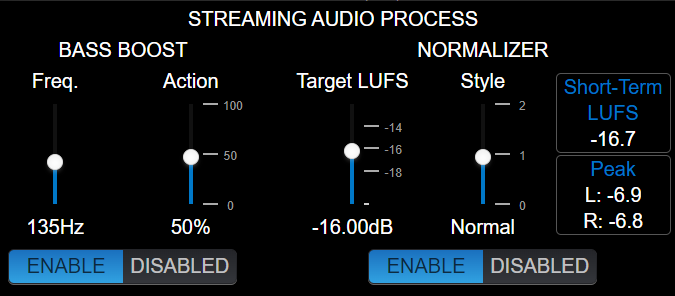
Clicking the **PROCESS** icon accesses the audio processor, which includes **level normalization** and **bass enhancement**. This processing only affects **Icecast/Shoutcast** *streaming*.
 #### Normalizer
Reduces signal dynamics and adjusts level to a constant value, achieving more consistent sound without volume jumps.
* **Target LUFS**: Determines streaming signal target level (± 1 LU).\
Adjusted according to content type:
* **-21 to -19 LU** → Signals with large level variation, without previous control (example: uncompressed microphones).
* **-18 to -15 LU** → Mixed signals of music and speech, using compressors on microphone channels to limit dynamics.
* **-14 to -12 LU** → Already heavily compressed signals (music).
* **Style**: Defines normalizer action times.\
Possible values: *slow*, *normal*, *fast*.
* *Slow*: recommended when there are large volume variations.
* *Fast*: useful for normalizing previously compressed signals.
#### Bass Boost
Applies bass enhancement to the *streaming* signal.
* **FREQ.** → Cutoff frequency; enhancement is applied below it.
* **ACTION** → Adjusts the degree of enhancement applied.
**Recommendation**: use *Bass Boost* in speech-focused broadcasts to obtain voices with greater bass impact.
***
### RTP LINK
The **RTP LINK** tab allows configuring streaming transmission to a specific IP address, for example, to send the program signal to a transmitter site (**STL**).
Implementing an RTP link requires advanced network configuration knowledge.
#### Normalizer
Reduces signal dynamics and adjusts level to a constant value, achieving more consistent sound without volume jumps.
* **Target LUFS**: Determines streaming signal target level (± 1 LU).\
Adjusted according to content type:
* **-21 to -19 LU** → Signals with large level variation, without previous control (example: uncompressed microphones).
* **-18 to -15 LU** → Mixed signals of music and speech, using compressors on microphone channels to limit dynamics.
* **-14 to -12 LU** → Already heavily compressed signals (music).
* **Style**: Defines normalizer action times.\
Possible values: *slow*, *normal*, *fast*.
* *Slow*: recommended when there are large volume variations.
* *Fast*: useful for normalizing previously compressed signals.
#### Bass Boost
Applies bass enhancement to the *streaming* signal.
* **FREQ.** → Cutoff frequency; enhancement is applied below it.
* **ACTION** → Adjusts the degree of enhancement applied.
**Recommendation**: use *Bass Boost* in speech-focused broadcasts to obtain voices with greater bass impact.
***
### RTP LINK
The **RTP LINK** tab allows configuring streaming transmission to a specific IP address, for example, to send the program signal to a transmitter site (**STL**).
Implementing an RTP link requires advanced network configuration knowledge.
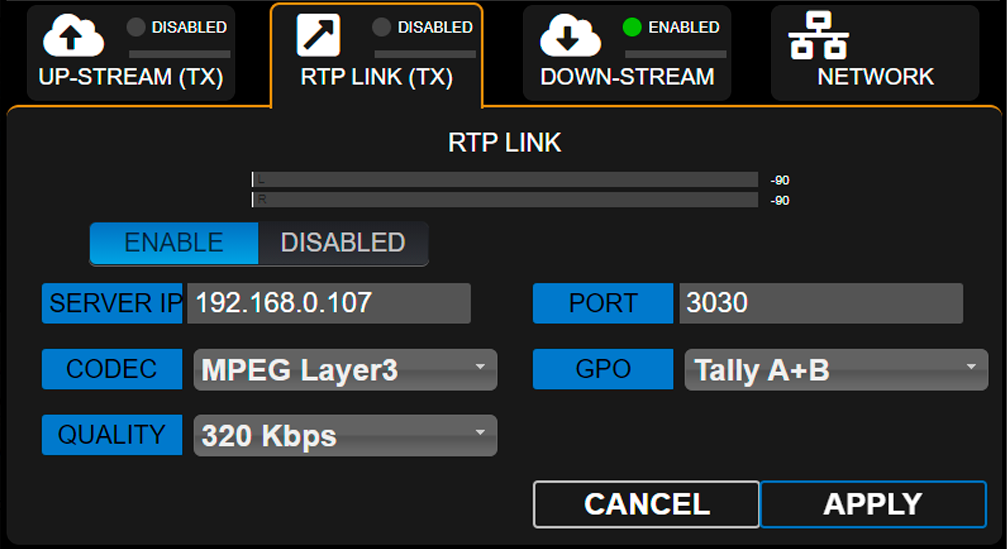 * **ENABLE/DISABLED**: Enables or disables RTP streaming when changes are confirmed by pressing **APPLY**.
To optimize system resources, keep stopped when service is not in use.
* **DESTINATION ADDRESS**: Destination IP address.
* **PORT**: TCP transmission port.
* **CODEC**: Audio format for RTP (**PCM** / **MP3**).
* **QUALITY**: MP3 bitrate or PCM sampling rate.
* **GPO**: Enables sending **on-air light (Tally Light)** signals via TCP/IP for compatible Solidyne equipment.
* **Studio A and B** (lines 1 and 2 respectively)
* **Studio B and A** (reversed order)
* **A+B** (signal activates on both lines, regardless of active studio)
***
### Down-Stream (RX)
Allows configuring an incoming stream. When **DOWN-STREAM** module is activated, the decoded audio is internally routed to **AES-1** input, which changes its name to **STREAM-1**.\
In this mode, the rear panel AES-1 connector is disabled.
* **RUN/STOP**\
Starts or stops streaming decoding when changes are confirmed with **APPLY**.
To optimize system resources, keep stopped when service is not in use.
* **PROTOCOL**\
Defines incoming *streaming* type. The following formats are supported:
* Public **HTTP** and **MMS** streams encoded in PCM 16 (44.1/48 kHz), MP3 or Opus.
* **RTP** streams in PCM 16 (44.1 kHz) and MP3.
* **SERVER URL/IP**\
Name or IP address of server generating the *stream*.
* **PORT**\
TCP port where *streaming* enters.\
Default value: **0**.
* **MOUNTPOINT**\
Unique name that identifies the *stream*.
* **APPLY**\
Applies configuration changes.
**Step by step** Download a step by step guide to [configure an incoming stream](http://www.solidyne.dx.com.ar/wordpress-files/DW/doc-guides/UNIDEX_AplicationNote-Incoming_streaming.pdf).
***
### REMOTE PLAYER
The **Web Remote Control Interface** allows listening to console audio through a **WebRTC** service.
#### Audio Format
* Encoding: **Opus**
* Configurable bitrate: **128 to 320 kbps**
#### Local network operation
When accessing from a **LAN** terminal, no advanced configurations are required.\
The remote player will play audio directly through the local network.
#### Internet operation
To access audio from the **Web Control Interface** through the Internet, the network must implement:
* **Symmetric NAT**
* **TURN server**
> If these services are not available, a warning message will appear in the player.
***
### SERVICES CFG
The **Services Configuration** screen allows assigning audio sources to streaming services.
| Service | Assigned audio source | Additional configuration |
| ------------ | -------------------------------------------------------------------------------------------- | --------------------------------------------------------- |
| **STREAM-1** | **Program** signal present at **AES3-1 PGM** output | Adjustable level in `SETTINGS → OUTPUTS → AES-1/STREAM-1` |
| **STREAM-2** | Can be assigned to **PGM**, **REC**, **AUX**, **VBUS**, **STUDIO**, **CUE** or **Talk-Back** | Configurable in `SETTINGS → OUTPUTS → STREAM-2` |
#### Operational notes
* The **ENABLE** column allows starting or stopping each service.
* It is recommended to **keep stopped** services that are not in use to optimize system resources.
***
### Streaming System
General network settings for **UX18 Streamer** module (not to be confused with web control access).
* **ENABLE/DISABLED**: Enables or disables RTP streaming when changes are confirmed by pressing **APPLY**.
To optimize system resources, keep stopped when service is not in use.
* **DESTINATION ADDRESS**: Destination IP address.
* **PORT**: TCP transmission port.
* **CODEC**: Audio format for RTP (**PCM** / **MP3**).
* **QUALITY**: MP3 bitrate or PCM sampling rate.
* **GPO**: Enables sending **on-air light (Tally Light)** signals via TCP/IP for compatible Solidyne equipment.
* **Studio A and B** (lines 1 and 2 respectively)
* **Studio B and A** (reversed order)
* **A+B** (signal activates on both lines, regardless of active studio)
***
### Down-Stream (RX)
Allows configuring an incoming stream. When **DOWN-STREAM** module is activated, the decoded audio is internally routed to **AES-1** input, which changes its name to **STREAM-1**.\
In this mode, the rear panel AES-1 connector is disabled.
* **RUN/STOP**\
Starts or stops streaming decoding when changes are confirmed with **APPLY**.
To optimize system resources, keep stopped when service is not in use.
* **PROTOCOL**\
Defines incoming *streaming* type. The following formats are supported:
* Public **HTTP** and **MMS** streams encoded in PCM 16 (44.1/48 kHz), MP3 or Opus.
* **RTP** streams in PCM 16 (44.1 kHz) and MP3.
* **SERVER URL/IP**\
Name or IP address of server generating the *stream*.
* **PORT**\
TCP port where *streaming* enters.\
Default value: **0**.
* **MOUNTPOINT**\
Unique name that identifies the *stream*.
* **APPLY**\
Applies configuration changes.
**Step by step** Download a step by step guide to [configure an incoming stream](http://www.solidyne.dx.com.ar/wordpress-files/DW/doc-guides/UNIDEX_AplicationNote-Incoming_streaming.pdf).
***
### REMOTE PLAYER
The **Web Remote Control Interface** allows listening to console audio through a **WebRTC** service.
#### Audio Format
* Encoding: **Opus**
* Configurable bitrate: **128 to 320 kbps**
#### Local network operation
When accessing from a **LAN** terminal, no advanced configurations are required.\
The remote player will play audio directly through the local network.
#### Internet operation
To access audio from the **Web Control Interface** through the Internet, the network must implement:
* **Symmetric NAT**
* **TURN server**
> If these services are not available, a warning message will appear in the player.
***
### SERVICES CFG
The **Services Configuration** screen allows assigning audio sources to streaming services.
| Service | Assigned audio source | Additional configuration |
| ------------ | -------------------------------------------------------------------------------------------- | --------------------------------------------------------- |
| **STREAM-1** | **Program** signal present at **AES3-1 PGM** output | Adjustable level in `SETTINGS → OUTPUTS → AES-1/STREAM-1` |
| **STREAM-2** | Can be assigned to **PGM**, **REC**, **AUX**, **VBUS**, **STUDIO**, **CUE** or **Talk-Back** | Configurable in `SETTINGS → OUTPUTS → STREAM-2` |
#### Operational notes
* The **ENABLE** column allows starting or stopping each service.
* It is recommended to **keep stopped** services that are not in use to optimize system resources.
***
### Streaming System
General network settings for **UX18 Streamer** module (not to be confused with web control access).
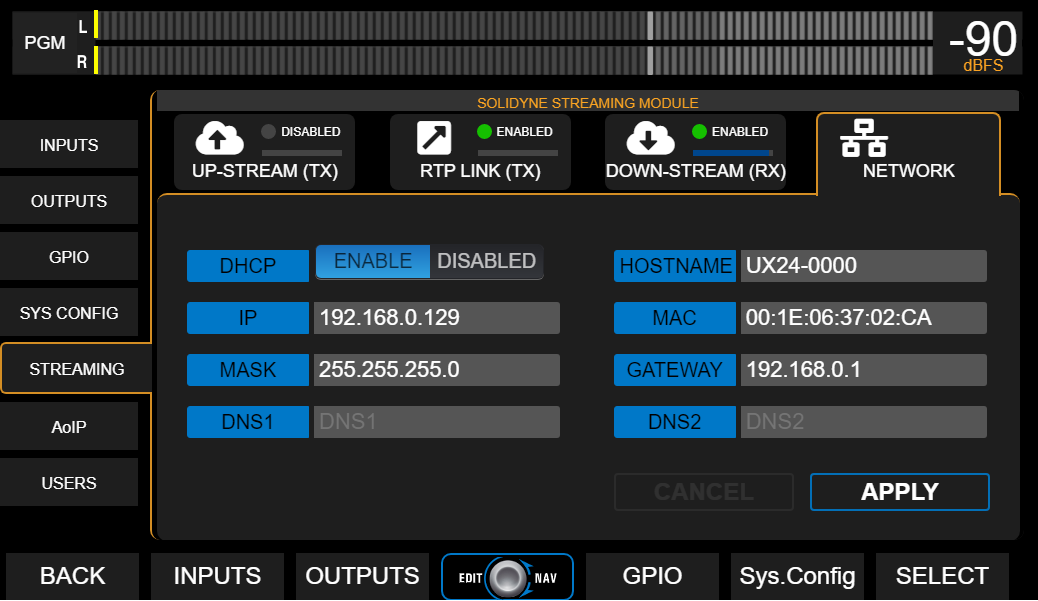 By default, the IP address works in dynamic mode (DHCP). The assigned address is shown on the main screen as **STREAM IP**.