> ## Documentation Index
> Fetch the complete documentation index at: https://docs.solidyne.ar/llms.txt
> Use this file to discover all available pages before exploring further.
# Streaming services
> Streaming services configuration
UX24 consoles can generate **two independent audio streams** and decode one incoming audio stream.
### Available streaming types
* **Streaming 1 (outgoing)**\
Uses **RTP** protocol, ideal for transmitter site link (**STL**).
* **Streaming 2 (outgoing)**\
Compatible with **Shoutcast/Icecast servers** for internet broadcasting.
* **Streaming 3 (incoming)**\
Can be **RTP** or **public HTTP streaming**.\
When enabled, the received audio is **automatically decoded and switched**, replacing the **AES-1** input.
### Signal source and send level
Streaming uses the **PROGRAM** signal taken from **AES-1** output, both for **Icecast/Shoutcast** server upload and **RTP** audio stream.
The default output level (gain=0) is **-20 dBfs** referenced to **0VU** (1 kHz @ 0VU = -20 dBfs).\
Gain is adjusted from **SETTINGS → OUTPUTS** screen.
If you change the **AES-1** output gain, the streaming send level will also change.
***
## Streaming services configuration
It's done from the **SETTINGS** screen under **STREAMING** option.\
It shows four tabs to configure outgoing streaming services (UP-STREAM and RTP Link); incoming (DOWN-STREAM) and network options.
### UP-STREAM (TX)
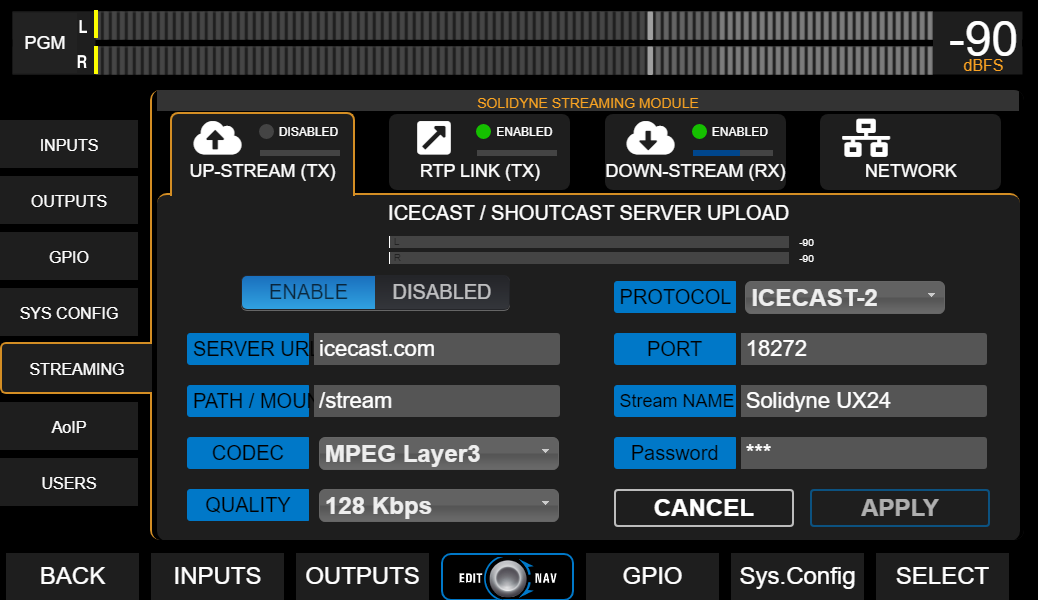
The **UP-STREAM** tab allows configuring an **Icecast** or **Shoutcast** broadcast server to publish the program signal.
 ### UP-STREAM Icecast/Shoutcast
* **ENABLE/DISABLED**: Enables or disables streaming transmission when changes are confirmed by pressing **APPLY**.
To optimize system resources, keep it stopped when service is not in use.
* **PROTOCOL**: Defines if server is Icecast or Shoutcast type.
* **SERVER IP**: Server destination IP address.
* **PORT**: Server TCP listening port.
* **MOUNTPOINT**: Unique name that identifies the stream on the server.
* **Stream NAME**: Name that identifies the stream.
* **CODEC**: Transmission audio format (Opus or MP3).
* **QUALITY**: Bitrate for encoding
* **PASSWORD**: Access password for publishing (if applicable).
* **APPLY**: Applies and saves changes and starts or stops transmission (according to ENABLE/DISABLED status).
Configuration parameters for Icecast/Shoutcast are provided by the server provider.
### RTP LINK
The **RTP LINK** tab allows configuring streaming transmission to a specific IP address, for example, to send the program signal to a transmitter site (**STL**).
Implementing an RTP link requires advanced network configuration knowledge.
### UP-STREAM Icecast/Shoutcast
* **ENABLE/DISABLED**: Enables or disables streaming transmission when changes are confirmed by pressing **APPLY**.
To optimize system resources, keep it stopped when service is not in use.
* **PROTOCOL**: Defines if server is Icecast or Shoutcast type.
* **SERVER IP**: Server destination IP address.
* **PORT**: Server TCP listening port.
* **MOUNTPOINT**: Unique name that identifies the stream on the server.
* **Stream NAME**: Name that identifies the stream.
* **CODEC**: Transmission audio format (Opus or MP3).
* **QUALITY**: Bitrate for encoding
* **PASSWORD**: Access password for publishing (if applicable).
* **APPLY**: Applies and saves changes and starts or stops transmission (according to ENABLE/DISABLED status).
Configuration parameters for Icecast/Shoutcast are provided by the server provider.
### RTP LINK
The **RTP LINK** tab allows configuring streaming transmission to a specific IP address, for example, to send the program signal to a transmitter site (**STL**).
Implementing an RTP link requires advanced network configuration knowledge.
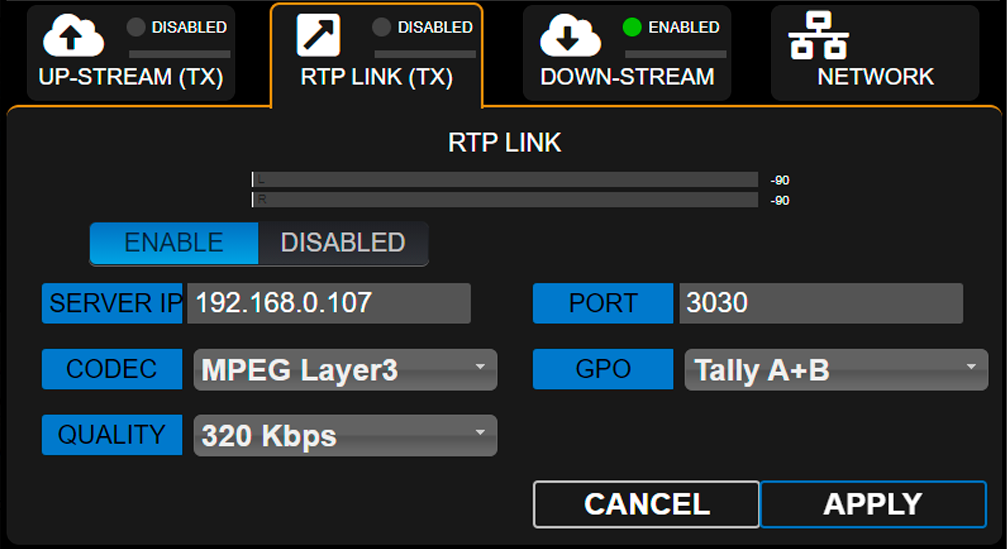 * **ENABLE/DISABLED**: Enables or disables RTP streaming when changes are confirmed by pressing **APPLY**.
To optimize system resources, keep it stopped when service is not in use.
* **DESTINATION ADDRESS**: Destination IP address.
* **PORT**: TCP transmission port.
* **CODEC**: Audio format for RTP (**PCM** / **MP3**).
* **QUALITY**: MP3 bitrate or PCM sampling rate.
* **GPO**: Enables sending **on-air light (Tally Light)** signals via TCP/IP for compatible Solidyne equipment.
* **Studio A and B** (lines 1 and 2 respectively)
* **Studio B and A** (reversed order)
* **A+B** (signal activates on both lines, regardless of active studio)
### Down-Stream (RX)
Allows configuring an incoming stream. When **DOWN-STREAM** module is activated (**ENABLE**), the decoded audio is internally routed to **AES-1** input, which changes its name to **STREAM-1**.\
In this mode, the AES-1 connector on the rear panel is disabled.
* **RUN/STOP**\
Starts or stops streaming decoding when changes are confirmed with **APPLY**.
To optimize system resources, keep it stopped when service is not in use.
* **PROTOCOL**\
Defines the incoming stream type. The following formats are supported:
* Public **HTTP** and **MMS** streams encoded in PCM 16 (44.1/48 kHz), MP3 or Opus.
* **RTP** streams in PCM 16 (44.1 kHz) and MP3.
* **SERVER URL/IP**\
Name or IP address of the server generating the stream.
* **PORT**\
TCP port where the stream enters.\
Default value: **0**.
* **MOUNTPOINT**\
Unique name that identifies the stream.
* **APPLY**\
Applies configuration changes.
**Step by step** Download a step by step guide to [configure an incoming stream](http://www.solidyne.dx.com.ar/wordpress-files/DW/doc-guides/UNIDEX_AplicationNote-Incoming_streaming.pdf).
***
### Network (Streamer Module)
General network settings for the **UX24 Streamer** module (not to be confused with web control access).
* **ENABLE/DISABLED**: Enables or disables RTP streaming when changes are confirmed by pressing **APPLY**.
To optimize system resources, keep it stopped when service is not in use.
* **DESTINATION ADDRESS**: Destination IP address.
* **PORT**: TCP transmission port.
* **CODEC**: Audio format for RTP (**PCM** / **MP3**).
* **QUALITY**: MP3 bitrate or PCM sampling rate.
* **GPO**: Enables sending **on-air light (Tally Light)** signals via TCP/IP for compatible Solidyne equipment.
* **Studio A and B** (lines 1 and 2 respectively)
* **Studio B and A** (reversed order)
* **A+B** (signal activates on both lines, regardless of active studio)
### Down-Stream (RX)
Allows configuring an incoming stream. When **DOWN-STREAM** module is activated (**ENABLE**), the decoded audio is internally routed to **AES-1** input, which changes its name to **STREAM-1**.\
In this mode, the AES-1 connector on the rear panel is disabled.
* **RUN/STOP**\
Starts or stops streaming decoding when changes are confirmed with **APPLY**.
To optimize system resources, keep it stopped when service is not in use.
* **PROTOCOL**\
Defines the incoming stream type. The following formats are supported:
* Public **HTTP** and **MMS** streams encoded in PCM 16 (44.1/48 kHz), MP3 or Opus.
* **RTP** streams in PCM 16 (44.1 kHz) and MP3.
* **SERVER URL/IP**\
Name or IP address of the server generating the stream.
* **PORT**\
TCP port where the stream enters.\
Default value: **0**.
* **MOUNTPOINT**\
Unique name that identifies the stream.
* **APPLY**\
Applies configuration changes.
**Step by step** Download a step by step guide to [configure an incoming stream](http://www.solidyne.dx.com.ar/wordpress-files/DW/doc-guides/UNIDEX_AplicationNote-Incoming_streaming.pdf).
***
### Network (Streamer Module)
General network settings for the **UX24 Streamer** module (not to be confused with web control access).
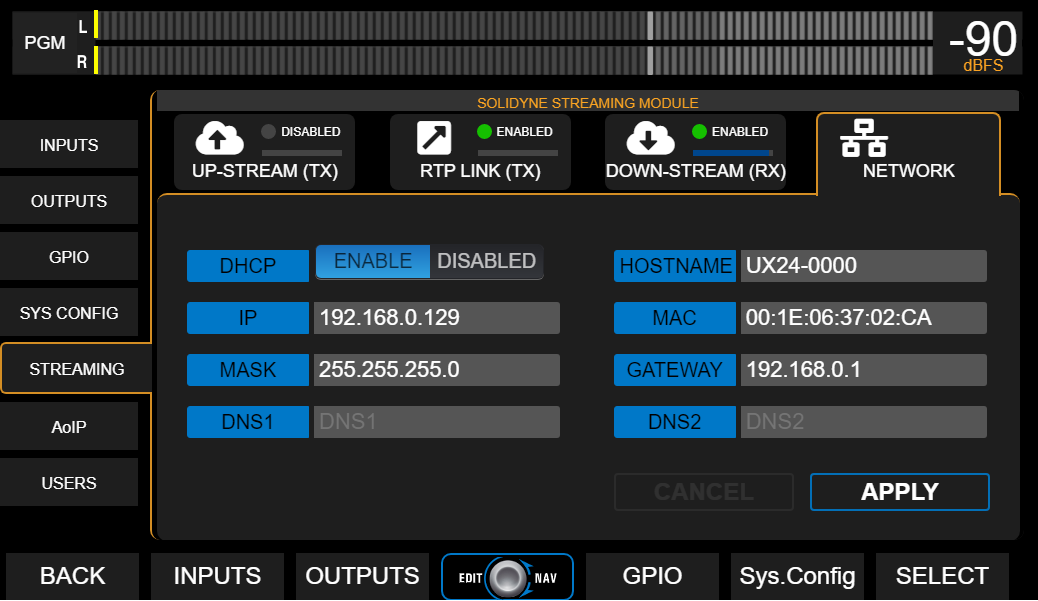 By default, the IP address works in dynamic mode (DHCP). The assigned address is shown on the main screen as **STREAM IP**.
Accessing the streamer module's IP address from a computer on the network will allow viewing and configuring all its functions.
By default, the IP address works in dynamic mode (DHCP). The assigned address is shown on the main screen as **STREAM IP**.
Accessing the streamer module's IP address from a computer on the network will allow viewing and configuring all its functions.