> ## Documentation Index
> Fetch the complete documentation index at: https://docs.solidyne.ar/llms.txt
> Use this file to discover all available pages before exploring further.
# TELCO - Communications
> Operation and management of telecommunications
The TELCO screen manages and broadcasts all types of telephone communications. \
Access it by pressing **TELCO** on the main screen.\
This screen shows channels defined in TELCO mode (see CHANNEL screen), which are those associated with landline phones (POTS) and Bluetooth mobile phones.
 In these instructions, the term "TELCO line" refers to both traditional lines and paired mobile phones.
Landlines (POTS) and mobile phones connect to UNIDEX through external adapters (Solidyne UDX 2TEL and TEL+BT).
Calls, whether through traditional telephony or Bluetooth mobiles, are operated the same way on the console, except for some specifics (for example, when originating a call).
**Each line uses its own channel**. Any channel can be configured in TELCO mode, though physical channels are recommended. Virtual channels in TELCO mode do not support the *talk-back* function for private dialogue.
Main operations (answer, hold, put on air, hang up) can also be done using the **CUE** and **ON AIR** buttons on each channel.
### TELCO Screen
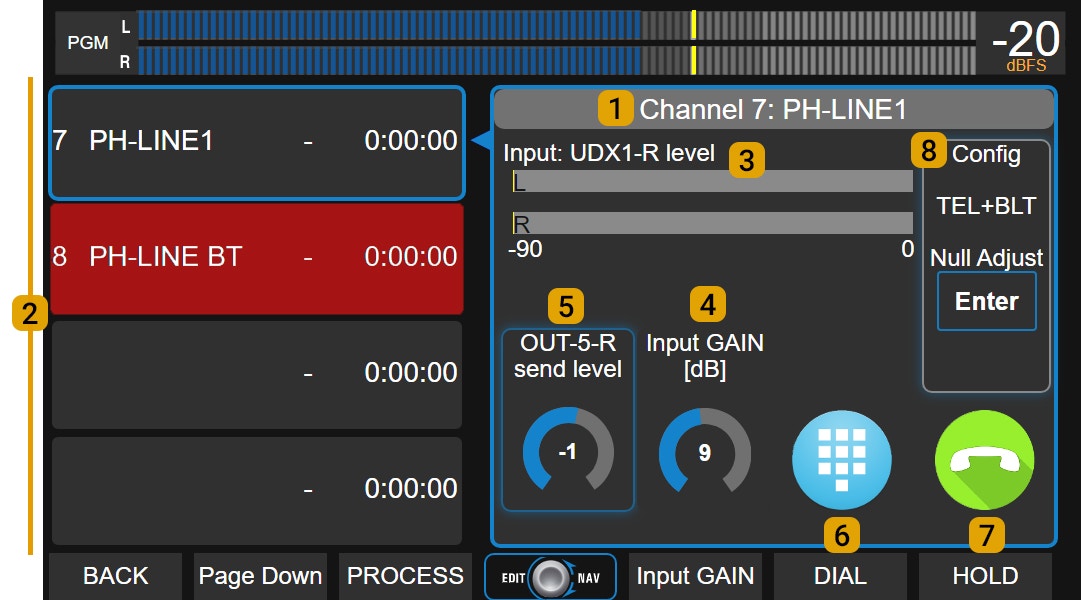
**Available Lines (2)**\
UX24 supports up to 8 TELCO lines. The screen displays them in two groups of four lines.\
If there are more than four, the **Page Down** button accesses the remaining ones. Each line indicates:
* Channel number and name.
* Status:
**Yellow**: incoming call (*RING*).
**Green**: line on hold (*HOLD*).
**Red**: line on air.
* Time on air or on hold.
**Selected Line (1)**\
Shows name and channel of currently selected line. On-screen controls always correspond to this line.\
To select a line, touch it in the list. It doesn't matter if it's on air, on hold or inactive.
**Level Indicator (3)**\
Shows received audio level. Also indicates the UNIDEX input name where the UDX adapter was connected.
**Input Gain**\
Controls input gain associated with the UDX adapter. Adjusted using the encoder.
**Send Level**\
Adjusts output gain associated with the UDX adapter for line send.
**DIAL**\
Opens a DTMF keypad for dialing (landlines only).
**HOLD / HANG UP**
* With incoming call: takes the line and puts it on hold (HOLD).
* With call on air: ends communication (HANG UP).
**CONFIG**\
Shows adapter type and options:
* **NULL ADJUST**: rejection adjustment (only for landlines with UDX 2TEL, 2TEL-P and TEL+BT adapters).
* **BLUETOOTH PAIRING**: activates pairing mode to link a mobile (Bluetooth channels only).
> **Note:** See UNIDEX external adapters section for connection details.
***
## Mobile Phone Operation
### Pairing a Mobile via Bluetooth
When pairing a mobile phone to the console through a Bluetooth adapter, a wireless link is established that allows broadcasting any call made from the mobile, whether through telephone network or applications.
While the mobile can be up to 5 meters away from the UDX Bluetooth adapter, keeping it nearby is recommended to avoid communication interference that may generate audio artifacts (robotic effect).
In these instructions, the term "TELCO line" refers to both traditional lines and paired mobile phones.
Landlines (POTS) and mobile phones connect to UNIDEX through external adapters (Solidyne UDX 2TEL and TEL+BT).
Calls, whether through traditional telephony or Bluetooth mobiles, are operated the same way on the console, except for some specifics (for example, when originating a call).
**Each line uses its own channel**. Any channel can be configured in TELCO mode, though physical channels are recommended. Virtual channels in TELCO mode do not support the *talk-back* function for private dialogue.
Main operations (answer, hold, put on air, hang up) can also be done using the **CUE** and **ON AIR** buttons on each channel.
### TELCO Screen
**Available Lines (2)**\
UX24 supports up to 8 TELCO lines. The screen displays them in two groups of four lines.\
If there are more than four, the **Page Down** button accesses the remaining ones. Each line indicates:
* Channel number and name.
* Status:
**Yellow**: incoming call (*RING*).
**Green**: line on hold (*HOLD*).
**Red**: line on air.
* Time on air or on hold.
**Selected Line (1)**\
Shows name and channel of currently selected line. On-screen controls always correspond to this line.\
To select a line, touch it in the list. It doesn't matter if it's on air, on hold or inactive.
**Level Indicator (3)**\
Shows received audio level. Also indicates the UNIDEX input name where the UDX adapter was connected.
**Input Gain**\
Controls input gain associated with the UDX adapter. Adjusted using the encoder.
**Send Level**\
Adjusts output gain associated with the UDX adapter for line send.
**DIAL**\
Opens a DTMF keypad for dialing (landlines only).
**HOLD / HANG UP**
* With incoming call: takes the line and puts it on hold (HOLD).
* With call on air: ends communication (HANG UP).
**CONFIG**\
Shows adapter type and options:
* **NULL ADJUST**: rejection adjustment (only for landlines with UDX 2TEL, 2TEL-P and TEL+BT adapters).
* **BLUETOOTH PAIRING**: activates pairing mode to link a mobile (Bluetooth channels only).
> **Note:** See UNIDEX external adapters section for connection details.
***
## Mobile Phone Operation
### Pairing a Mobile via Bluetooth
When pairing a mobile phone to the console through a Bluetooth adapter, a wireless link is established that allows broadcasting any call made from the mobile, whether through telephone network or applications.
While the mobile can be up to 5 meters away from the UDX Bluetooth adapter, keeping it nearby is recommended to avoid communication interference that may generate audio artifacts (robotic effect).