

Input Level
The Audimax 362HD does not have manual input level control.Adjustment is automatic through the AGC system.
- The rear panel has input connectors for balanced (XLR and RJ45) and unbalanced (RCA) equipment.
- It can be connected to non-professional consoles (-10 dBV) up to broadcast consoles with balanced outputs of +4 dBu or even +8/+12 dBu.
- The AGC eliminates level variations inherent to operation or recorded material:
- If the level remains low, it compensates the signal to maintain uniform output.
- If the level constantly exceeds 0 VU, it attenuates to prevent overload.
Verifying Input Level
The AGC (image section 2) has a three-stage indicator: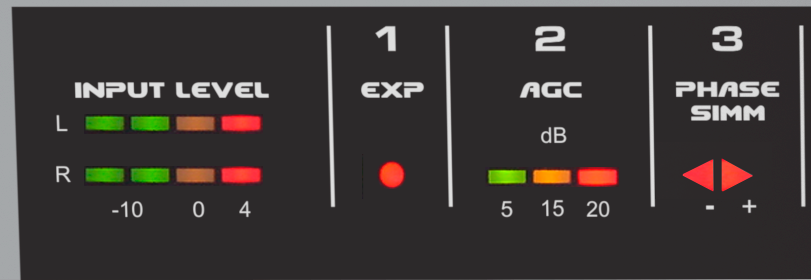
- The first LED (green) should remain lit when music or voice is present.
- The second LED (yellow) should light on peaks or remain steadily lit.
- The third LED (red) should never remain permanently lit.
Sound Customization
The Audimax 362HD has been designed for easy and intuitive operation. No specialized knowledge in audio processing is required to set it up and adjust its sound. Initial setup: simply set all controls to center position… and that’s it!You’ll be on air with proper sound. Sound customization is done through seven rotary controls on the front panel.
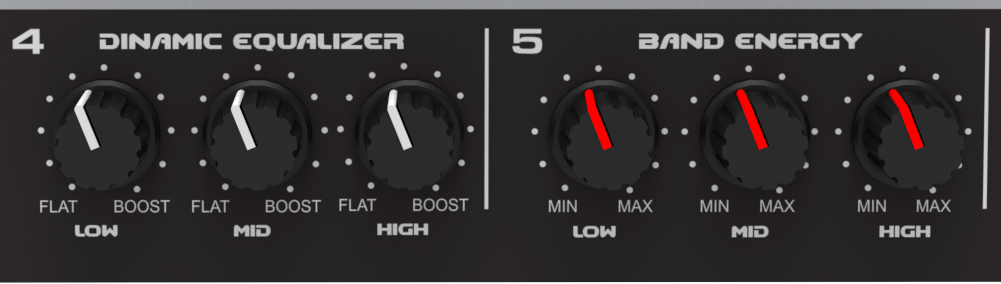
Dynamic Equalizer
The 3-band dynamic equalizer acts on the compression thresholds of each band.Unlike a conventional equalizer, its effect increases with higher signal levels.
- Ensure that the multiband compressor is working (check “Multiband compressor” LEDs).
- Adjust the Dynamic Equalizer knobs for bass, mid, and treble:
- Turn left → increases compression in that band.
- Turn right → decreases compression, releasing the band and enhancing those frequencies.
It’s advisable to maintain a balanced relationship between the three bands. Extreme differences create imbalance between bass, mids, and treble.
- For bass impact, release this band slightly more than mids and treble.
- Remember that listeners can boost bass on their receivers; therefore, it’s better to deliver clean, not over-compressed bass.
Band Energy
These controls increase peak density in the bands by modifying compressor recovery times.- Turn right → compact and aggressive sound (fast recovery).
- Turn left → soft sound with more dynamics (slow recovery).
Multiband Compressor
This is the heart of processing. The indicators show the band compressors action.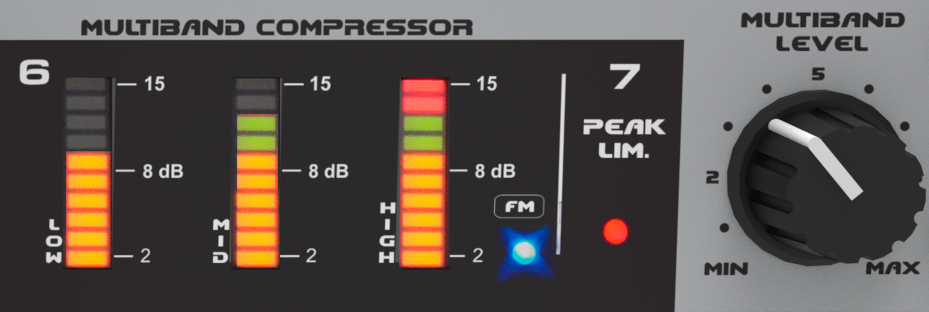
This control has the most impact on station loudness.
- Turn left → softer sound, less processed, with lower energy.
- Turn right → stronger sound, with more energy, but less dynamics and naturalness.
An appropriate working level is achieved when multiband compressor indicators are active without reaching maximum.
- For natural and balanced voices: medium or lower position of Multiband control.
- For more intense processing: use slow recovery times (Band Energy toward the left).
Control Relationships
For Dynamic EQ and Band Energy to work, the multiband compressor must be active. This means at least the first LEDs in each band should light up.Without multiband compression, the controls have no effect since they are associated with compression operation.