

Analog Inputs and Outputs
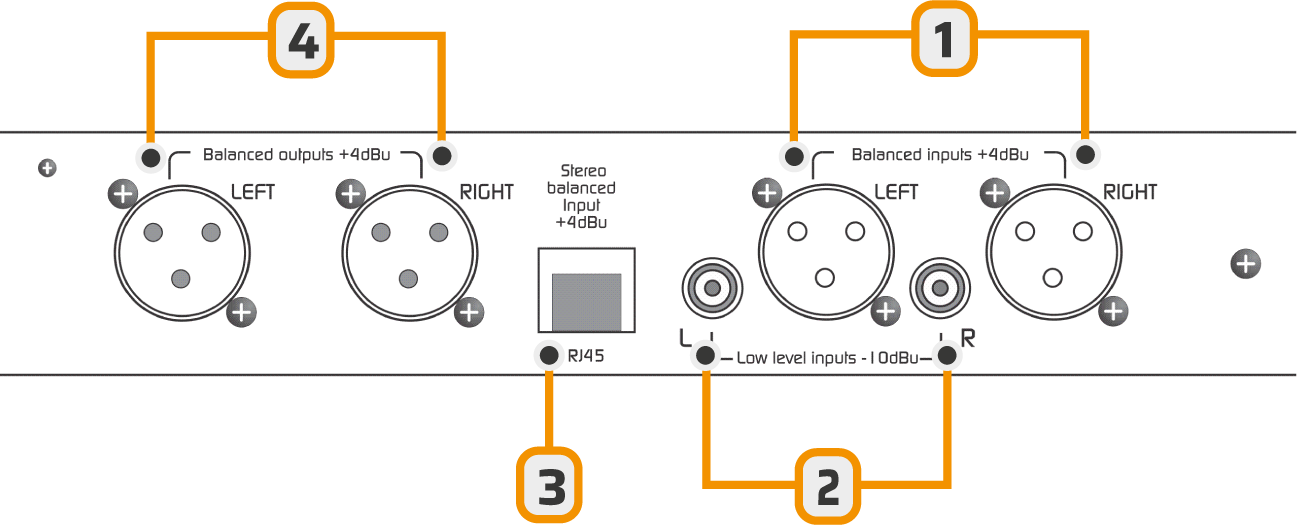
XLR connection is standard: shield to pin 1, inner conductors to 2 (signal +) and 3 (signal -)
USB Digital Input/Output
The Audimax 362HD/USB model includes an optional module to send and receive audio through a PC connection using a standard USB A/B cable.- When connected to a Windows© computer, the system automatically recognizes the processor and installs the necessary drivers.
No additional drivers are required. - The unit is recognized as a stereo sound card:
- USB playback device → corresponds to the audio input to the processor.
- USB capture device → corresponds to the audio output from the processor.
About USB Detection
- Before connecting the USB port, ensure that both the console and PC are properly grounded through three-terminal power plugs.
Check with a multimeter (25V AC scale) between the PC chassis and console chassis.
Reading should be 0V. Otherwise, the USB input of the processor or computer could be damaged.
Reading should be 0V. Otherwise, the USB input of the processor or computer could be damaged.
- Avoid changing USB cables between ports, as Windows may reassign device order.
HD Mode (High Definition)
HD mode is intended for audio applications that do not use the FM stereo encoding stage (MPX).- Fully digital stations (HD Radio and streaming).
- Sound reinforcement applications (small rooms, auditoriums, shopping centers).
- FM pre-emphasis network is disabled (and therefore the de-emphasis on audio outputs).
- A fast-action limiter is enabled on the outputs.
- MPX outputs are disabled.
Enabling HD Mode
To change the operating mode, you need to access the internal micro-switches by removing the top cover of the unit.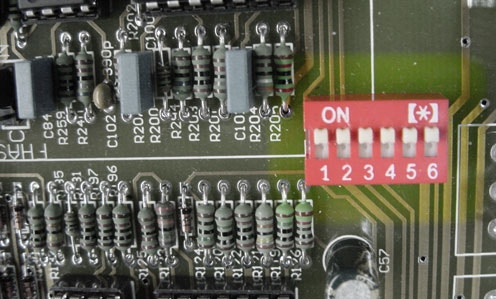
- All switches ON = FM Mode
- All switches OFF = HD Mode
- Lit = FM
- Off = HD
From factory, the unit comes configured in FM mode.