

Connections
On the rear panel there are two pairs of RJ11 connectors: PHONE SET/LINE 1 and PHONE SET/LINE 2.These are used to connect the telephone pairs (POTS lines) and their associated telephones. The telephones operate normally while the lines are not engaged by the HL240-VQ (OFF mode). When a line is engaged (ON mode) it disconnects from the telephone. The lines can come from a public exchange or a private branch exchange (PBX).
Using a PBX degrades the hybrid’s rejection, so it is recommended to connect the HL240-VQ directly to public exchange lines. The telephone hybrid includes internal RF rejection filters for AM, VHF and UHF bands.
If using ADSL lines (with Internet signal), make sure you have the corresponding RF filter. The telephone connections are protected against high voltage discharges (sparks or indirect lightning) using metal oxide varistors, withstanding overvoltages up to 2 kV.
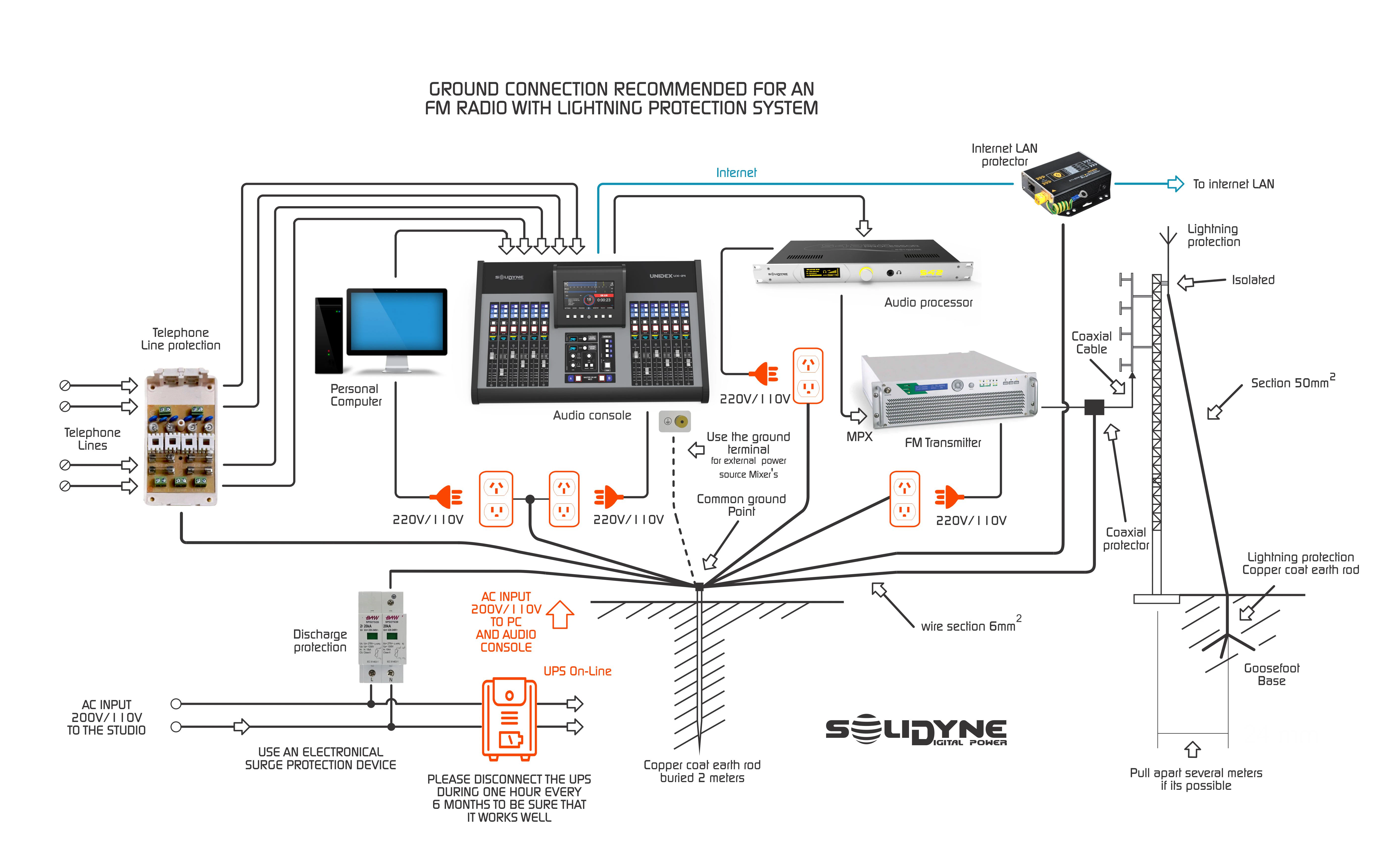
General grounding diagram for radio stations
General grounding diagram for radio stations
Rejection Factor Adjustment
The hybrid rejection adjustment applies only to analog landlines.Its function is to minimize the local signal return coming back through the line.
On an analog line, local sources (studio microphones) and audio from the other end mix on the same pair of wires.
The telephone hybrid separates both signals, but separation is never complete: a small portion of the audio sent to the line returns to the console.
The telephone hybrid separates both signals, but separation is never complete: a small portion of the audio sent to the line returns to the console.
Rejection is factory-adjusted with standardized impedances, but needs readjustment at each installation. The NULL-1 and NULL-2 controls (rear panel) allow calibrating the rejection for each line. Procedure:
1
Establish call
Use the associated telephone to make a call (to another landline or mobile).
2
Inject reference tone
Press the AUDIO TONE button. A tone will be injected into the line.
This tone does not interrupt the signal sent from the console, so sending should be muted.
This tone does not interrupt the signal sent from the console, so sending should be muted.
3
Adjust rejection
Turn the NULL control (multi-turn) in both directions, observing the OUTPUT LEVEL indicator.
Find the position with the lowest signal level.
Find the position with the lowest signal level.
4
Optional monitoring
Listen to the residual tone variation using headphones connected to the HEADPHONES output or monitor from the console.
5
Repeat for other line
Perform the same adjustment for the second line.
Priority System
The priority system applies only to landlines.When local signal is detected (studio microphones), the incoming audio from the line is attenuated by 10 dB. This system has two purposes:
- Give priority to the host in a debate: if both speak simultaneously, studio voice prevails.
- Improve local voice quality by reducing the residual signal that the hybrid cannot reject.
- Avoid using background music (beds), or keep it at very low level, as it could trigger the priority system and attenuate incoming audio.
- In interviews and dialogues, the priority system action is natural and not perceived by the listener.
- In special applications (e.g.: contests where listeners must identify a song), the attenuation may be undesired.
In these cases, using Bluetooth phones is recommended.