

Landlines
Telephone lines are controlled with a button and a level knob: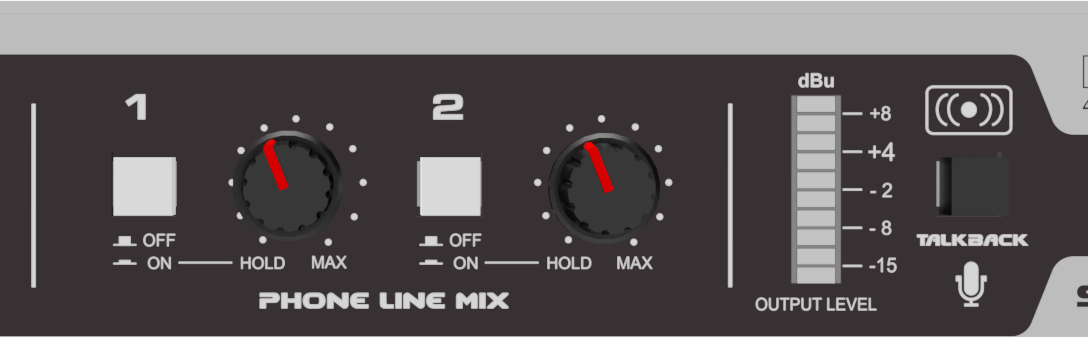
- ON: Picks up the phone line.
- Rotary-HOLD: In this position (fully left) holds the call with program audio.
- Rotary-AIR: Towards the right, adjusts the level in the output mix.
- OFF: Releases the line back to the associated telephone.
The call will also ring on the associated telephone.
- To answer from the HL240-VQ, press the line button.
- To call from the studio, dial on the telephone and then transfer to the HL240-VQ by pressing the line button and hanging up.
Mobile phones via Bluetooth
HL240-VQ handles up to two mobile phones connected via Bluetooth.
- Press and hold the BLT button to turn on the channel (LED flashing).
- Enable Bluetooth on the previously paired mobile phone.
- Connect the mobile to the Solidyne BLT-1 or BLT-2 device.
- Incoming or outgoing mobile calls route through the Bluetooth channel.
To avoid interference, keep the distance between the mobile phone and the HL240-VQ as short as possible.
Receiving a call
Incoming calls (landline or mobile) can be answered from either the associated telephone or the HL240-VQ.The LINE and BLT buttons flash in sync with the ring pattern.
- Bluetooth: a single press of the BLT button answers the call on the mobile. To answer and talk from the phone, first disconnect from Bluetooth then reconnect to transfer to the hybrid.
- Landlines: press ON/OFF for the hybrid to pick up the line. You can also answer from the associated telephone and transfer to the HL240-VQ by pressing ON/OFF before hanging up.
Call hold and talk-back
The unit always sends return audio to the remote telephone, regardless of the level knob position.- With the knob in HOLD position and an active call, the line audio is not mixed to the output, but the other end hears the current program (AUDIO IN signal).
-
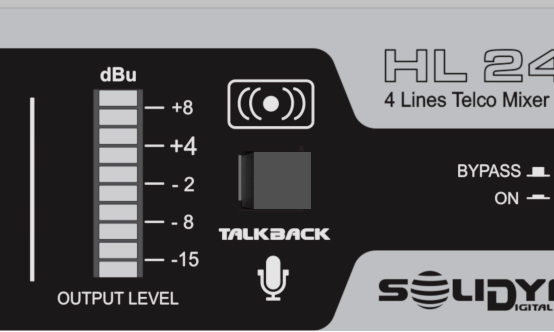
In this state, you can talk to the lines using the built-in Talkback microphone.
Pressing Talkback temporarily interrupts the AUDIO IN signal and sends the operator’s voice to all lines.
Going on-air
The HL240-VQ includes an internal conference mixer.The mix is adjusted with the front panel knobs and sent to the console through AUDIO OUT.
1
Send to output mix
Set the level knob to center position. If talking privately with the line off-air, use this moment to adjust the level.
2
Enable on console
Open the console channel assigned to the HL240-VQ.
3
Adjust on-air level
If there was no previous chat (or it was from the telephone), make the final level adjustment live from the HL240-VQ. Peaks on the OUTPUT LEVEL indicator at +4 dBu.
Ending the call
- On telephone lines:
- OFF disconnects the line from the hybrid and returns it to the associated telephone.
- If OFF is pressed with the telephone on-hook during a call, the communication ends.
- To transfer to the telephone, first take the call off-air, pick up the handset and then press OFF.
- On Bluetooth channels:
- Briefly press the BLT button or end from the mobile phone.
- Before ending, take the call off-air.
- If ended directly from HL240-VQ, an end beep will sound that could go on-air.
Send level to lines
Audio sent to the lines enters through AUDIO IN.The INPUT LEVEL (Send to Lines) control adjusts this level. The send level should maintain peaks between –2 and +4 dBu.
Output level
The balanced output delivers the mix of lines and Bluetooth channels.Adjust the level knobs so the OUTPUT LEVEL indicator shows peaks at +4 dBu. This ensures proper drive to the VQR processing.
When operating with Bluetooth, verify the mobile phone volume is at maximum.
Direct outputs
The PH-1 and BLT-1 outputs deliver pre-fader signal at fixed level.They allow monitoring Line-1 and Bluetooth-1 on the console, even if other lines are on-air. Even when using direct outputs, the signals remain available in the main HL240-VQ mix.