

Mobile Phone Bluetooth Connection
The MX2100 supports connecting a mobile phone via Bluetooth for transmission to studios or to add a mobile phone to the broadcast when linking through an external computer or landline.- Compatible with any Bluetooth-enabled phone.
- Eliminates dependency on hands-free cables that vary by brand and model.
- Maximum distance: up to 5 meters; recommended: keep the phone on your person but separated from the console (shirt pocket or belt on the opposite side).
- Advantage: signal remains digital from the phone to inside the MX2100, achieving better audio quality.
Pairing the Phone with the Console
Initial pairing only needs to be done once per phone. After that, connection is automatic when Bluetooth is activated on both devices.1
Turn off Bluetooth on the console
Verify that the Bluetooth LED (located on the DTMF keypad) is off.
- If it blinks green every 2 seconds → it’s on.
- To turn it off: hold down the ”#” and “9” keys until the LED turns off.
2
Activate search mode on the console
With Bluetooth off, hold down ”#” and “9” for ~10 seconds until the LED flashes rapidly alternating green/red.
This indicates the MX2100 has entered search mode.
This indicates the MX2100 has entered search mode.
3
Search for devices on the phone
On the phone, start searching for Bluetooth devices.
The procedure depends on the model, consult your phone’s manual.
The procedure depends on the model, consult your phone’s manual.
4
Select the console
The phone will show the device Solidyne BTM641 (on older models: BTM751).
- If a code is requested: enter 0000.
- The MX2100 ID is stored in the phone.
- The console LED changes to slow blinking green (one flash every 2 seconds), indicating active connection.
On some phones, after detecting the device you need to press “connect” to activate it. Others activate it automatically.
Reconnecting a Paired Device
To reconnect a previously paired phone:1
Turn on Bluetooth on the console
Press ”#” and “9” until the LED turns green (approximately 5 seconds).
2
Turn on Bluetooth on the phone
When the phone confirms connection, it’s ready to operate.
When making or receiving calls, audio is sent to the console.
When making or receiving calls, audio is sent to the console.
On some phones, reconnection is not automatic and you must manually select the Solidyne BTM641 device from the Bluetooth devices list.
Volume Adjustment
- Set the Bluetooth volume on the phone to maximum to obtain the best signal-to-noise ratio.
- Adjustment must be made during a Bluetooth call.
- Phone volume is independent of Bluetooth volume.
- The value is stored in the phone’s memory.
- If you change phones, you’ll need to readjust the level to maximum.
Turning off Bluetooth on the Console
To avoid battery drain when not in use, turn off Bluetooth by holding down ”#” and “9” until the LED turns off completely.Mobile Phone Cable Connection (obsolete)
Mobile Phone Cable Connection (obsolete)
The RJ-11 “Cellular&Phone” connector allows connecting a mobile phone using a hands-free accessory.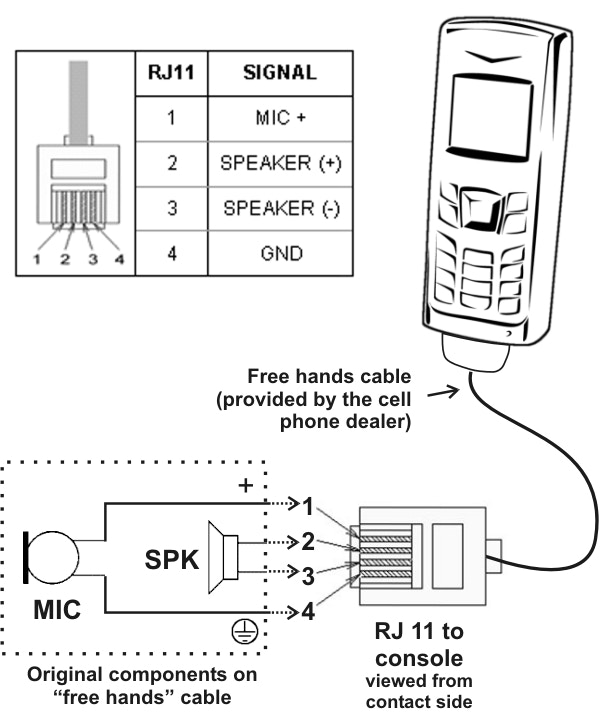
- Used as backup for external computer link, especially when Bluetooth is being used to broadcast another phone.
- The phone transmits microphone (tip of miniplug) and speaker (ring) signals to the MX2100.
- The console sends the program signal to the phone, which retransmits it to the radio.
- Return from the radio arrives at the phone and then to the console, integrating into the headphone mix (STUDIO).
- While using this connector, the phone’s microphone and speaker are disconnected.
The connection cable varies by phone brand and model. You need to acquire the specific “hands-free” accessory for each phone and follow the manufacturer’s documentation.