

Case 1: Real-time Remote Broadcasting
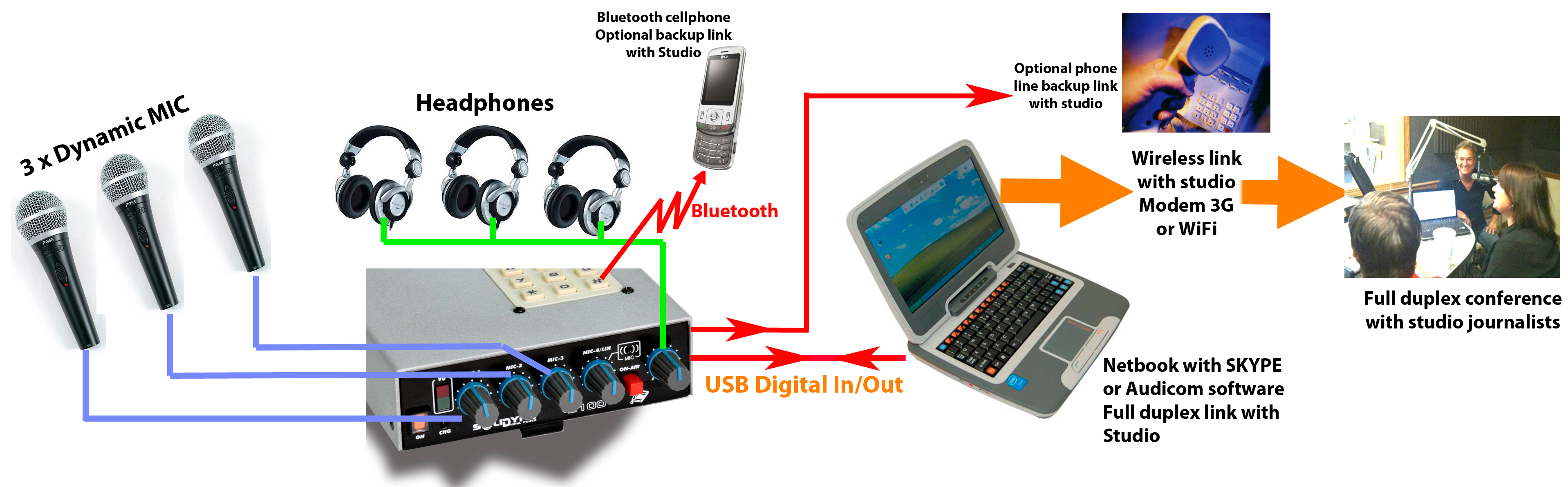
About Broadcasting
- Communication with the radio station is established from a laptop connected via USB to the MX2100.
- Alternatively, a tablet or smartphone connected via Bluetooth can be used.
- The mobile device uses a communications application, such as Skype® to communicate with the Studio.
- Cellular connections via Bluetooth or landline can be used as backup for the Internet link.
If Bluetooth is used to communicate with the radio station in an emergency, the MIC-4/LIN/Bluetooth control must remain closed to avoid a feedback loop.
The Bluetooth return feeds directly into the headphone mix.
The Bluetooth return feeds directly into the headphone mix.
About Studio Return Feed
- The mix generated in the console is sent via USB to the laptop, which transmits it to the Studio.
- From the laptop, the Studio return enters the console via USB, directly to the headphone mix.
- Connecting a microphone to the MIC-3 input triggers the USB return switching to the headphone mix.
- In headphones, the operator hears both the Studio return and the program mix (MIC-1, MIC-2, MIC-3).
In a two-way communication with Studio via Internet, a microphone must ALWAYS be connected to the MIC-3 input. This ensures the USB return is routed to the headphones.
If no microphone is connected to MIC-3:
If no microphone is connected to MIC-3:
- The Studio return will not be heard.
- The USB signal on the MIC-3/USB control cannot be used, as it would send the Studio return to air.
Case 2: High-Quality One-Way Communication
The diagram shows a scenario where the portable console operates as a remote studio, broadcasting to the main Studio through high-quality audio streaming.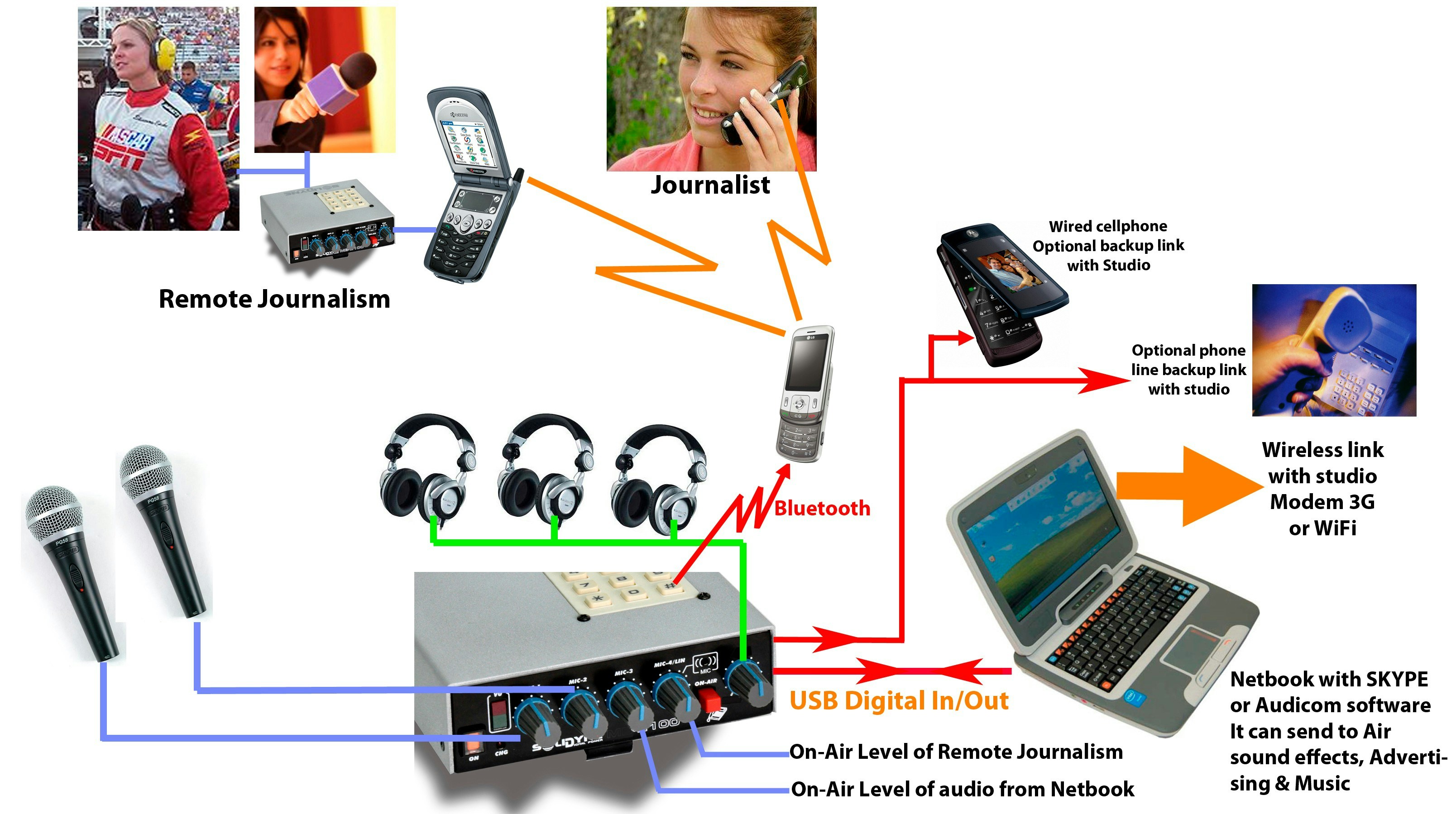
About Broadcasting
- The console connects via USB to a laptop with Internet access.
-
Communication with the Studio is established from the laptop:
- Using Solidyne Audicom® to generate the stream.
- Or any other compatible encoding software.
Skype® or other VoIP apps do not apply in this case, as they are voice-only, while here stereo audio high quality transmission is required. -
As backup options you can use:
- A wired cell phone.
- Or a landline connected to the console’s RJ-11.
About Studio Return Feed
- The one-way data flow allows sending high-quality audio, but dialogue with the Studio is not possible due to streaming delays.
- In this condition, all signal is generated from the MX2100.
- If Studio return feed is mandatory, it is recommended to do it through:
- Cell phone (wired or via Bluetooth).
- The return is heard in headphones, without delay.
About Available Signals
Microphones and Lines- Available: MIC-1 and MIC-2.
- MIC-3 remains unconnected, to enable sending the USB input to air (audio from computer).
Connecting a microphone to MIC-3 triggers the USB return switching to the headphone mix, which only applies to two-way communication with Studio.
- A cell phone linked via Bluetooth allows broadcasting a remote interviewer or journalist (using MIC-4/LIN/Bluetooth control).
- A second MX2100 can also be linked via cell phone.
When the console is connected via USB (to computer or charger), the internal MIC-4 is disabled, and the Bluetooth return appears instead.
This allows broadcasting a phone call when Bluetooth is not being used to link the MX2100 with Studio (assuming the main link is done through the computer).
This allows broadcasting a phone call when Bluetooth is not being used to link the MX2100 with Studio (assuming the main link is done through the computer).