

The operation for both cases is described below.
Mobile Phone
- Via Bluetooth:
- From the mobile phone, call the radio station.
- Once communication is established, use the microphones and headphones connected to the MX2100 to talk with Studios.
- If the radio station calls the journalist, the ring is heard in headphones and the call signal on the mobile.
- The call can be answered from the mobile phone itself or by briefly pressing # 9 on the console.
- Via hands-free cable (deprecated):
- Make the call from the mobile phone.
- Once established, press the PHONE button on the console.
- Connect the “hands-free” cable (already connected to the Cellular & Phone input of the MX2100) to the mobile connector.
- From this point on, dialogue is conducted using the console’s microphones and headphones.
To end communication from a mobile phone, hang up and disconnect using the mobile keypad (refer to phone manual).
Landline
- Press the PHONE button to take the line.
- Dial the radio station number using the console’s DTMF keypad.
- Once communication is established:
- Speak through the microphones connected to the MX2100.
- Listen to Studios through the headphones.
- The program signal (console output) is sent to the radio through the line.
- To end communication: press the PHONE button again, which will remain in the out position, ending the call.
- For incoming calls from the radio station:
- The call RING is heard in headphones.
- The call is answered directly from the console.
If communication is interrupted…
- Mobile Phone:
- The mobile phone itself terminates the call.
- The MX2100 operator can wait for the radio station to call back and answer from the mobile, or press # 9 on the console to answer.
- The link with the radio station is reestablished.
- Landline:
- If the call drops, release the ON-AIR button to initiate or receive new communication.
- For incoming calls from the radio station:
- The RING is heard in headphones.
- Answer directly from the console by pressing ON-AIR.
Diagram: transmission via Bluetooth mobile
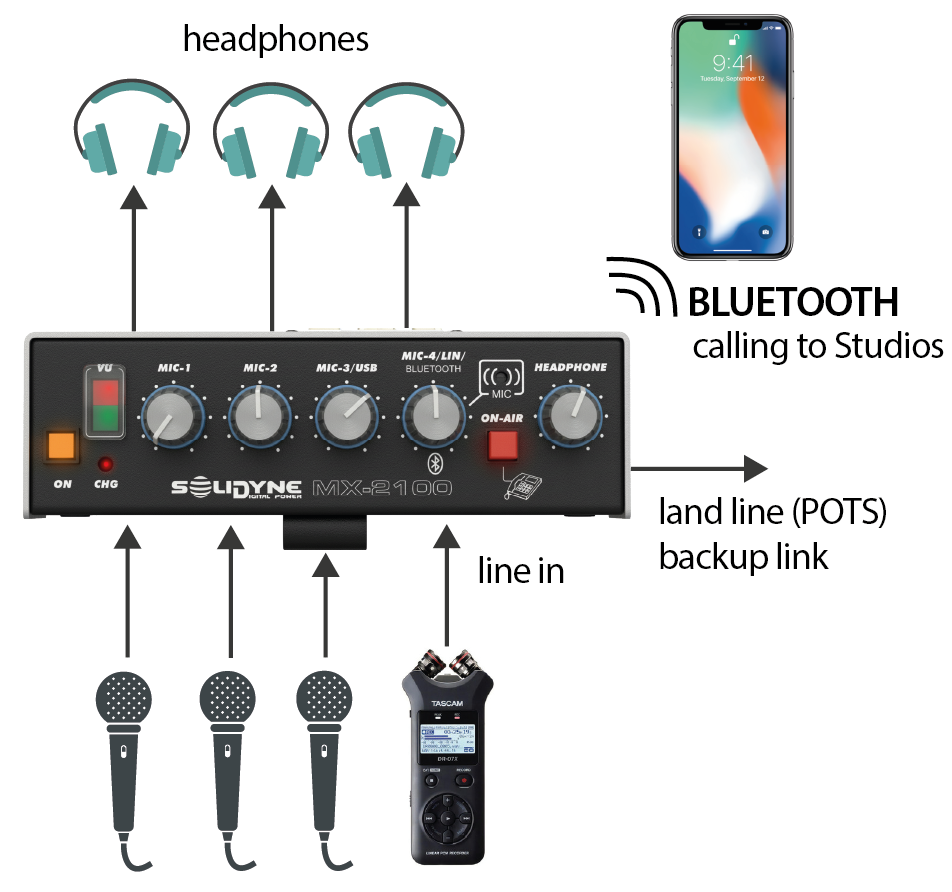
- The console transmits to Studios using a Bluetooth-paired mobile phone.
- A landline can be connected as transmission backup.
- The Studios return feed enters via Bluetooth directly into the headphone mix.
- The mix of up to three microphones and one line input (which allows connecting, for example, a portable recorder) is sent on air.