

Overview
The UDX 2TEL interface allows connection of two analog phone lines (POTS) and their associated telephone sets.- UDX 2TEL-P
Includes controls to take the line and transfer it to the console.
This allows installing the unit and associated phones in locations away from the console, such as a production office. - UDX 2TEL
Has no onboard controls.
Designed for calls to be handled by the operator from the console.
At the mixer, each telephone line works independently on a channel.
UDX 2TEL Connection
Connection is made with two standard STP RJ45–RJ45 cables connected pin-to-pin (Solidyne SOL-P50 or SOL-P25).- “TO UNIDEX INPUT” output → Connect to a UNIDEX input (1 to 4)
- “FROM UNIDEX OUTPUT” input → Connect to an unbalanced analog output (5 to 8)
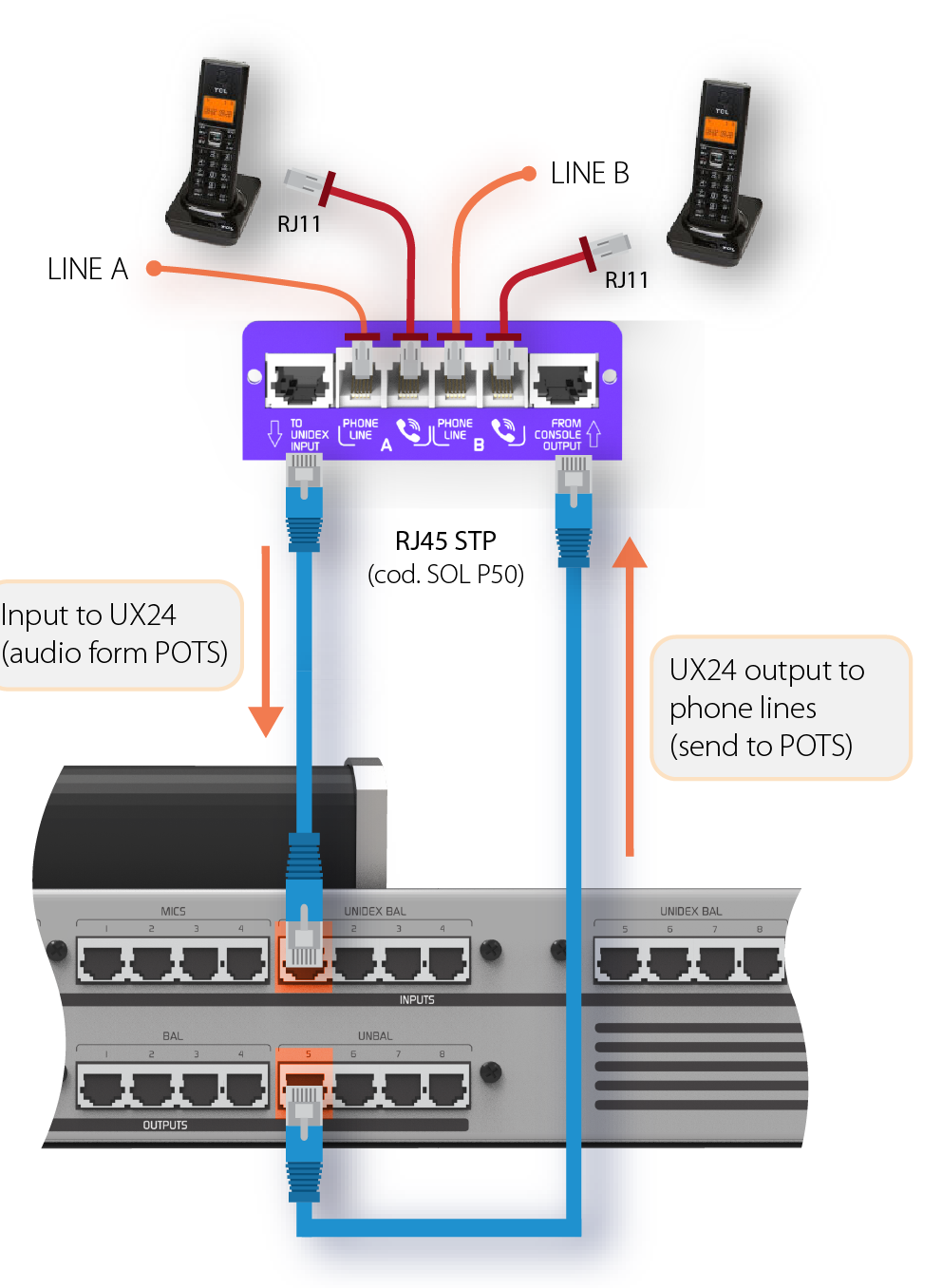
Recommended input/output correspondence
Telephone Line Connection
Telephone lines and their associated sets are connected using standard RJ11 cables.- Two inputs for telephone lines
- Two inputs for connecting associated telephone sets
Connection Type
- Lines can be connected directly to the public telephone network or to the station’s PBX.
- Private exchanges (PBX) slightly reduce hybrid rejection, so direct connection to the public network is recommended.
- GSM ATA adapters (cellular gateway) can be used, which work with a GSM chip and allow connection to a conventional fixed telephone.
Protection and Filtering
UDX TEL adapters include:- Internal RF rejection filters (AM, VHF and UHF bands)
- Internal protection against high voltage surges (indirect lightning) using metal oxide varistors.
Telephone lines have internal protection against high voltage surges (indirect lightning) using metal oxide varistors. However, it is essential to install external gas discharge tubes on public network lines, connected to a 2m buried ground rod.In case of lightning damage, equipment warranty does not cover repairs.
Consult the General Ground Connection Diagram for proper installation.
Consult the General Ground Connection Diagram for proper installation.
- Inputs
- Outputs (sends)
- Channels
Input Configuration
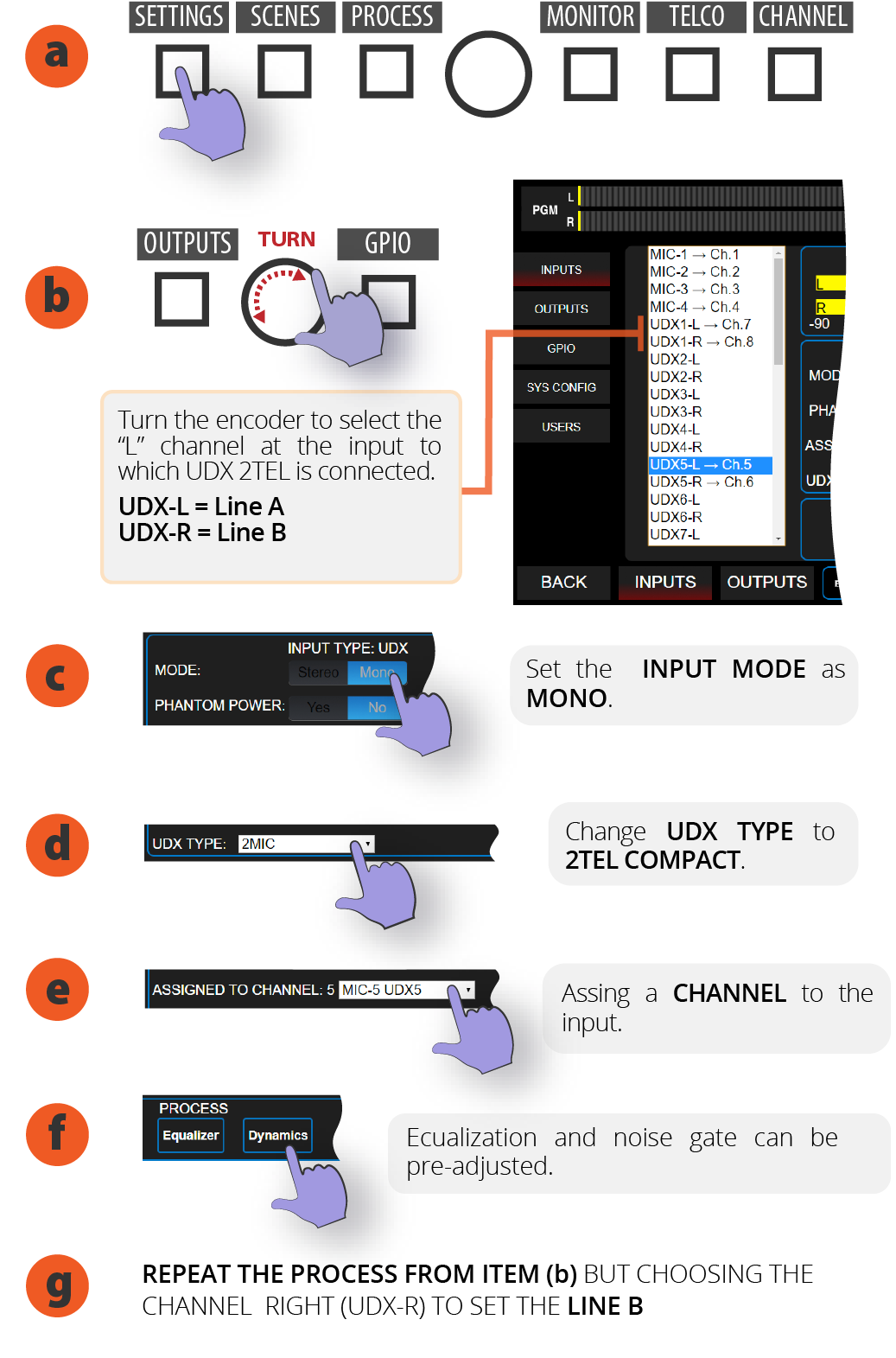
The layout and shape of controls shown below may vary. This does not affect the configuration procedure.
- On the main screen, access SETTINGS.
- Turn the encoder to select the “L” channel of the UNIDEX input where UDX 2TEL is connected. “L” corresponds to LINE A of UDX 2MIC while “R” is LINE B.
- By touching the screen, set INPUT MODE to MONO.
- In UDX TYPE option select 2TEL
- Touch the screen to open the ASSIGNED TO CHANNEL menu to assign a CHANNEL to the input. If you choose a channel that already has an input assigned, a warning will appear. If you continue, the input on that channel is replaced.
- In the PROCESS section you can preset equalization and/or noise gate.
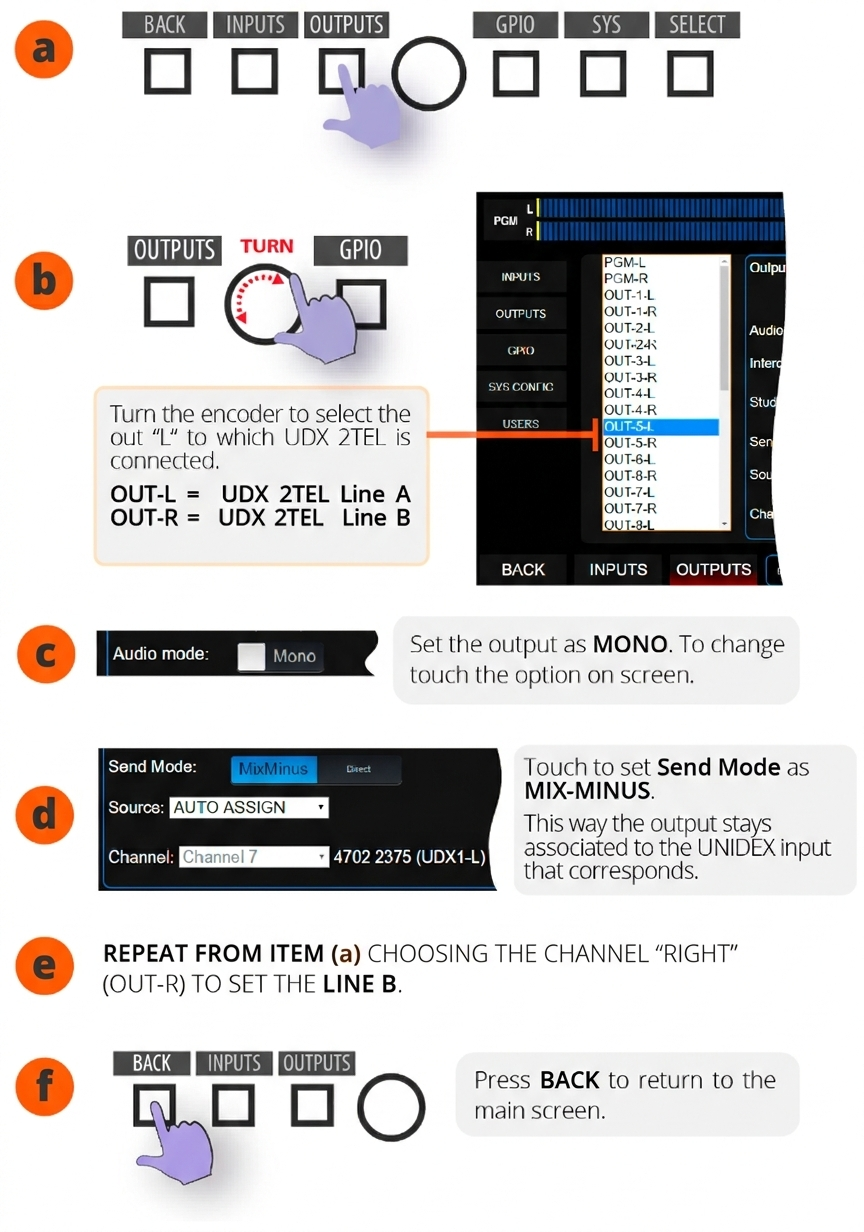
- Press BACK to return to main screen.
- The next step will be configuring the output.
Output Configuration
- From the main screen, access SETTINGS.
- In SETTINGS choose OUTPUTS.
- Turn the encoder to select “L” channel of the output where UDX 2TEL is connected. OUT-L = UDX 2TEL Line A OUT-R = UDX 2TEL Line B
- In AUDIO MODE, set the output to MONO.
- Set SEND MODE to MIX-MINUS. When activating MIX-MINUS the output will be associated with its corresponding UNIDEX input.
- Repeat the operation for Line B.
Channel Configuration
- On main screen, press CHANNEL. CUE buttons change to SELECT mode.
- Press the CUE/SELECT button on the channel to configure. The console exits SELECT mode and shows the CHANNEL screen for the selected channel.
- In MODE option, open the menu and choose TELCO.
- To edit the label, touch the name. An on-screen keyboard will appear to enter text.
- Verify that the output assignment indicates the output corresponding to the input used, and that the mode is MIX-MINUS.
- Press BACK to return to main screen.
Null Adjustment
It is essential to adjust the rejection factor or null for each telephone line.- From factory, units are calibrated to work with ideal impedances.
- In practice, real lines present impedance variations.
- If rejection is not optimized, when putting a call on air, the studio announcer’s voice can mix with the call audio, degrading quality.
- UDX 2TEL
- UDX 2TEL-P
- TEL+BT (landline only)
Adjustment Procedure
- Press TELCO button to access Telecommunications operation screen.
- Establish a call (can be outgoing or incoming). The telephone microphone should be muted on the other end.
- In the CONFIG section of TELCO screen press ENTER Null Adjust. The console injects an adjustment tone into the telephone line. The return level is displayed in INPUT LEVEL. The line does not need to be on air (the fader can be closed).
- Rejection is adjusted from the UDX 2TEL box. Each line has an adjustment preset.
- Using a trimmer tool, gently turn the preset in both directions until finding the point where the signal return shown on the indicator is minimum.
- Once rejection is adjusted, end the call.
- Repeat the rejection adjustment for the other line.
If you change telephone lines, the adjustment must be repeated.