

Microphones
The MiniMixer allows connecting up to 4 dynamic microphones.MIC 3 and MIC 4 inputs share the same fader.
- The MASTER MIC button enables all microphones on air and activates the Tally Light output.
- The microphone mix is internally compressed.
- The compressor acts when the signal reaches 0 VU.
- It is important that the MIC 3+4 channel reaches 0 VU so the compressor can compensate for level differences between voices.
- The compressor action is displayed on the MIC COMP indicator.
Lines
- The USB/LINE IN fader controls the USB digital input when the computer is connected.
- If USB is not connected, this fader controls the LINE IN signal.
- When USB is in use, the LINE IN input can also be used as an alternative input from the PHONE zone controls, which allow switching between PHONE and LINE IN.
- This allows mixing on air: 4 microphones + 2 stereo lines + Bluetooth.
- Raise the fader directly.
- The correct working level is achieved when peaks reach 0 VU.
The USB port generates a program signal feed to the computer.
This audio stream is used for Internet streaming.
This audio stream is used for Internet streaming.
Monitoring
The headphone control in the CUE MONITOR zone sets the level for all four headphone outputs.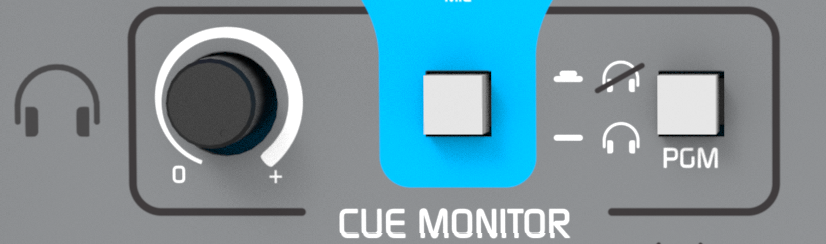
- For individual volume control on each headphone, use headphones with built-in level control or connect an external headphone distributor to any of the outputs.
- When a signal is sent to CUE, it is distributed to all headphone outputs.
- The PGM button in the CUE MONITOR zone allows muting the program signal in headphones to hear only the signals in CUE.
Monitor speakers output
- Headphone output #1 can function as a monitor speakers output, with automatic muting when the Tally Light output is connected.
- When microphones are enabled, the Tally Light activation automatically mutes headphone output #1, preventing feedback between speakers and microphones.
- Audio remains available on the other headphone outputs.
Talk
- The TALK button momentarily interrupts the headphone signal and sends the voice from the built-in internal microphone in the console.
- This allows the operator to communicate directly with all headphones, even if team members are far away.
- This avoids visual signals or the need to remove headphones (which are receiving program signal) to be able to talk.