

Access it by pressing TELCO on the main screen.
This screen shows channels defined in TELCO mode (see CHANNEL screen), which are those associated with landline phones (POTS) and Bluetooth mobile phones.
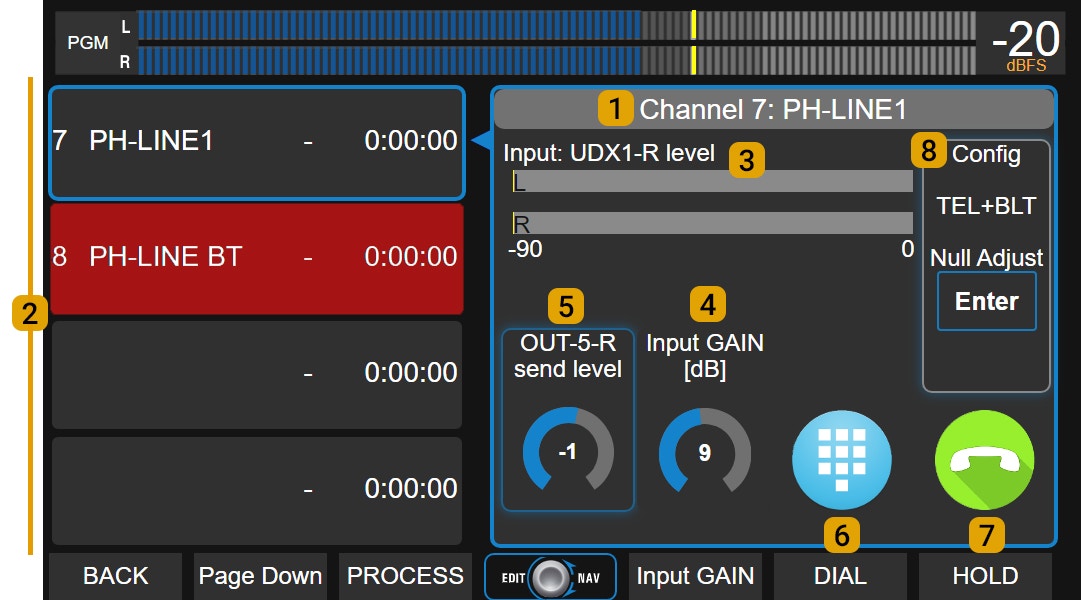
Landlines (POTS) and mobile phones connect to UNIDEX through external adapters (Solidyne UDX 2TEL and TEL+BT).
TELCO Screen
Available Lines (2)UX24 supports up to 8 TELCO lines. The screen displays them in two groups of four lines.
If there are more than four, the Page Down button accesses the remaining ones. Each line indicates:
- Channel number and name.
- Status: Yellow: incoming call (RING). Green: line on hold (HOLD). Red: line on air.
- Time on air or on hold.
Shows name and channel of currently selected line. On-screen controls always correspond to this line.
To select a line, touch it in the list. It doesn’t matter if it’s on air, on hold or inactive. Level Indicator (3)
Shows received audio level. Also indicates the UNIDEX input name where the UDX adapter was connected. Input Gain
Controls input gain associated with the UDX adapter. Adjusted using the encoder. Send Level
Adjusts output gain associated with the UDX adapter for line send. DIAL
Opens a DTMF keypad for dialing (landlines only). HOLD / HANG UP
- With incoming call: takes the line and puts it on hold (HOLD).
- With call on air: ends communication (HANG UP).
Shows adapter type and options:
- NULL ADJUST: rejection adjustment (only for landlines with UDX 2TEL, 2TEL-P and TEL+BT adapters).
- BLUETOOTH PAIRING: activates pairing mode to link a mobile (Bluetooth channels only).
Note: See UNIDEX external adapters section for connection details.