

Rear Panel Connectors
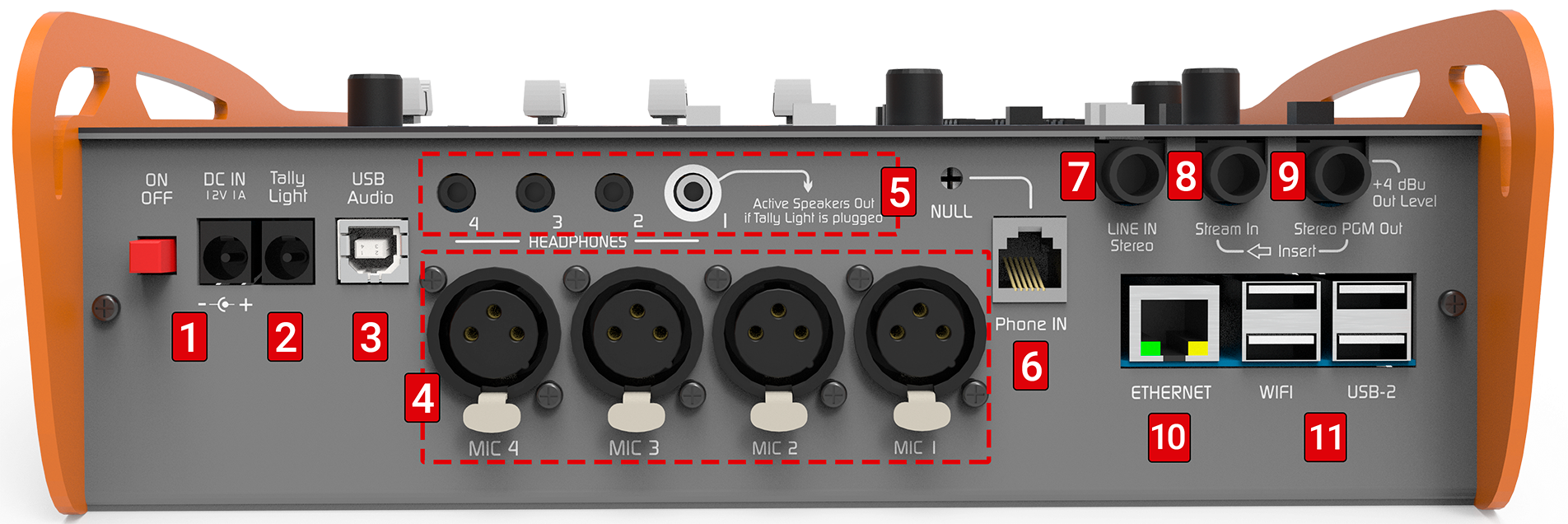
Power Supply (1)
- External power input: 2 mm barrel connector (pin +).
- Switching power supply 90/240 V → output 12 V / 1.5 A.
- Also accepts 12 V external battery (observe polarity).
- Internal battery: approx. 4 hours autonomy (SIP call via Ethernet, without Wi-Fi or Bluetooth).
- Charging: occurs with unit powered on and connected to external supply.
- Full charging time (completely discharged battery): 10 hours.
On-Air Light (2)
- 2.5 mm barrel connector (pin +).
- Provides 12 VDC, supports up to 200 mA.
- When an on-air light is connected:
- Headphones #1 output becomes monitor speakers output.
- Automatically mutes when microphones are activated to prevent feedback.
USB Audio (3)
- Digital connection to computer via USB A/B cable (use provided cable).
- Recommendation: do not exceed 4 m length.
- Compatible with Windows 7 to 11, Linux Ubuntu and macOS (automatic recognition).
-
System detects:
- USB Playback Device → LINE USB input on console.
- USB Recording Device → audio output from PGM.
In Windows, manage through: Control Panel → Sound → Audio → select playback and recording devices.
Microphones (4)
- Four balanced inputs (XLR) for dynamic microphones.
- MIC 3 and MIC 4 share the same fader.
- Recommendation: use microphones of same brand and model on shared inputs.
Headphones (5)
- Four 1/8” TRS outputs (minijack).
- All deliver same level, controlled by CUE MONITOR knob.
- Output #1 can be used as monitor speakers output:
- Automatically mutes when on-air light is connected and microphones are sent to PGM.
Landline Phone (6)
- RJ11 connector for POTS line connection.
- Can connect directly to public network or PBX (private exchange).
- Internal surge protection with varistors.
-
NULL Preset allows hybrid rejection adjustment.
Rejection adjustment (NULL)
Performed when connecting console to line. If console is disconnected and later reconnected to same phone line, adjustment is not necessary.
However, readjustment is required each time connected to a different line.1Prepare signal
Send spoken content to PGM from computer. If spoken content unavailable, live microphone speech can be used.2Establish call
Make a call using landline (PHONE).3Mute caller
Ask other end to activate mute or remain silent.
You can call your own mobile phone and mute its microphone.4Listen in CUE
Remove PGM from headphones (PGM button in CUE released). Listen to line in CUE.5Adjust NULL preset
Turn NULL preset until finding point of minimum return.6Finish
End the call.
Stereo Line Input (7)
- Unbalanced 1/4” TRS connector.
- Controlled by LINE fader when USB is not connected.
- If USB is active, LINE becomes secondary input (from PHONE section).
Program Insert (8)
- Stream-In 1/4” TRS with interruption contact.
- When connected, replaces internal PGM mix in streaming and USB.
- Allows external processors: PGM Out → Processor → Stream-In.
Program Output (9)
- Stereo PGM Out (1/4” TRS).
- Sends complete mix: microphones, USB, auxiliary line and phone lines.
Ethernet (Wired Network) (10)
- RJ45 port for local network connection.
- Uses:
- Web access to CODEC configuration.
- Internet connection for SIP and streaming.
- Web access to recordings.
- Factory setting: DHCP enabled.
USB Ports (Wi-Fi and Modem) (11)
- USB 2.0 type A ports.
- Allow connection of:
- Wi-Fi antenna.
- 4G modem (requires 1 m extension cable).