

1
Access the update system
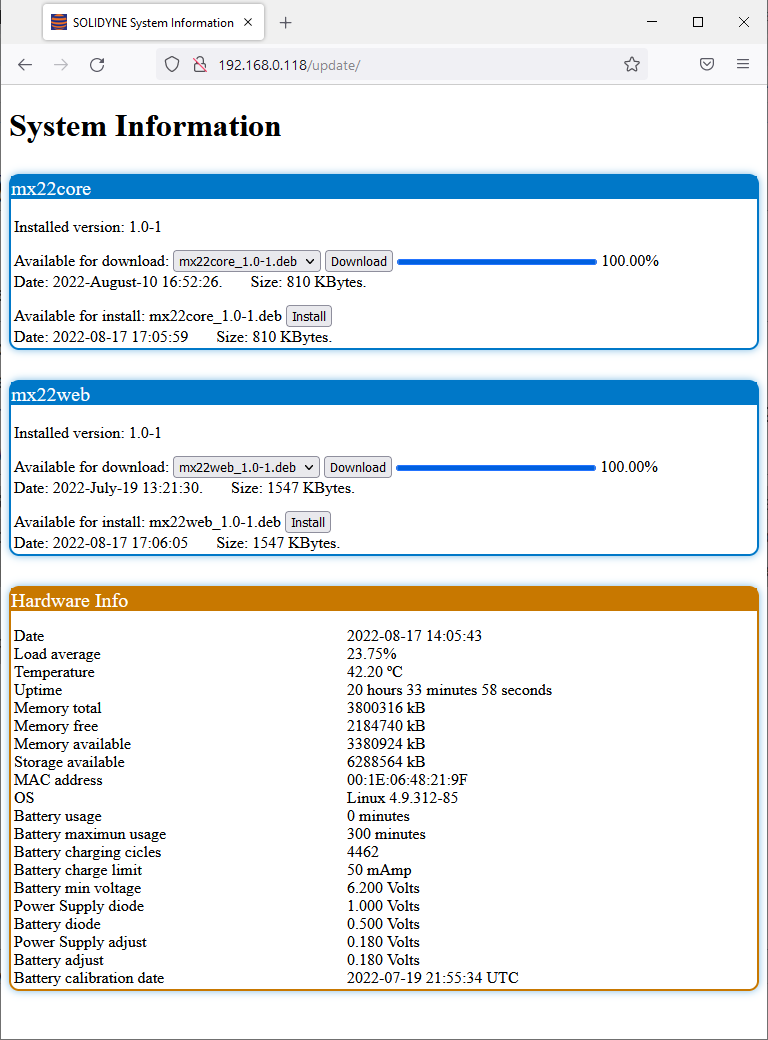
Enter the console’s IP address in the browser followed by the subpath /update.
Example:
Example:
http://192.168.0.121/update2
Check available packages
The screen displays the installed software packages and, if available, the latest versions ready for update.
3
Download update
Click Download to get the latest version.
The package is stored in the console’s internal memory.
The package is stored in the console’s internal memory.
4
Install update
Once the download is complete, the Install option becomes available.
Click to start the installation process.
Click to start the installation process.
- The console allows updates even over Wi-Fi.
- Since the package is stored locally before installation, the console can complete the installation autonomously.
- The Hardware Info section displays hardware information such as battery charge cycles.