

Recording Screen
The MX2200 console allows you to make a backup recording of the event in stereo MP3 format (16 bits / 48 kHz), widely supported by audio players and editors. The RECORDING screen is accessed by rotating the encoder from the HOME screen. It allows you to start/stop recording and configure its parameters.
- STATUS
Allows you to enable or stop recording.
When stopped, the file is automatically generated with the content recorded up to that moment. - MAX TIME
Defines the maximum recording time.- Prevents the operator from having to stop it manually.
- Recording stops automatically when reaching the defined time.
- Editing: value is entered using the console’s numeric keypad (maximum 240 minutes / 4 hours).
- It’s possible to increase the time limit while recording is in progress, without interrupting it.
- BIT RATE
Defines audio quality.- Range: 64 to 320 kbps.
- The higher the value, the better quality and larger file size.
- At 192 kbps approximately 100 hours can be stored inside the console.
When recording is enabled, the main screen indicates the recording status and shows the remaining available time.
Managing Recordings
Management (monitoring, playback, renaming, downloading and cleanup) is done remotely from a networked computer. To access: enter the equipment’s IP address followed by /recording in a browser (Firefox, Chrome, Safari, Edge, etc.). Example:192.168.0.118/recording
1
Connect the console
Connect the console to the local network using the Ethernet port (recommended) or Wi-Fi antenna.
2
Open browser
On a computer on the same network, open a browser and enter the MX2200’s IP address with the
/recording subpath.3
Get IP address
To find the assigned IP, rotate the CONTROL (encoder) knob and access the SETUP screen.
The first three items show the connection status and IP address for Ethernet, Wi-Fi and 4G Modem.
The first three items show the connection status and IP address for Ethernet, Wi-Fi and 4G Modem.
Web Interface
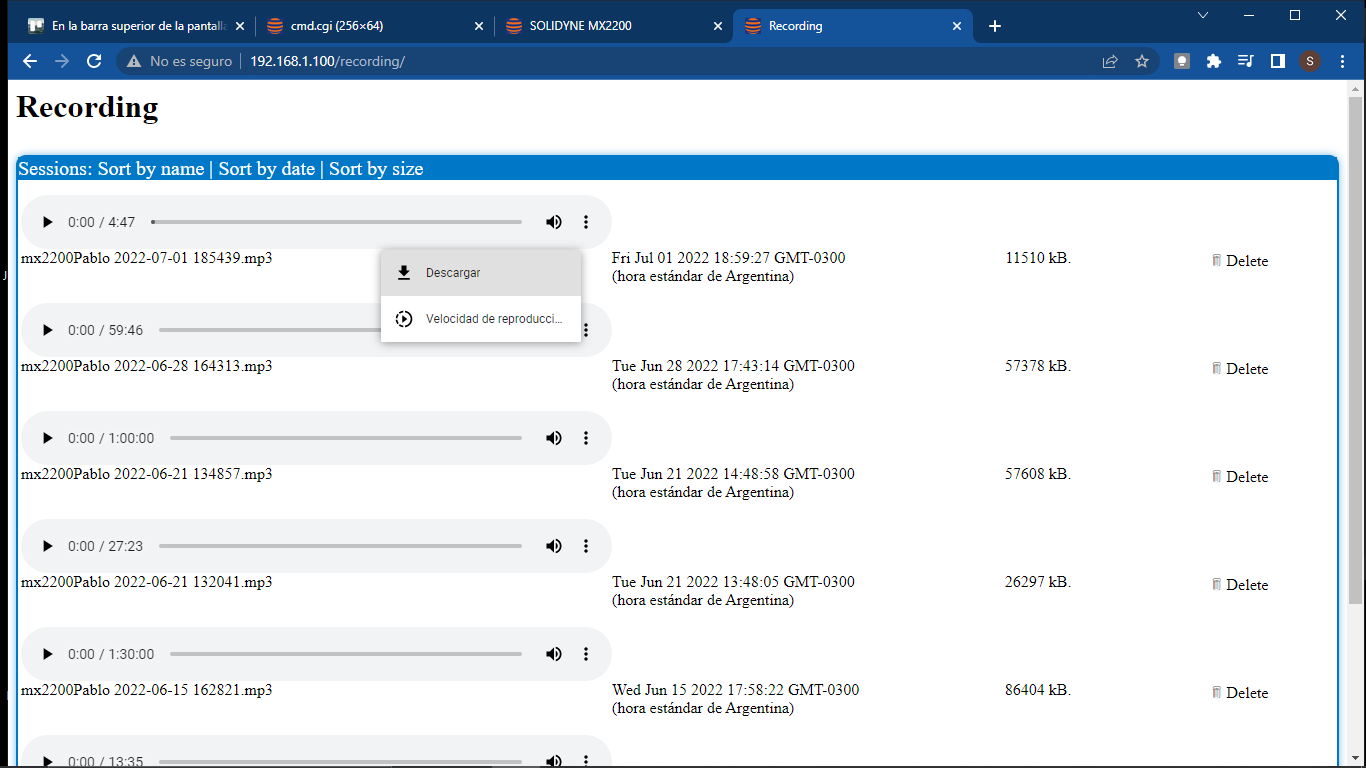
-
Each recording is saved with the name:
[Equipment name] + [Date and time] - The HTML5 interface includes a player to forward, rewind and pause.
-
The list can be sorted by name, date or size.
The displayed date corresponds to the local time of the client computer, not the console.
- Audio can be downloaded and will be saved to the browser’s default downloads folder.