

- Service plans are usually based on the number of simultaneous users allowed.
- Once access is configured on the console, usage is very simple: just ensure the MX2200 is connected to the Internet and start broadcasting.
- It is an ideal method when mass signal distribution is required.
- Start HTTP STREAM
- Reception at the studios
1
Open Connection Center
Turn the encoder until the CONNECTION CENTER screen appears and press it to enter.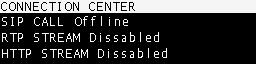
2
Select HTTP STREAM
Navigate with the encoder, select HTTP STREAM and press to open the option.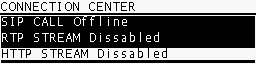
3
Enable the link
On the control screen, select YES to start the link with the web server.
When the connection is established, both CONNECTION CENTER and HOME screens will show HTTP STREAM ENABLED.
When the connection is established, both CONNECTION CENTER and HOME screens will show HTTP STREAM ENABLED.
4
End the link
Repeat the procedure and select NO to disable the transmission.
This method is ideal for public streaming of a radio station or event, allowing global access without requiring specialized software for listeners.