RTP connection offers maximum quality and low latency, but requires network configuration at both ends (transmitter and receiver).
It is ideal for fixed installations or locations with known and controlled networks.
Network Prerequisites
Make sure you have the correct IP/port defined and have resolved NAT / firewall / port forwarding at the receiver. Without this preparation, the link may not establish.
Start RTP from MX2200
Return from Studios
Studio Reception (VLC)
1
Open Connection Center
Turn the encoder to CONNECTION CENTER and press it to enter connection options.
2
Select RTP STREAM
Choose RTP STREAM and press to open the RTP link screen (enable/disable).
3
Enable the link
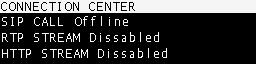
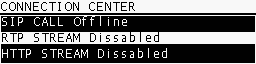
Select YES to start the RTP link to the studios.When active, both CONNECTION CENTER and HOME screens show RTP STREAM ENABLED.
4
End the link
Repeat the procedure and select NO to disable RTP.
Before starting, verify that the network and audio format configuration in the MX2200 matches what is expected at the receiver (destination IP, port, codec and sampling rate).
RTP transmission is unidirectional. Return is not typically used in this mode because the location generates content without studio interaction.
If you need return audio (intercom or floor), use a SIP call or telephone communication (Bluetooth mobile or POTS landline) in parallel to RTP.
To receive streaming from an MX2200 on a computer, use software with RTP support. VLC Player (free) is recommended.
1
Choose compatible format
Configure the MX2200 with a format that the receiver supports directly:
PCM16 @ 44.1 kHz (linear)
MP3 (any available mode)
OPUS requires an SDP (Session Description) file to describe the content to the player.
2
Open network location in VLC
In VLC Player go to Media → Open Network Location.
3
Enter the URL
Use the format:
[protocol]://[source_IP]:[port]
Example:
rtp://0.0.0.0:3030
Where:
rtp is the protocol used by MX2200.
0.0.0.0 means “listen from any incoming IP” on the receiving PC.
3030 is the configured port for reception.
Some VLC versions also accept: rtp://@:3030
4
Verify firewall/port
Ensure the configured UDP port is allowed in both system firewall and studio router.