

PROCESS SCREEN
Press PROCESS on the main screen to access. This also activates SELECT mode to choose a channel.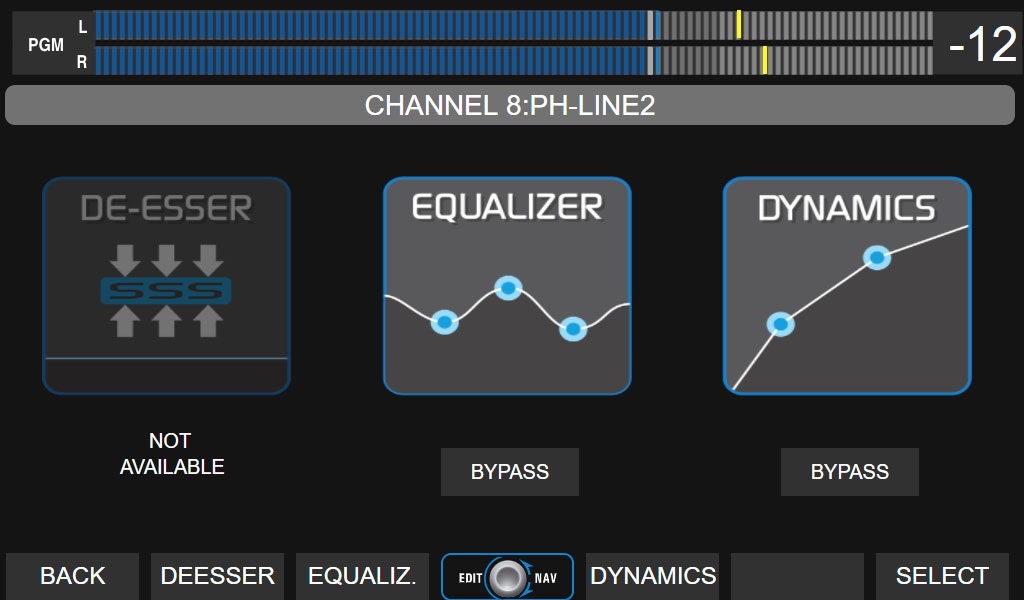
PROCESS screen functions
- View which processors are on the channel and if they are active or in BYPASS.
- Enable/disable a processor by touching BYPASS.
- Access settings by touching the icon or contextual button.
- In SELECT mode, use CUE/SELECT on the console or the encoder to scroll through all 24 channels (physical in cyan, virtual in purple).
- Any action in PROCESS cancels SELECT, applying changes to the active channel.
- SELECT can also be activated from PROCESS to choose another channel.
Done by combining the encoder and touch options, as indicated for each processor.
Process settings can be saved in the scene.
PARAMETRIC EQUALIZER
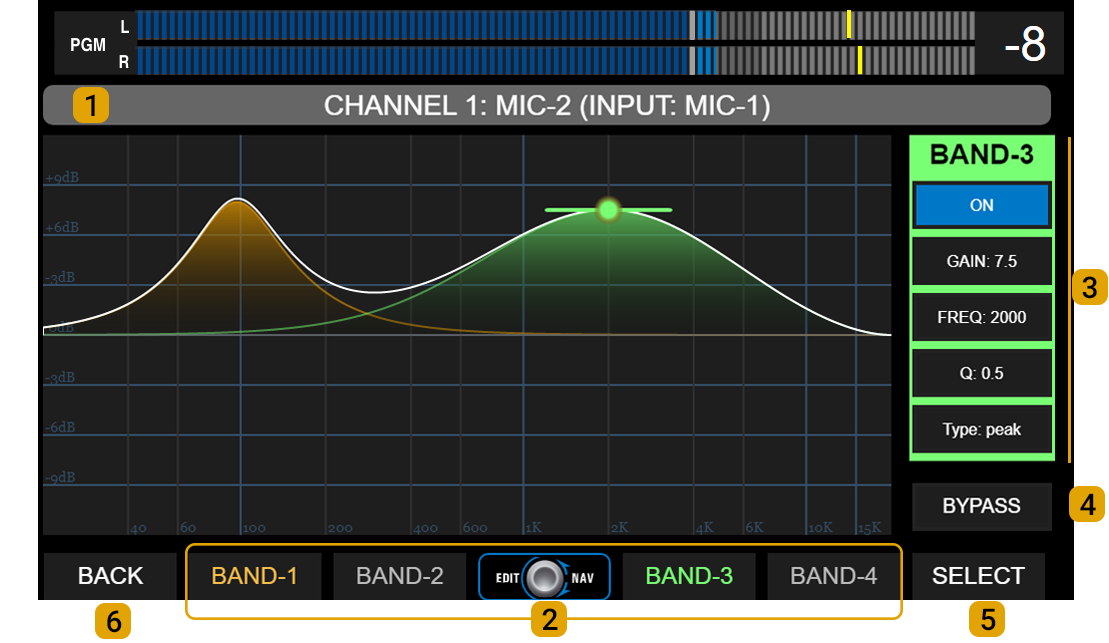
Each band has a color that identifies it in the graph and parameter area.
All inputs have 3 parametric bands, except MIC-1 to MIC-4 inputs which have four bands. 3 - CONTROLS: Parameters for each EQ band. Background color changes with selected band.
- GAIN: Gain in dB, with a range of ± 9 dB.
- FREQ: Adjusts working frequency. All bands cover 20 Hz to 20 kHz.
- Q: EQ bell width. Determines precision of applied correction.
- TYPE: Band operation mode. Toggle by touching TYPE on screen.
- Band #1: peak, low-shelf or HPF.
- Band #2 (and #3 on microphone inputs): peak or HPF/LPF.
- Band #3 (#4 on mic inputs): peak, hi-shelf or LPF.
- ON/OFF: Band enable/disable. Toggle by touching ON/OFF on screen.
Toggle by touching BY-PASS on screen. 5 - SELECT: Activates channel selection mode. 6 - BACK: Returns to previous screen.
High-Pass / Low-Pass Filters
- Band #1 can function as 2nd order high-pass filter (HPF) (12 dB/oct).
- Band #3 (Band #4 on MIC-1 to MIC-4 inputs) can function as 2nd order low-pass filter (LPF) (12 dB/oct).
- Band #2 (and Band #3 on MIC-1 to MIC-4 inputs) can work as HPF or LPF.
If two bands are configured as high-pass or low-pass at the same frequency, total cutoff attenuation will be 24 dB/oct.
DYNAMICS
The DYNAMIC processor includes a noise gate and a compressor.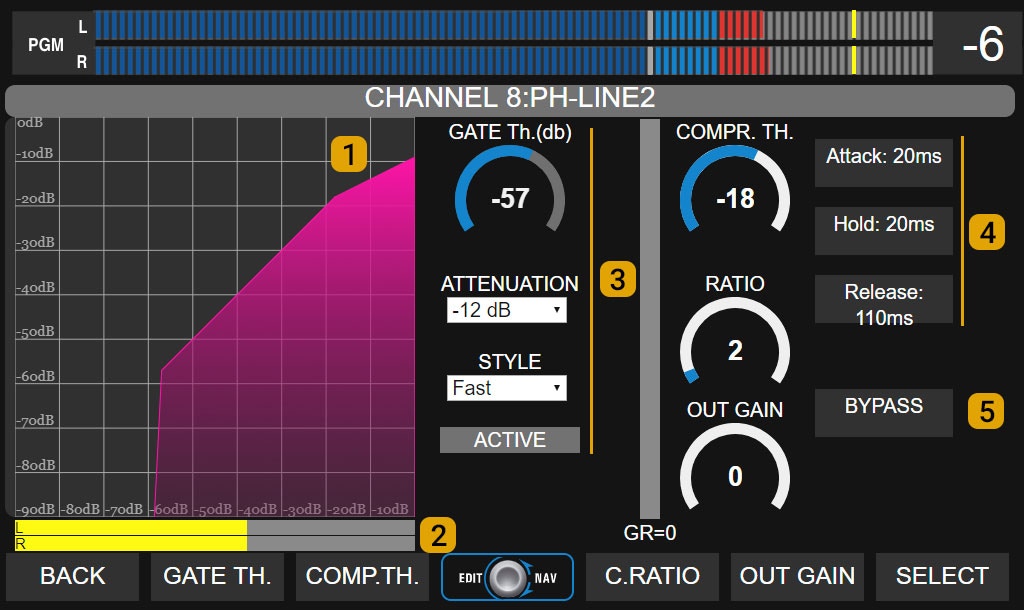
3 - Noise Gate
- Threshold: Gate activation threshold (dB).
- Attenuation: Applied signal attenuation when gate is active.
- Style: Changes recovery time between preset values.
- Active: Indicator lights red when gate is closed.
4 - Dynamic Compressor
Controls for adjusting:- Threshold
- Ratio
- Attack time
- Release time
- Hold
- Output gain
DE-ESSER
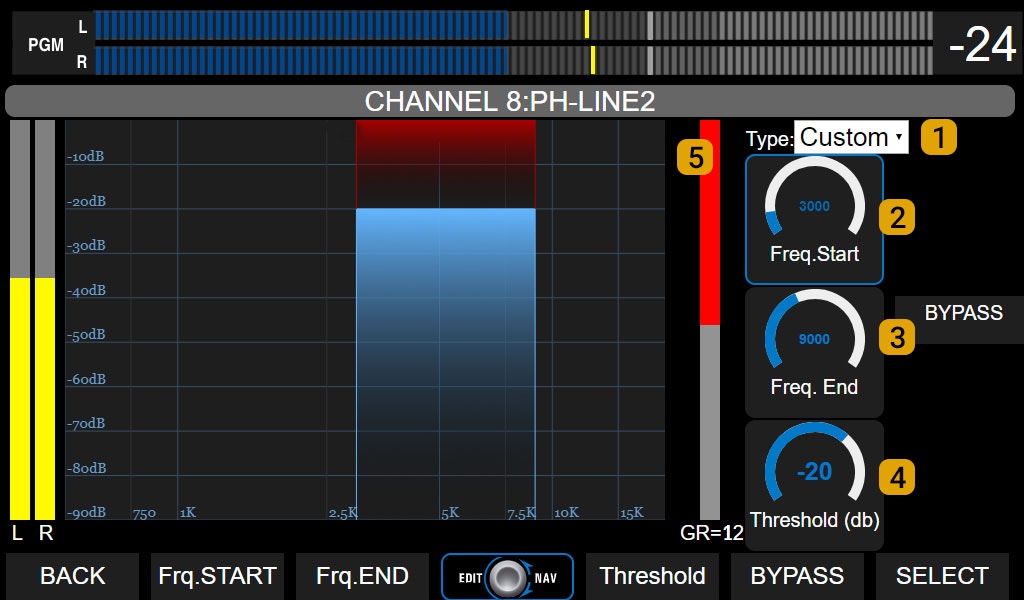
This processor works as a multiband compressor, attenuating only the defined frequency range when signal level exceeds the set threshold. Controls:
- 1 - Type: Preset settings.
- 2 - Frequency start: Lower cutoff frequency. Adjusted according to voice characteristics. Usually between 4,500 and 5,500 Hz.
- 3 - Frequency end: Upper cutoff frequency. Adjusted according to voice characteristics. Usually between 7,000 and 10,000 Hz.
- 4 - Threshold: Threshold level in dB. When signal in working band exceeds this value, it is attenuated with a fixed 15:1 ratio.
- 5 - Gain reduction: Shows applied level reduction in dB.