

Startup Sequence
When powering on the console, UNIDEX starts its operating system. Once the startup sequence is complete, the main screen appears and loads:- The default user profile.
- The last active scene before shutdown.
User Profile and Permissions
The user profile determines the access level to functions within the console.From settings, you can define which profile loads automatically at startup.
From factory, the console starts with the ADMIN profile, which has full access.
Available User Levels
- BASIC – Restricted access to essential functions
- EXPERT – Advanced access (password required)
- ADMIN – Full access (password required)
During startup, no password is required, even if the default profile has protection.
For UX24 to start in restricted mode and require a password for advanced functions, you must change the default profile to one other than ADMIN.
For UX24 to start in restricted mode and require a password for advanced functions, you must change the default profile to one other than ADMIN.
SETTINGS → USERS
CPU Shutdown
UNIDEX consoles have an internal CPU that must be safely shut down before completely disconnecting the console.CPU Shutdown Procedure:
-
On the main screen, tap the ”+” icon located in the STATUS section.
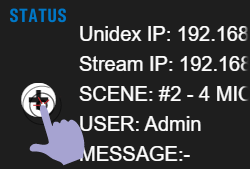
-
In the popup window, select the POWER-OFF option.
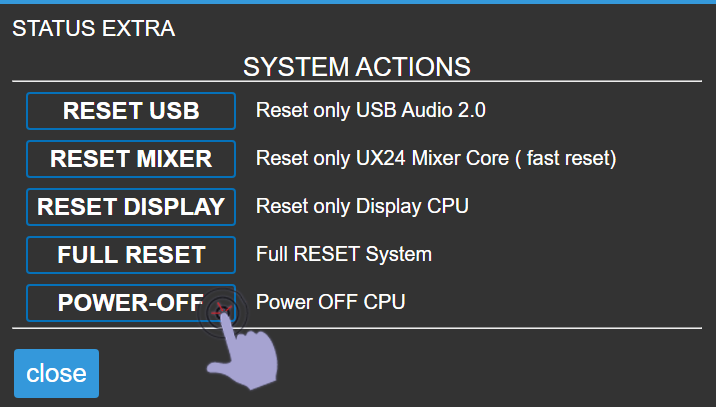
System Actions
System actions are available from the main screen by accessing STATUS → ”+”. These functions allow separately restarting different system stages, and are not used during normal operation.Reset actions are technical maintenance tools.
Under normal operating conditions, it is not necessary to execute them.
Under normal operating conditions, it is not necessary to execute them.
Available Options
- RESET USB
Restarts only the USB stage.
Forces the operating system to re-recognize connected USB devices. - RESET MIXER
Restarts UNIDEX’s internal mixing engine and control surface.
Does not affect the CPU or display. - RESET DISPLAY
Restarts the onboard computer that manages streaming and the graphical interface. - FULL RESET
Restarts all system stages.
Equivalent to a complete power off and on of the equipment.