Streaming services overview
UX18 consoles can generate two independent audio streams and decode one incoming audio stream.- Stream 1 (outgoing)
Uses RTP protocol, ideal for transmitter site link (STL). - Stream 2 (outgoing)
Compatible with Shoutcast/Icecast servers for internet broadcasting. - Stream 3 (incoming)
Can be RTP or public HTTP streaming.
When enabled, the received audio is automatically decoded and switched replacing the AES-1 input. - Remote monitoring: UX18 includes a WebRTC service that allows remote audio monitoring from the Web Control Interface, both locally and externally via Internet.
Streaming services configuration
Access through SETTINGS screen, under STREAMING option. Requires ADMIN profile.STREAMING opens the Streaming Interface Access screen. Shows a summary of audio transmission and reception streams status, and allows access to other configuration instances:
- STREAM CFG → Access to streaming services configuration.
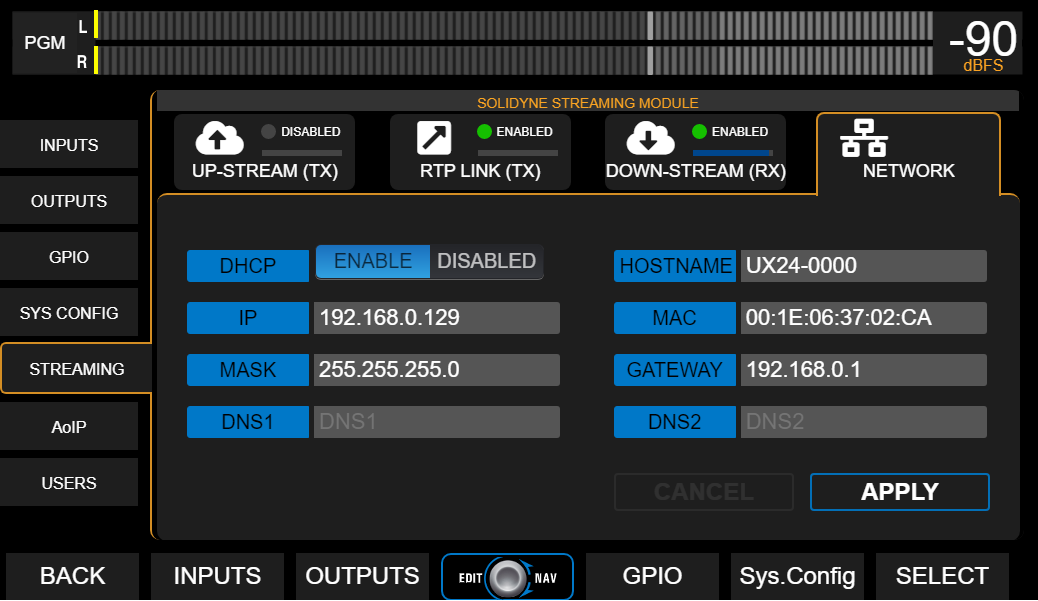
- SYSTEM → Access to LAN configuration for UX18 streaming services
(not to be confused with WEB remote control LAN configuration).
UP-STREAM (TX) - Icecast/Shoutcast
The UP-STREAM tab allows configuring an Icecast or Shoutcast broadcast server to publish the program signal.- RUN/STOP: Enables or disables streaming transmission when changes are confirmed by pressing APPLY.
- PROTOCOL: Defines if server is Icecast or Shoutcast type.
- SERVER IP: Server destination IP address.
- PORT: Server TCP listening port.
- MOUNTPOINT: Unique name that identifies the stream on the server.
- Stream NAME: Name that identifies the stream.
- PASSWORD: Access password for publishing (if applicable).
- CODEC: Transmission audio format (Opus or MP3).
- QUALITY: Encoding bitrate
- APPLY: Applies and saves changes and starts or stops transmission (according to RUN/STOP status).
Configuration parameters for Icecast/Shoutcast are provided by the server provider.
Audio processing for streaming
Clicking the PROCESS icon accesses the audio processor, which includes level normalization and bass enhancement. This processing only affects Icecast/Shoutcast streaming.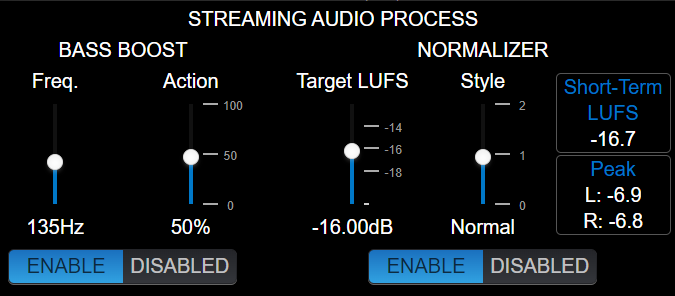
Normalizer
Reduces signal dynamics and adjusts level to a constant value, achieving more consistent sound without volume jumps.- Target LUFS: Determines streaming signal target level (± 1 LU).
Adjusted according to content type:- -21 to -19 LU → Signals with large level variation, without previous control (example: uncompressed microphones).
- -18 to -15 LU → Mixed signals of music and speech, using compressors on microphone channels to limit dynamics.
- -14 to -12 LU → Already heavily compressed signals (music).
- Style: Defines normalizer action times.
Possible values: slow, normal, fast.- Slow: recommended when there are large volume variations.
- Fast: useful for normalizing previously compressed signals.
Bass Boost
Applies bass enhancement to the streaming signal.- FREQ. → Cutoff frequency; enhancement is applied below it.
- ACTION → Adjusts the degree of enhancement applied.
RTP LINK
The RTP LINK tab allows configuring streaming transmission to a specific IP address, for example, to send the program signal to a transmitter site (STL).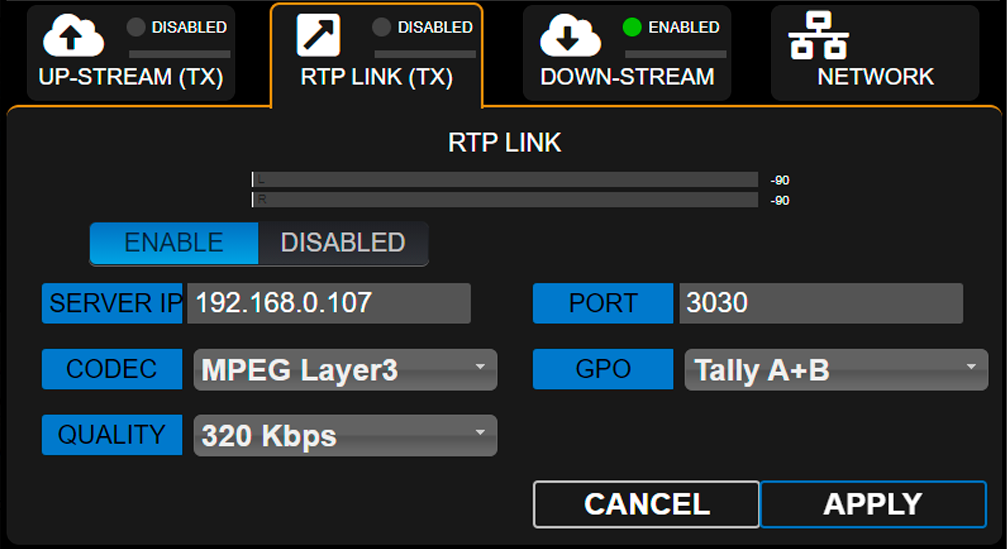
- ENABLE/DISABLED: Enables or disables RTP streaming when changes are confirmed by pressing APPLY.
- DESTINATION ADDRESS: Destination IP address.
- PORT: TCP transmission port.
- CODEC: Audio format for RTP (PCM / MP3).
- QUALITY: MP3 bitrate or PCM sampling rate.
-
GPO: Enables sending on-air light (Tally Light) signals via TCP/IP for compatible Solidyne equipment.
- Studio A and B (lines 1 and 2 respectively)
- Studio B and A (reversed order)
- A+B (signal activates on both lines, regardless of active studio)
Down-Stream (RX)
Allows configuring an incoming stream. When DOWN-STREAM module is activated, the decoded audio is internally routed to AES-1 input, which changes its name to STREAM-1.In this mode, the rear panel AES-1 connector is disabled.
-
RUN/STOP
Starts or stops streaming decoding when changes are confirmed with APPLY. -
PROTOCOL
Defines incoming streaming type. The following formats are supported:- Public HTTP and MMS streams encoded in PCM 16 (44.1/48 kHz), MP3 or Opus.
- RTP streams in PCM 16 (44.1 kHz) and MP3.
-
SERVER URL/IP
Name or IP address of server generating the stream. -
PORT
TCP port where streaming enters.
Default value: 0. -
MOUNTPOINT
Unique name that identifies the stream. -
APPLY
Applies configuration changes.
Step by step Download a step by step guide to configure an incoming stream.
REMOTE PLAYER
The Web Remote Control Interface allows listening to console audio through a WebRTC service.Audio Format
- Encoding: Opus
- Configurable bitrate: 128 to 320 kbps
Local network operation
When accessing from a LAN terminal, no advanced configurations are required.The remote player will play audio directly through the local network.
Internet operation
To access audio from the Web Control Interface through the Internet, the network must implement:- Symmetric NAT
- TURN server
If these services are not available, a warning message will appear in the player.
SERVICES CFG
The Services Configuration screen allows assigning audio sources to streaming services.Operational notes
- The ENABLE column allows starting or stopping each service.
- It is recommended to keep stopped services that are not in use to optimize system resources.
Streaming System
General network settings for UX18 Streamer module (not to be confused with web control access).