

Power Supply
UX18 uses an external switched-mode power supply, 110/240V 50/60Hz. The connector for the power supply is located on the rear panel.Connect the locking connector to the rear panel first, then plug the power supply into the mains.
Grounding
UX24 is grounded through the power cable. Do not use adapters or cables that bypass the ground pin. It is also recommended to connect the chassis ground terminal to the installation ground using 4 mm or larger cable. The general electrical installation must have adequate grounding. For reference, you may consult the grounding diagram for FM.WARNING!Ensure that the computer connected to UX24 via USB has adequate grounding.
Rear Panel
The rear panel consolidates all console connections. RJ45 connectors are used for all audio connections, with the exception of microphone inputs, headphone outputs, and control room monitor speaker outputs. Also found on the rear panel are Ethernet ports, a USB port, connections for on-air lights (Tally Light), and GPIO control.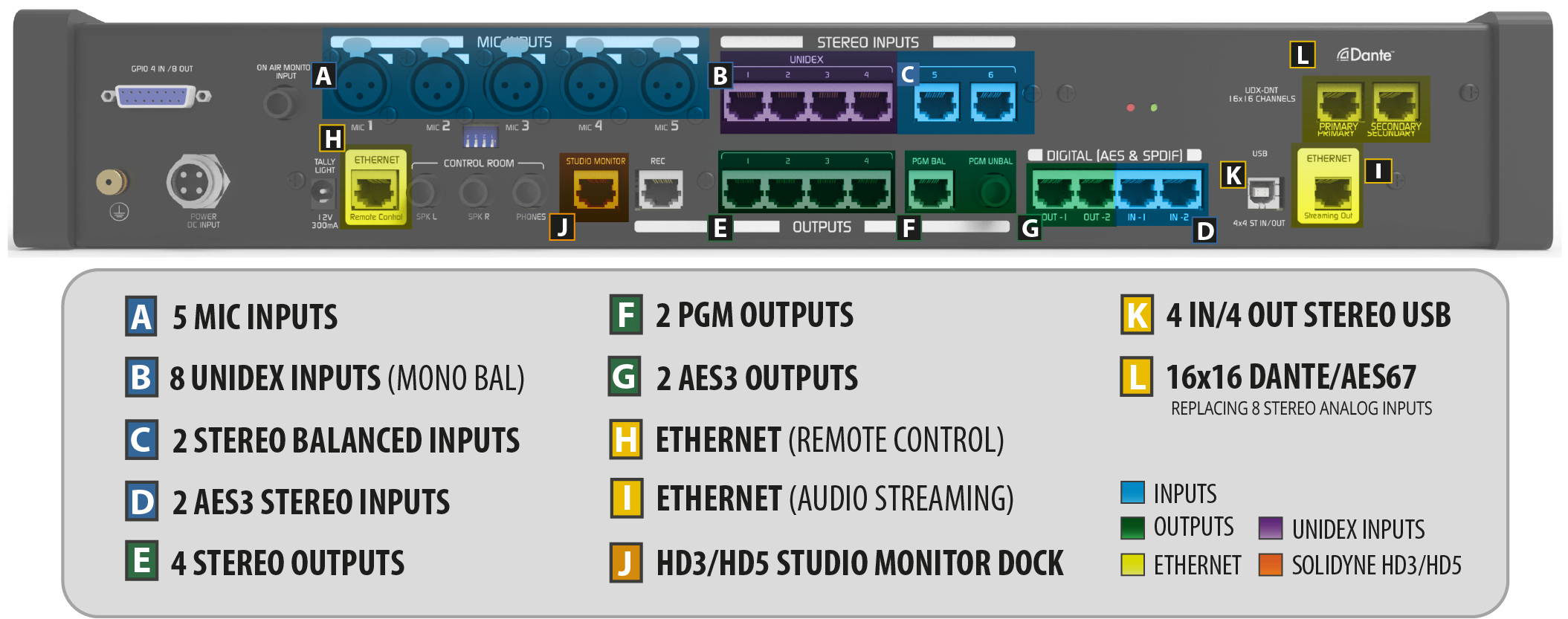
- 5 microphone inputs with XLR connectors.
- 8 UNIDEX mono inputs, groupable in stereo pairs.
- 2 balanced stereo inputs.
- 1 unbalanced stereo “On-Air Monitor” input (assignable to a channel).
- 2 AES3 digital inputs.
- 4 USB stereo audio inputs.
- 1 audio stream (replaces AES3-1)
- OPTION: DANTE x16
- 2 balanced PGM outputs
- 4 balanced stereo outputs
- 2 AES3 digital outputs
- 4 USB stereo audio outputs
- 2 audio streams
- OPTION: DANTE x16