

Access it by pressing TELCO on the main screen.
This screen displays the channels defined in TELCO mode (see the CHANNEL screen), which are those associated with landline telephone lines (POTS) and Bluetooth mobile phones.
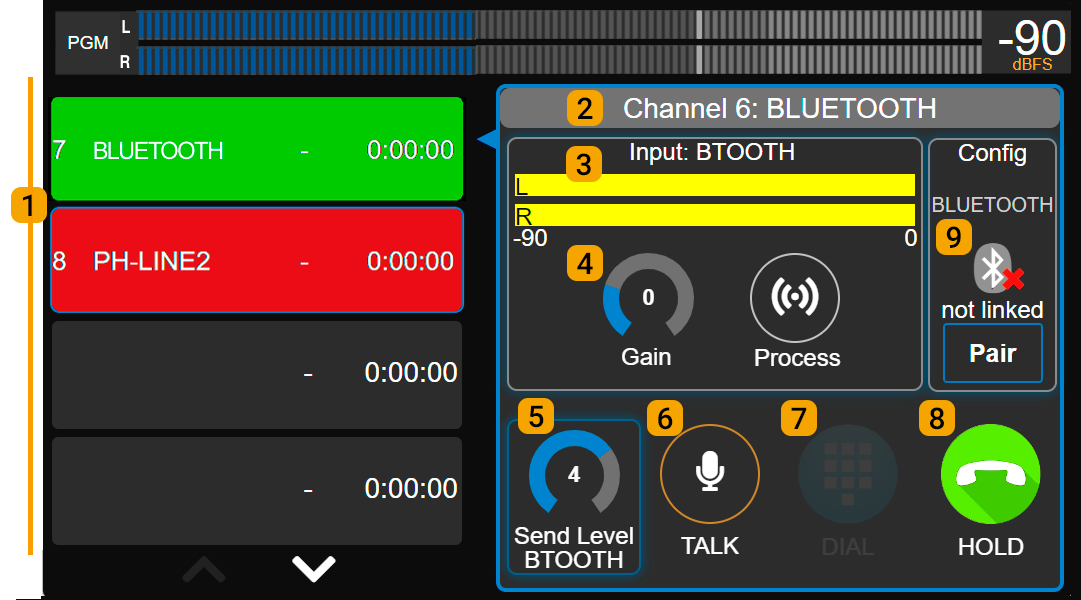
UX18 includes one on-board Bluetooth link. Additional Bluetooth links or landlines (POTS) can be added via external adapters (Solidyne UDX 2TEL; TEL+BT and 2BLT).
TELCO Screen
Available Lines (1)
UX18 supports up to 8 TELCO lines. They are displayed on screen in two groups of four lines.If there are more than four, the Page Down button provides access to the remaining ones. Each line shows:
- Channel number and name.
- Status: Yellow: incoming call (RING). Green: line on hold (HOLD). Red: line on air.
- Time on air or on hold.
Selected Line (2)
Displays the name and channel of the currently selected line. The on-screen controls always correspond to this line.To select a line, tap it in the list. It does not matter whether it is on air, on hold, or inactive.
Level Indicator (3)
Displays the received audio level. It also shows the name of the UNIDEX input to which the UDX adapter is connected.Input Gain (4)
Controls the input gain associated with the UDX adapter. Adjust by tapping the control and turning the encoder.Send Level (5)
Adjusts the output gain associated with the UDX adapter for sending to the line. Adjust by tapping the control and turning the encoder.TALK (6)
Activates Talkback mode, enabling the cue microphone to speak to the line. It is equivalent to holding down the CUE button on the channel, but unlike CUE, the on-screen TALK does not operate with pushbutton logic — instead, it acts as a toggle switch: it activates with one tap and deactivates with a second tap. It also deactivates when the line is put on air.While TALK is active, whether by pressing CUE or enabling it on screen, the PGM signal feed to the line is interrupted; only the cue microphone is sent.
DIAL (7)
Opens a DTMF keypad to dial a number (landlines only).HOLD / HANG UP (8)
- With an incoming call: answers the line and places it on hold (HOLD).
- With a call on air: ends the communication (HANG UP).
CONFIG (9)
Displays the adapter type and its options:- NULL ADJUST: hybrid balance adjustment (landlines only, with UDX 2TEL, 2TEL-P and TEL+BL adapters). The adjustment is made manually from the UDX interface.
- BLUETOOTH PAIRING: activates pairing mode to link a mobile phone (Bluetooth channels only).
Operation with Mobile Phones
Pairing a Mobile Phone via Bluetooth
Pairing a mobile phone to the console via a Bluetooth adapter establishes a wireless link that allows any call made from the phone — whether over the telephone network or through apps — to be put on air. Procedure for pairing a phone for the first time:- Select the desired Bluetooth line in TELCO.
- Press
BLUETOOTH PAIRING(search mode). The channel’s OLED display also shows the “pairing” status.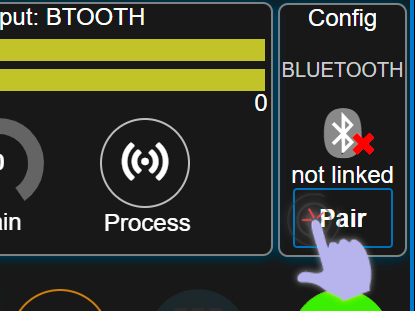
- On the phone, enable Bluetooth and search for devices.
- Connect to SOLIDYNE BTM641.
- The TELCO screen and OLED display show PAIRED.
Bluetooth Disconnection and Reconnection
There are three distinct actions when working with Bluetooth that should not be confused:- Enabling or disabling Bluetooth on the phone: Simply determines whether the function is on or off on the device.
- Pairing the phone with a Bluetooth device: The process by which the phone detects and registers an external device (headphones, car audio system, UNIDEX channel, etc.). This is done once per device. If the device is “unpaired,” the phone forgets it and the pairing process must be repeated to reconnect.
- Connecting or disconnecting a previously paired device: The phone temporarily links to an already registered device. The actions of connecting/disconnecting must not be confused with pairing/unpairing. When the phone has Bluetooth enabled, it can easily connect and disconnect from Bluetooth devices in the paired devices list (unpaired Bluetooth devices nearby will not appear in this list).
- When Bluetooth is turned off on the phone: The call usually transfers to the phone without dropping, though behavior varies by model. When Bluetooth is re-enabled, the connection may re-establish automatically or require selecting the SOLIDYNE BTM641 device again.
- When the Bluetooth channel is manually disconnected during a call: The call transfers to the phone and returns to the console upon reconnection.
- When the phone’s speakerphone is activated during the call: Audio comes out of the phone and leaves the console; reconnecting Bluetooth returns it.
Pairing More Than One Phone
The console can handle up to 8 TELCO lines connected to mobile phones via UDX adapters.If there are multiple Bluetooth lines, the pairing procedure is the same as described above, with a few considerations. Example: The console has three Bluetooth lines named BLT-1, BLT-2, and BLT-3. Line BLT-1 is already paired with Phone A, and now Phone B needs to be paired with BLT-2:
- Phone A (BLT-1) may or may not be connected; it makes no difference.
- On the TELCO screen, select line BLT-2 and activate Bluetooth PAIRING.
- On Phone B, enable Bluetooth and search for devices. Only devices in pairing mode will appear. SOLIDYNE BTM641 corresponding to channel BLT-2 will appear, as it is the only UNIDEX device in PAIRING mode.
- Select SOLIDYNE BTM641 (corresponding to channel BLT-2) and connect.
Editing the name on the phone: this option is found in the Bluetooth device properties; the procedure varies depending on the operating system.
Incoming Call on a Mobile Phone
The phone is connected to the console via Bluetooth.- When a call arrives, CUE/SELECT flashes blue and a ring tone sounds through CUE. On the TELCO screen, the line shows RING (yellow).
- The call can be answered by:
- Pressing CUE/SELECT on the channel.
- Tapping HOLD on the TELCO screen.
- When answered, the line is placed on hold (HOLD). The caller is not on air but hears the program signal. This state is indicated on screen (HOLD in green) and by the ON AIR button flashing.
CALLS FROM APPS When a call originates from an application (WhatsApp, Telegram, Linphone, Viber, or others), many mobile phones made before 2020 do not support answering via Bluetooth. In that case: • Answer the call directly on the phone.
• Then press ON AIR on the corresponding channel. The call is placed on HOLD.
• Continue with normal operation (see below). - To speak privately: hold down CUE (sends the cue microphone and silences control room monitoring). Releasing CUE returns to the previous state (the talkback function does not change the CUE state). With CUE lit, you can hear the person on the other end of the line.
- To put on air: press ON AIR and raise the fader.
- To return the line to hold, press ON AIR again.
- To hang up:
- Hold ON AIR pressed for 3 seconds.
- Or tap HANG-UP on screen.
IF THE MOBILE PHONE IS NOT CONNECTED VIA BLUETOOTHIf the mobile phone is not connected to UNIDEX when the call is received, answer the call on the phone and then enable/connect Bluetooth on the device.Once the phone is connected to a Bluetooth channel, press ON AIR on the channel and the call is placed on hold.
Originating a Call from the Mobile Phone
- The phone has Bluetooth enabled and connected to a UNIDEX channel:
- Place the call on the phone. It can be a conventional call or through an app.
- Press ON AIR to place it on hold at the console.
- Speak from the console using the cue microphone and the CUE circuit.
- If the phone is not connected:
- Place the call and then enable/connect Bluetooth on the phone. If Bluetooth was disabled, it will normally reconnect to UNIDEX when enabled. If Bluetooth is enabled on the phone but not connected, connect it by selecting the UNIDEX device from the device list.
- You can also enable Bluetooth before placing the call, and once connected to the console, dial.
Communications from External Software
In recent years, voice and video calls over the Internet (WhatsApp, Discord, Zoom, Google Meet, etc.) have become widespread.- From a phone paired via Bluetooth: operated as a TELCO line.
- From an external computer: cannot be configured as TELCO; handled as a line-level audio signal, with specific considerations:
- The USB-OUT of UNIDEX assigned as an input in the PC software must send PGM in mix-minus mode to prevent the remote party from hearing their own audio.
- The operator can use CUE in talkback mode (by holding it down) to speak privately with the software, just as with a TELCO line.
- These communications can be integrated into a conference with one or more TELCO lines.
Operation with Landlines
Incoming Call
- CUE flashes blue and a ring tone sounds through CUE. The TELCO screen also shows RING on the line.
- Answer:
- By pressing CUE/SELECT on the channel.
- By tapping HOLD on the screen.
When answered, the line is seized and the call is placed on HOLD. The line audio is not on air, but the caller hears the program signal.
- To speak privately: hold CUE pressed. Releasing CUE returns the button to its previous state (the talkback function does not change the CUE state). When CUE is active, the line audio is heard through the pre-fade listen circuit.
- To put on air: ON AIR and raise the fader.
- To hold: ON AIR again.
- To hang up:
- Hold ON AIR pressed for 3 seconds.
- Or tap HANG-UP on screen.
Calling from the Console
(Landlines only)- Press TELCO.
- Select the landline.
- Tap DIAL to open the dialing keypad. This action seizes the line, which is placed on HOLD. The dial tone is heard through the CUE circuit.
- Dial the number. Digits are dialed directly as they are entered.
- Speak privately via CUE.
- Proceed as with an incoming call.
IMPORTANT
Do not exceed the send level to the line to avoid feedback through the hybrid.
ABOUT THE ON-AIR AUDIO LEVELA telephone call does not always need to reach 0 VU to match the loudness of studio voices peaking at the same level. Low frequencies, which carry the greatest energy load, produce higher meter deflections but are not present in telephone line audio. For the ear, loudness is defined by the midrange frequency range. If the VU meter appears to “peak lower” with a telephone line compared to studio voices, this does not mean “it sounds quieter.” Furthermore, the broadcast audio processor will take care of matching both signals.